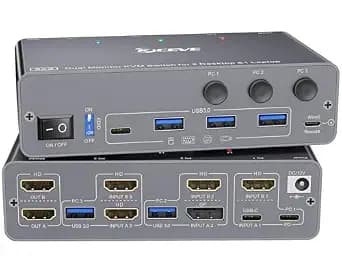
KCEVE KVM Switch 2 Monitors 3 Computers USB C HDMI DP, EDID, 4K@60Hz
Beschreibung
KCEVE USB 3.0 KVM Switch 2 Monitors 3 Computers USB C for 1 Laptops 2 Desktop Share 2 HDMI Monitor and 4 USB 3.0 Devices 3 computers share one set of mouse, keyboard, printer, scanner, and display on 2 HDMI monitors Choose extended screen mode or mirror mode by pressing “Windows+P” 2 Switching methods: Switched by 1.5m Wired Remote & Button Switch Plug and play. No need driver LED light indicate which computer is active Great Compatibility Compatible with Windows11/10/8/7/XP/Vista/Chrome/Mac OS system Support USB C, HDMI, DP interfaces input device: Desktop, laptop, Monitor, HDTV, Projectors. Compliant with HDMI 2.0, Displayport 1.4, YUV: 4:4:4 UHD Resolution Visual Enjoyment Support UHD 4K@60Hz,4K@30Hz,2K@144Hz,1080P@144Hz or lower resolution Please Note: Using 8K cables will solve the problem of flickering and black screen. Input: Laptop (USB C + HDMI+PD) Desktop (HDMI +HDMI+USB),(HDMI +DP+USB) Video Out: 2 x HDMI(Monitor) Size: 13.8x7.6x3.5cm(5.4x3x1.4in),360g/0.8LB Build-in: ESD protection system Shell Material: Aluminum Powered by DC 12V Power supply Packing List: 1 x KVM Switch 2 monitors 3 Computers 1 x USB C Cable 2 x USB 3.0 Cable 1 x Wired Remote 1.5m 1 x DC 12V Power Supply 1 x User Manual
Vor- und Nachteile vergleichen
Ähnliche Produkte im direkten Vergleich
Eine zufällige Auswahl analysierter Produkte aus derselben Kategorie. Unterschiedliche Produkte sind nicht zwangsläufig austauschbar.

KVM Switch 3 Monitors 2 Computers 8K@60Hz 4K@144Hz,MLEEDA 3 Monitor KVM Switch for 2 Computers Share 3 Monitors and 4 USB 3.0 Device,with Wired Remote,USB Cable and 12V Power Adapter

UGREEN 8K@60Hz Displayport KVM Switch 2 Monitors 2 Computers, Aluminum

KVM Switch 3 Monitors 4 Computers with Audio, HDMI + DisplayPort 8K@30Hz/4k@144Hz DP KVM Switcher, USB 3.0 KVM Switches for 4 PC Share 3 Display, Suitable for Office/Work from Home, Programmer Setup
Eine Sache weniger zu suchen
Vor dem Kauf: kurze Fragen
I have a Windows PC and a Mac. Will this KVM switch let me share my monitor, keyboard, and mouse between them without losing display quality?
Absolutely. This is the most common setup for this switch, and it handles it flawlessly. You can connect your PC via HDMI or DisplayPort and your Mac via USB-C. The switch supports full 4K@60Hz resolution on both monitors, so you won't see any degradation in text sharpness or video clarity. As many users have noted, it is a true plug-and-play experience—no drivers are needed, and your keyboard and mouse will switch over instantly with the press of a button.
I’ve seen some reviews mention that there is no hotkey switching. How do I actually switch between my computers?
You are correct that this model uses a physical button on the device rather than a keyboard shortcut. You'll press the button on the top of the switch to cycle between your connected computers. While some users on Reddit have mentioned they wish it had hotkey support, most find the button placement convenient enough. We recommend placing the switch on your desk rather than hiding it behind your monitor to make switching effortless.
Will this work if I have a mixed setup, like a Raspberry Pi and a Windows laptop? I’m worried about compatibility issues.
Great news—this is a surprisingly versatile unit. While it is marketed for standard PCs and Macs, several users have reported successful use with Raspberry Pi devices and other Linux-based systems. The switch relies on standard USB HID protocols for the keyboard and mouse, which ensures broad compatibility. Just ensure your Pi supports the video output resolution you intend to use. The EDID emulation built into the switch also helps prevent screen flickering when you switch away and back.
The product description mentions EDID emulation. What does that actually mean for me in practice?
In simple terms, EDID emulation tells your computer that a monitor is still connected even when you switch to another computer. Without it, your computer might think the monitor was unplugged and rearrange your desktop icons or change the resolution. With this KVM switch, the EDID emulation ensures that your computer "remembers" the monitor's settings, so you won't experience window shuffling or resolution resets when you switch back. It makes the transition between computers feel seamless and stable.
Is this KVM switch good value for the money compared to more expensive models?
For the vast majority of users, yes. This switch hits a sweet spot between price and performance. It offers a solid metal build quality that feels more durable than plastic alternatives, and it supports dual monitors at 4K@60Hz, which is a feature often found on pricier units. The main trade-off is the lack of hotkey switching and a slightly bulkier cable set. If you don't need those specific features, you are getting excellent value. If you require hotkeys or higher refresh rates (like 144Hz), you would need to look at premium brands like Level1Techs, which cost significantly more.
Von einem ähnlichen Produkt mit mehr Bewertungen in dieser Kategorie: Unitek HDMI KVM Switch 1 Monitor 2 Computers with Power Adapter
Can I switch between computers with a keyboard shortcut, or do I have to press a button?
This model uses a physical button on the unit — there's no hotkey switching. That's the most common complaint in reviews, so if keyboard shortcuts are a must-have for your workflow, you'll want to look at a hotkey-capable KVM instead. If you're fine reaching for a button (or placing the switch within arm's reach), it works reliably.
Do I need to use the included power adapter, or can it run without it?
Use the adapter. While some users have tried bus-powering it, the most stable experience — especially with wireless peripherals — comes from plugging in the included DC adapter. Several reviewers noted mouse dropouts when running unpowered, so treat the adapter as required, not optional.
Will it work with my Mac and Windows PC together, and does it handle 4K?
Yes, mixed Mac/Windows setups are one of its most common use cases, and it's plug-and-play for both. For resolution, check your monitor's specs against the switch's rated maximum before buying — some users with high-refresh or 4K@60Hz displays ran into EDID handshake issues (blank screen after sleep), which is the second-most-cited complaint. Standard 1080p and 4K@30Hz setups report smooth sailing.
Are the cables included, and are they long enough for a desktop tower?
Yes — HDMI and USB cables are in the box, which reviewers consistently call a nice bonus. That said, they're on the short side (roughly 3 ft), so they're ideal for laptop docks or monitors sitting close to both computers. If your tower lives under the desk, plan on buying longer cables.
Who is this KVM best suited for — and who should skip it?
It's a great fit for remote workers, students, or anyone sharing one monitor, keyboard, and mouse between two computers on a budget, especially if you value compact size, included cables, and simple setup. Skip it if you need hotkey switching, dual-monitor output, DisplayPort, or rock-solid EDID behavior with a fussy high-refresh display — in those cases, a TESmart or Cable Matters alternative will save you the return shipping.
Die Antworten beschränken sich auf das Angebot des Herstellers und die von uns analysierten Rezensionen. Fragen, die diese Quellen nicht abdecken, werden hier nicht beantwortet.
Transparent von Grund auf