Analysiert am Sep 26, 2026· 18 Rezensionen in dieser Analyse· Verfügbare Stichprobe · nicht alle Käufer
Zuverlässigkeit der Rezensionen
83/ 100Note B
These signals—ratings and text mostly agreeing, 92% detailed reviews, 92% top ratings, no promotional phrasing, and 77% authentic-sounding—support the trust score.
Affiliate-Link — die Provision ist unabhängig von der Bewertung immer gleich.
Beschreibung
Product description Welcome to FCZFCZ Store! We specialize in providing high capacity, long life, safe and stable replacement batteries for your laptop. We select high-quality cells and strictly control the production process to ensure that each battery has excellent performance and durability. How to buy the right laptop replacement battery? 1. Quickly check your laptop model name Press [Win]+[R] on your keyboard at the same time Type [msinfo32] in the Run window and click [OK] Look for “System Model ” in the system information. 2. Check the original battery directly (most accurate method) Turn off the laptop and disconnect the power Remove the bottom cover of the laptop Locate the battery and record: Battery type/Voltage/capacity TIPS: The same battery model may have different capacity, please buy the original capacity battery to avoid damage to your laptop. The same laptop may be suitable for different capacity batteries, we recommend that you find the original battery model for purchase. 47XV3 Battery Specifications Battery model: 47XV3 Capacity: 50Wh 4113mAh 3-cell Voltage: 11.55V Color: BLack Battery Type: Rechargeable Lithium-ion Battery Condition: 100% brand new, Grade A Cell Replacement Part Number: 47XV3 5Y3T9 31CP5/73/78 Compatible Machine Models (use "Ctrl+F" to find your model quickly) for Dell Latitude 9330 series. Overload Protection Each FCZFCZ brand battery includes a variety of built-in protections such as overheat protection, overcurrent protection, overload protection, high voltage protection, and short circuit protection to ensure maximum safety. Perfect Fit All our batteries are brand new, 100% compatible, fit your laptop, meet OEM specification, safe and efficient. Same size as original batteries, no need to worry about assembly and fitment issues Grade "A" Cells Laptop batteries are made of A-grade cells, which are strictly screened and tested for more cycles, longer endurance, better compatibility and adaptability Perfect fit for your laptop All of our laptop replacement batteries are 100% brand new, the batteries are made of A-grade cells for long life and durability. Tip: We strongly recommend that you purchase a replacement battery with the same capacity as the original battery. If you purchase a replacement battery with a different capacity, it may cause the original charger to fail to charge and you will have to purchase an additional charger, adding extra cost. Battery maintenance New battery: When using for the first time, discharge to about 5% (not 0%) and then charge to 95%, avoiding full charge and discharge. Avoid over-discharge: Do not drain the battery to 0%, as this will damage the battery in the long run. We recommend charging the battery when it drops to 5%. Long-term storage: If not used for a long period of time, it should be stored fully charged. Charged and discharged once a month. Installation suggestion Turn off the laptop, disconnect the power supply, open the back cover of the laptop, install the new battery and secure the it. Battery installation is easy, you can search for laptop battery installation videos. Battery troubleshooting Battery is loose, remove and reinstall to ensure good contact. Check the battery driver, if not normal, download the driver software to update. Conductive material is damaged, use the original battery to test. After powering on, the battery cannot be recognized, recommended to update the BIOS settings. Unable to power on: Must be plugged in at the same time as powering on; requires a 10-second long press of the power button for power cycle reset 10 Piece Opening Pry Tool Repair Kit with Screwdriver Plastic Spudger for Lap... FCZFCZ L21M4P71 Battery 52.5Wh Replacement for Lenovo ThinkPad T14 Gen3 / T14... FCZFCZ L22B3P70 Battery 46.5Wh Replacement for Lenovo ThinkPad L14 Gen 4 21H1... FCZFCZ PP03XL Battery 43.3Wh Replacement for HP Pavilion x360 13-BB 13-BB0000... FCZFCZ V0GMT Battery Replacement for Dell G7 17 7700 XPS 15 7590 9550 9560 95... Add to Cart Buying Options Buying Options Buying Options Buying Options Customer Reviews 4.3 out of 5 stars 14 — — — — Price $6.09 $ 6 . 09 — no data — no data — no data — no data Battery Model 10PCS Opening Pry Tool L21M4P71 L22B3P70 PP03XL V0GMT Capatity NO 52.5Wh 3392mAh 4-cell 46.5Wh 4112mAh 3-cell 43.3Wh 3560mAh 3-Cells 56Wh 4900mAh 3-Cells Compatible Machine Models NO for Lenovo ThinkPad P14s Gen 3 (Type 21AK, 21AL, 21J5, 21J6) series; for Lenovo ThinkPad P14s Gen 4 (Type 21HF, 21HG, 21K5, 21K6) series; for Lenovo ThinkPad T14 Gen 3 (Type 21AH, 21AJ, 21CF, 21CG) series; for Lenovo ThinkPad L14 Gen 4 (Type 21H1 21H2 21H5 21H6) series; for Lenovo ThinkPad L15 Gen 4 (Type 21H3 21H4 21H7 21H8) Series. for HP Pavilion x360 13-BB 13-BB0000 series: 13-bb0000nc 13-bb0005TU 13-bb0013nf 13-bb0014TU 13-bb0015cl 13-bb0015TU 13-bb0047nr 13-BB0062TU 13-bb0069TU 13-bb0075TU 13-bb0750ng; for HP Pavilion x360 14-DV 14-dv0000 series for Dell G7 17 7700 Series; for Dell XPS 15 7590 Series; for Dell XPS 15 9550 Series; for Dell XPS 15 9560 Series; for Dell XPS 15 9570 Series; for Dell Precision 5510 Series; for Dell Precision 5520 Series; for Dell Precision 5530 Series
Vor- und Nachteile vergleichen
Ähnliche Produkte im direkten Vergleich
Eine zufällige Auswahl analysierter Produkte aus derselben Kategorie. Unterschiedliche Produkte sind nicht zwangsläufig austauschbar.
Einbezogen bedeutet nicht als authentisch bestätigt. Markiert bedeutet nicht als Fälschung nachgewiesen. Dies sind analytische Einordnungen.
3 veranschaulichende Auszüge werden angezeigt, nicht der gesamte Rezensionsbestand.
In die Analyse einbezogen5.0/5 Sternen
OEM quality tested and verified.
“I got this battery as a replacement/ backup for my Dell Latitude. Upon testing and evaluating the battery I must say, Windows battery health is showing a full capacity at around 40,900 mvh versus the design capacity of 41,587, I'm assuming that the slight variance between design capacity and full charge capacity is due to the way Windows tests it. Upon replacing my battery, every hole and every pin was in the correct location. Do bear in mind that this is solely just the battery so it is not going to come with a screwdriver extra screws or a new battery cable. So if you're doing this repair on your own and it's your first time pay extra special attention to not yank the battery cable out. It's actually stuck down with a sticker to the battery and to the motherboard but carefully lift that sticker and then gently pull it off of the battery. It fits my latitude just like it was designed. OEM and the battery life under full use is right around 2 hours as I expected. I do have to say that there are other batteries on the market that are cheaper, but considering how close it comes to manufacturer battery life in the specifications, I'm assuming that they're using higher quality cells which will last longer. That tells me that you're going to get more charge cycles out of it. More use out of it in the long term. It may be the superior option to spend a little more on your battery to get a higher quality battery. I would say that this is an exceptional value for the money and it has OEM performance. For installation, if you know how to open your laptop for general maintenance and care and know how to remove a couple screws on the inside, you should be able to do this within 5 to 10 minutes.”
Erkannte Signale: Konkretes Detail: quantity, entity, process · Liest sich wie eine authentische Stimme
In die Analyse einbezogen5.0/5 Sternen
Tools Included Means No Excuses! You Can Do It Yourself!
“Working on a laptop can be daunting at first especially if you don't have the proper tools. Fortunately this battery replacement comes with everything necessary to make the swap: screwdrivers, prying tools, and of course the battery itself. The disassembly and assembly process is very straightforward. As an added bonus the three screws are included with the battery in case you might lose one of the small screws in the process of swapping the parts. Note that the only thing not included is the battery connection cable that connects the motherboard with the battery itself. You will need to use the one already in your laptop. I had no problem with the battery being recognized and if you follow the included instructions, which recommend a charge and drain cycle three times over, you will get the most battery longevity. The manufacturer also has other suggestions which are helpful for battery health. Windows also has built-in battery health options that you can access either through Power Settings or the terminal. In terms of fit and finish this battery slotted right into where the manufacturer's original battery fit and there was no problem aligning the screws, replacing the cable, or closing the laptop back up. In terms of performance I got excellent results on charge cycles and notice no overheating or any other signs of voltage problems. I am very happy with this order and look forward to many hours with my laptop without having to be plugged in.”
Erkannte Signale: Konkretes Detail: entity, process · Liest sich wie eine authentische Stimme
In die Analyse einbezogen5.0/5 Sternen
Fully compatible with Dell Latitude 7420 notebook, Exactly Same One!
“After having the Dell Latitude 7420 for 4 years, its original battery is losing its power. The battery's operational time is reduced to less than 1 hour, so it's time to replace the battery. Finding the right one is not too difficult, but it may be confusing with so many different models. It would be helpful to verify the original model number; "7FMXV" is the model number provided by Dell. The whole installation process took about 10-15 minutes. Several steps to follow: open the back of the computer housing, remove eight screws, and gently pull it out from the back side. Once you can assess the inner compartment, remove four screws (all screws are self-tapping, so there's no need to worry about losing them), except for one screw on the top side of the battery. Gently pull up the front side and then remove the connector. Two wires run through the battery, so be careful to pull them out of the slots. Finally, install a new battery and follow the process in reverse. That is as simple as it is. Once you power on, it may give BIOS errors indicating "detecting some changes." Click "continue", and it is done. The new battery looks and functions like the original. Now, it can hold 4-8 hours of run time, depending on the intensity of the work. The fit and form factor are precisely the same as the original one.”
Erkannte Signale: Konkretes Detail: quantity, entity, process · Liest sich wie eine authentische Stimme
Eine Sache weniger zu suchen
Vor dem Kauf: kurze Fragen
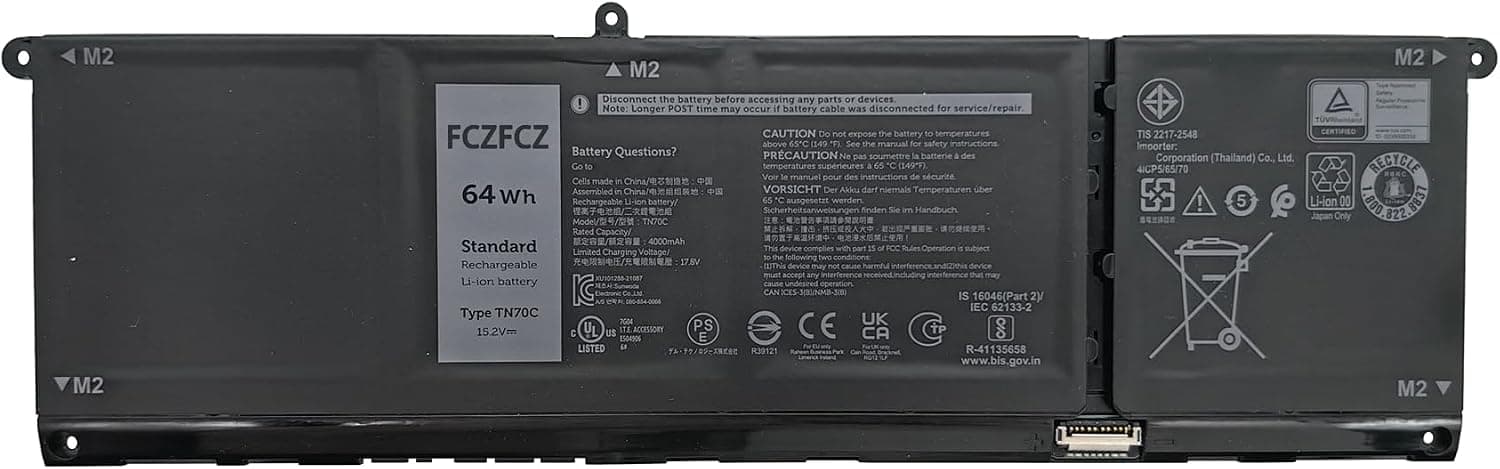
Will this TN70C battery fit my specific Dell laptop?
It's designed for a wide range of Dell models — including Inspiron 3510/3511/3520/3521/5310/5320/5330/5410, Latitude 3320/3330/3420/3520/3530, and Vostro 3510/3511/3520/5310/3420/5410/5510/5620 series. To be safe, check your laptop's bottom panel or run a quick system info tool to confirm your model number matches. Many Reddit users recommend double-checking before ordering, since Dell reuses similar chassis names across years.
Is this a genuine Dell battery or a third-party replacement?
It's a high-quality third-party replacement — not an official Dell OEM part. That said, reviewers consistently note it matches OEM specifications (64Wh, G91J0 / V6W33 compatibility) and performs just like the original. If you absolutely need a Dell-branded battery, buy directly from Dell; otherwise, this is a reliable, cost-effective alternative.
How easy is the installation? Do I need special tools?
Most buyers say it's a straightforward 10–15 minute job. The battery typically ships with a small screwdriver and basic instructions. You'll need to open the bottom case, disconnect the old battery, and swap in the new one — no soldering or advanced skills required. YouTube tutorials for your specific Dell model can walk you through it step by step.
How long does the battery last per charge, and will it restore my laptop's runtime?
Users report getting 4–6 hours of mixed use, depending on your laptop's power settings and workload. Several reviewers mentioned it brought their aging Dell "back to life" with runtime close to when the laptop was new. For best results, calibrate it once by fully charging, then draining to 5% and recharging.
What if it doesn't work or dies early — can I return it?
Yes, most sellers offer a 30-day return window and a 12-month warranty against defects. If the battery arrives damaged, doesn't hold a charge, or fails within the warranty period, contact the seller for a replacement or refund. TikTok users often suggest testing it immediately after delivery so you can flag any issues within the return window.
Will this battery fit my 2015 MacBook Air 13 inch?
Aus 3 berücksichtigten Rezensionen, die „fit“ erwähnenAus dem Angebot des Herstellers
Yes. The listing states it is compatible with MacBook Air 13" Model A1466 EMC 2925 (Early 2015 Version), and reviewers confirm it fit as it should and installed easily in their A1466 MacBook Air.
Is it easy to install this battery yourself?
Aus 6 berücksichtigten Rezensionen, die „ease of replacement“ erwähnenAus dem Angebot des Herstellers
Reviewers report it is simple to install, with one noting the included tools fit perfectly and the swap took about 10 to 15 minutes. The listing advises turning off the laptop and disconnecting power before installing the new battery.
How long does the battery last on a charge?
Aus 4 berücksichtigten Rezensionen, die „battery life“ erwähnen
Reviewers report varied results: one got well over four hours depending on usage, another held a solid 2.5 to 3 hours with full usage, and one found battery life lacking but was happy overall.
What should I do if the new battery is not recognised by my laptop?
Aus dem Angebot des Herstellers
The listing recommends updating the BIOS settings, or disconnecting the old battery and holding down the power button for 20 seconds, then connecting the new battery.
What warranty or return options come with this battery?
Aus dem Angebot des Herstellers
The listing states it offers a 60-day money-back return, a 12-month replacement, and 2 years of tech assistance.
Die Antworten beschränken sich auf das Angebot des Herstellers und die von uns analysierten Rezensionen. Fragen, die diese Quellen nicht abdecken, werden hier nicht beantwortet.