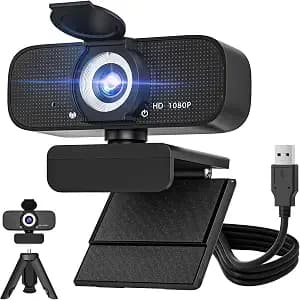
1080P Full HD Webcam with Built-in Microphone and Rotatable Tripod, Privacy Cover, for Desktop PC or Laptop Computer-Style1
Description
Built-In Noise - Cancelling Microphone - The noise-canceling microphone reduces background noise to enhance the sound quality of your video. Even in noisy surroundings, viewers can hear your voice loud and clear. Great for webinars, video conferencing, and live streaming.; Automatic Light Correction - The camera components is equipped with automatic light correction technology and can automatically adjust the image brightness and restore color according to the ambient light, helping you achieve the best optical effect.; Easy Plug and Play - Our easy-to-operate HD webcam works with USB 2.0, USB 3.0 and USB 3.1 and doesn't require you to download additional drivers and it comes equipped with a 5ft USB power cable. Just plug the webcam into the USB port of your devices and use it right away!
One less thing to search
Before you buy: quick questions
Is the video quality good enough for important work meetings or interviews?
Absolutely. The 1080p resolution provides a sharp, clear image that is a significant upgrade from most built-in laptop cameras, making you look professional on platforms like Zoom and Teams. As noted in many reviews, good lighting is key to getting the best performance—a well-lit room makes a big difference.
How does the built-in microphone handle background noise like keyboard clicks or fans?
The microphone is clear for voice capture in quiet environments. However, like most built-in webcam mics, it's omnidirectional and can pick up ambient noise. For calls in a noisy home office, users on TikTok and Reddit often recommend using a headset or a dedicated USB microphone for optimal audio isolation.
Is it truly "plug-and-play," and will it work with my Mac or older PC?
For most Windows 10/11 users, it's a seamless plug-and-play experience. For Mac users and some Linux or older Windows systems, you may need to select the camera manually in your video settings or download a driver. The compatibility is broad, but a small number of users have reported needing this quick extra step.
Does the tripod feel stable, and will the privacy cover scratch the lens?
The included tripod provides flexible positioning and is stable on level surfaces. Some users note the legs can be slightly wobbily on uneven desks. The sliding privacy cover is a great security feature, but handle it with care. To prevent potential scratches, ensure the lens is clean before sliding the cover closed, as a few reviews have suggested.
Who is this webcam NOT the best fit for?
This webcam is an excellent value-for-money choice for calls, online learning, and casual use. It might not satisfy users who require broadcast-quality audio for streaming, exceptional low-light performance without additional lighting, or a metal, premium-feel construction. In those cases, a higher-end webcam or separate microphone setup would be recommended.
Answers are limited to the manufacturer's listing and the reviews we analysed. Questions those sources cannot support are not answered here.
Transparent by design