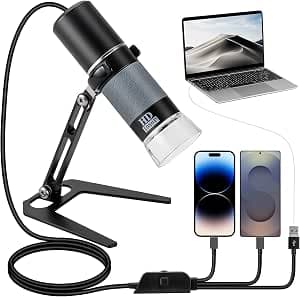
1080P USB Microscope with Metal Stand, 50X-1000X Handheld Digital Microscope Camera Compatible with iPhone/Android/Windows/Mac
Description
Digital Microscope 1080P PACKAGE 1. USB MICROSCOPE 4-IN-1 2. Metal Stand 3. User Manual
One less thing to search
Before you buy: quick questions
Is the magnification really 1000X? What can I realistically see with it?
It's important to manage expectations here. While the hardware can achieve high digital zoom, the *optical* magnification is lower. Most users find the clearest, most useful detail in the 50X to 200X range. This is perfect for examining coin details, skin texture, hair splits, insects, plant leaves, and checking solder joints on circuit boards. Think of it as a powerful inspection tool, not a laboratory-grade microscope.
Is it truly easy to use with iPhones and Android phones?
It is compatible, but requires a few steps. Your phone must support USB OTG (most modern Android do). For iPhones, you'll need the official Lightning to USB Camera Adapter. You'll also need a free camera app from the App Store or Google Play (like "CameraFi" or "OTG View") as it doesn't work with the native camera app. Once set up, it works well, but the initial connection isn't always instant plug-and-play.
How stable is the metal stand? I've read it can be wobbly.
The included stand is good for basic observation but has limitations. As noted in several online reviews, it can be sensitive to vibrations on a desk. For the steadiest shots, especially at higher magnification, ensure your desk is stable and avoid touching it during use. For frequent, precise work like soldering, some hobbyists gently modify the stand or purchase a heavier third-party one for maximum stability.
What software do I need for my Windows PC or Mac, and is it good?
For Windows and Mac, you use the software provided on the included CD or downloadable via the manufacturer's link. The software gets the job done for capturing images and video, but be aware that many users find the interface outdated. The consensus is that the hardware outperforms the software. The good news is it's free, and once you learn its quirks, it's functional for basic use.
Who is this microscope best suited for, and who might want to look elsewhere?
This microscope is a fantastic value for beginners, students, parents, and hobbyists (like coin or stamp collectors) who want an affordable entry into micro-observation. It's great for casual learning and fun discovery. However, if you require rock-solid stability for professional precision work, extremely high optical magnification for biological cells, or a seamless wireless experience, you might want to invest in a higher-end dedicated digital microscope. For its price point, it excels as a versatile and accessible tool.
Answers are limited to the manufacturer's listing and the reviews we analysed. Questions those sources cannot support are not answered here.
Transparent by design