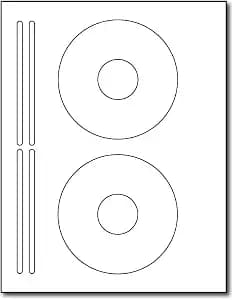
16 Count Printable CD Labels for Inkjet & Laser Printers – Matte White CD Disc Stickers (8 Sheets / 16 Labels)
Description
Make your discs stand out with printable CD labels designed for standard formatting and reliable printer performance. These matte white labels print beautifully on both inkjet and laser printers, producing clean, smudge-resistant designs for your music collections, video projects, event recordings, and client deliverables. Each sheet includes 2 CD labels with a center hub hole (non-full-face), making them compatible with standard disc label templates. No applicator required—just print, peel, and apply.
One less thing to search
Before you buy: quick questions
Do these labels fit standard CD label templates in software like Microsoft Word or Avery?
Yes, absolutely. This is one of the most praised features in reviews. The labels are designed to match the dimensions of standard CD label templates perfectly. Whether you're using a built-in template in your word processor, Avery design tools, or other label-making software, they should align without any adjustment needed.
I've seen comments about having to cut them out. Are the labels pre-perforated or pre-cut?
They are not pre-perforated. The labels are printed on full sheets, and you will need to cut them out with scissors along the indicated outlines. Many users on forums mention this, noting it's a simple process but important to know before you buy. If you're looking for automatically pop-out labels, you'd need to search specifically for "pre-perforated" sheets.
Are they truly compatible with both inkjet and laser printers? Any printing tips?
Yes, they are formulated for use with both printer types. For best results: ensure you select the correct paper type (e.g., "Matte Photo Paper" or "Labels") in your printer settings. A common tip from users, especially with inkjets, is to allow the printed sheets to dry completely for 10-15 minutes before handling to prevent any potential smudging.
How is the adhesive? Do they peel off easily or leave residue?
The adhesive is designed for standard CD/DVD surfaces. Most users find application easy and bubble-free if you take your time. For best adhesion, clean the disc surface first. While they stick well for typical storage and handling, a few users note that on heavily handled discs or non-standard surfaces, the edges *might* lift over time. They are not intended for extreme conditions.
Who would you say these labels are best suited for?
These are an excellent, cost-effective solution for personal projects, archiving family photos/music, creating simple project discs, or small-scale business demos. They're perfect for hobbyists, students, and anyone needing a reliable, no-fuss label. If you need labels for professional, high-volume, or rugged daily use, you might want to explore thicker, laminated, or pre-cut professional-grade options.
Answers are limited to the manufacturer's listing and the reviews we analysed. Questions those sources cannot support are not answered here.
Transparent by design