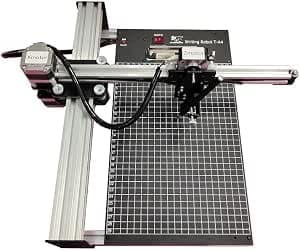
2.0 T-Structure Pen Plotter XY Plotter, iDraw 2.0 XY Plotter Handwriting Machine with A4 Working Range, with Basement Plate, Twice Faster Writing Speed
Description
Please contact seller for support with software installation if necessary. NOTE: It is a plotter, not a printer. it doesn't support word files. If you want to write in signle stroke lines, you have to make single stroke in the first place. Computer fonrts are outline fonts.; 1. Higher Precision and Speed, Time-saving and High-efficient replacing the servo motors with stepper motors, the handwriting, plotting, and lasering speed is 3-4 times that iDrawHo; 2. Better Compatibility with High Power La-ser Head, Explore More Possibility; 3.Contact Switch, Power On/Off, and Pause Buttons Give You Safer and More Convenience The limit switch can help you to find the beginning point each time.; 4. Open-source Free Software with Lifetime Update, Best STEAM Programming Robots for Students and Teachers, Geeks, Creators, DIY Enthusiasts,; 5. Support Over 100 Fonts, You Can Customize Your Fonts Too. You have to make fonts in the first place.; 6. Better for Repeat Jobs or Your Small Business; 7. Colorful Layer Painting, No More Just White and Black Most of the generative arts are just white and black, with iDraw 2.0, you will have a colorful world-by-layer printing function.; 8. Lifetime support.; Please contact seller for support with software installation if necessary.
One less thing to search
Before you buy: quick questions
I'm not very tech-savvy. How difficult is it to set up and get started?
There is a learning curve, but a supportive community makes it manageable. The plotter itself is solid and reliable, but the initial software setup (like Inkscape or the dedicated iDraw software) requires some patience, especially on Mac. Think of it as a rewarding DIY project. Many YouTube and Reddit users have created excellent step-by-step tutorials, and the customer support team is notably helpful if you get stuck.
What can I actually create with this? Do I need special software or fonts?
You can create handwritten cards, artwork, signatures, and even etch on soft surfaces! However, it doesn't use standard computer fonts directly. You'll need "Single Line Fonts" (like those used by CNC machines) or vector graphics (.SVG files). Free software like Inkscape is perfect for this. As several TikTok creators have shown, once you have your file ready, the plotter executes it with impressive precision.
Can I use my own favorite pens, or am I limited to the ones provided?
You can absolutely experiment with your own pens! The holder has an adjustable clamp. The key is finding pens that fit snugly and have consistent ink flow. Many users have great success with certain gel pens and technical drawing pens. A common tip from reviewers is to test pens on a scrap piece of paper first, as some may skip if the tip retracts slightly under pressure.
The description says "twice faster." How fast is it really for something like a birthday card?
"Twice faster" refers to improvements over the previous model. For a few lines of text on a card, it's very quick (a couple of minutes). However, for complex, detailed drawings, it will take time—this is true for all plotters. Its speed is appreciated for its reliability over long jobs, not for instant results. It's about automation and consistency, not rushing.
How does the iDraw 2.0 compare to a cutting machine like a Cricut for writing?
A Cricut can draw, but the iDraw 2.0 is a dedicated *pen plotter* built for precision writing and drawing. Its T-structure and direct-drive system make it more rigid and accurate for this specific task. While a Cricut offers an all-in-one ecosystem with easier software, the iDraw is often favored by makers for its open-source compatibility, superior build quality for the price, and focus purely on plotting. If your main goal is detailed drawing or writing, this is a specialized and powerful tool.
Answers are limited to the manufacturer's listing and the reviews we analysed. Questions those sources cannot support are not answered here.
Transparent by design