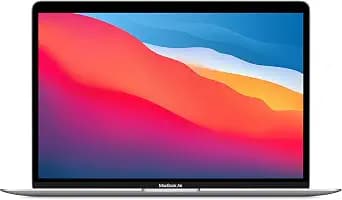
2020 Apple MacBook Air Laptop: Apple M1 Chip, 13” Retina Display, 8GB RAM, 256GB SSD Storage, Backlit Keyboard, FaceTime HD Camera, Touch ID. Works with iPhone/iPad; Silver
Description
All-Day Battery Life – Go longer than ever with up to 18 hours of battery life.; Powerful Performance – Take on everything from professional-quality editing to action-packed gaming with ease. The Apple M1 chip with an 8-core CPU delivers up to 3.5x faster performance than the previous generation while using way less power.; Superfast Memory – 8GB of unified memory makes your entire system speedy and responsive. That way it can support tasks like memory-hogging multitab browsing and opening a huge graphic file quickly and easily.; Stunning Display – With a 13.3 inch Retina display, images come alive with new levels of realism. Text is sharp and clear, and colors are more vibrant.; Why Mac – Easy to learn. Easy to set up. Astoundingly powerful. Intuitive. Packed with apps to use right out of the box. Mac is designed to let you work, play, and create like never before.; Simply Compatible – All your existing apps work, including Adobe Creative Cloud, Microsoft 365, and Google Drive. Plus you can use your favorite iPhone and iPad apps directly on macOS. Altogether you’ll have access to the biggest collection of apps ever for Mac. All available on the App Store.; Easy to Learn – If you already have an iPhone, MacBook Air feels familiar from the moment you turn it on. And it works perfectly with all your Apple devices. Use your iPad to extend the workspace of your Mac, answer texts and phone calls directly on your Mac, and more.; Fanless Design – Your MacBook Air stays cool and runs quietly even while tackling intense workloads.; AppleCare – Every Mac comes with a one-year limited warranty and up to 90 days of complimentary technical support. Get AppleCare plus to extend your coverage and reduce the stress and cost of unexpected repairs.; Environmentally Friendly – MacBook Air is made with a 100 percent recycled aluminum enclosure and uses less energy for a smaller carbon footprint.
One less thing to search
Before you buy: quick questions
Is the base model with 8GB of RAM and 256GB of storage enough for a computer science student or someone doing light photo/video editing?
For most students and light creative work, the base model is excellent. The M1 chip is incredibly efficient. However, based on extensive user feedback from developers and editors on forums like Reddit, if you regularly run virtual machines, compile large codebases, or edit 4K video projects, the 8GB RAM can feel limiting. For long-term use and heavy multitasking, many power users recommend upgrading to 16GB of RAM if your budget allows. The 256GB SSD is fast but fills up quickly with media libraries; consider your cloud storage usage or external drive plans.
Can this MacBook Air support two external monitors?
Natively, the M1 MacBook Air supports only one external display. This is a common point of discussion online and a key consideration for users wanting a multi-monitor workstation. There are software workarounds and specific docking stations that can enable dual displays, but they don't always work seamlessly. If connecting two external monitors is essential for your workflow, you may want to look at the MacBook Pro models or newer M3 MacBook Airs which support this natively.
How does the battery life hold up in real-world use, and does the lack of a fan mean it overheats?
The battery life is consistently rated as one of its best features. Most users report getting a full 8-10+ hour workday of web browsing, document editing, and video streaming on a single charge. Regarding the fanless design: it runs completely silent, which users love. The M1 chip is so power-efficient that for everyday tasks, it stays cool. During sustained, very heavy workloads (like long video exports), the bottom may get warm, but it's designed to manage heat effectively without throttling performance significantly for most users.
I’ve heard about the "notch" on the display. Is it annoying in daily use?
This is a common pre-purchase concern! Feedback from YouTube reviewers and everyday users suggests it's largely a non-issue after a short adjustment period. The menu bar is black, so the notch blends in, and most apps are designed to work around it. In full-screen mode for videos, it's typically hidden by letterboxing. While some users initially find it distracting, the overwhelming consensus is that the quality of the brilliant Retina display far outweighs this design quirk.
With newer M2 and M3 models available, is the 2020 M1 MacBook Air still a good buy?
Absolutely, and it's often cited as the "value king" in tech reviews. The M1 chip remains exceptionally powerful for the vast majority of users. You're choosing the M1 Air for its proven performance, legendary battery life, and often a significantly lower price than newer models. The main trade-offs are the older design (thicker bezels, wedge shape), the single external display limit, and slightly less impressive webcam. If the latest design, MagSafe charging, and a slightly brighter screen are worth the extra cost to you, consider the newer Airs. Otherwise, the M1 Air remains a fantastic and highly recommended machine.
Answers are limited to the manufacturer's listing and the reviews we analysed. Questions those sources cannot support are not answered here.
Transparent by design