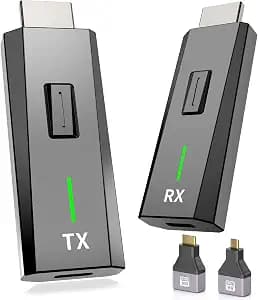
2026 Upgraded Wireless HDMI Transmitter and Receiver 328FT/100M, 4k Decode 1080P Output, Plug & Play Portable 2.4g/5g, Wireless Hdmi Extender Kit to Monitor from Laptop/PC/Projector/TV Box
Description
【Wireless HDMI Transmitter and Receiver – Seamless, High-Quality Streaming】 Say goodbye to messy cables and complicated setups! Our wireless HDMI transmitter and receiver offer a simple, plug-and-play solution for transmitting audio and video signals without the need for WiFi, apps, or Bluetooth. With ultra-low latency (<0.01s), you’ll experience virtually no delay in your presentations, meetings, or media streams. It’s perfect for a clean, clutter-free space—ideal for offices, homes, schools, churches, parties, and more.; 【Advanced 5G Chip & 328FT/100M Wireless Range】 Equipped with a dual-band chip (2.4G & 5G) and LDS antenna, this wireless HDMI system ensures fast, stable, and long-range transmission. It supports a distance of up to 328ft (100m), allowing you to enjoy smooth video streaming even through walls or ceilings. The system’s near-zero delay guarantees a flawless experience whether you’re sharing slides in a meeting, showing a movie in the living room, or broadcasting a live event.; 【Broad Compatibility for a Variety of Devices】 This wireless HDMI transmitter and receiver are compatible with laptops, cameras, set-top boxes, Blu-ray players, security cameras, DVDs, DSLRs, cable/satellite boxes, and more. Whether you’re presenting, watching videos, or teaching, you can easily project content onto HDTVs, projectors, or monitors for an enhanced viewing experience. It’s the perfect solution for business, education, and home entertainment!; 【Wireless HDMI 1080P HD Image Output】 Enjoy stunning image quality with support for 1080P/60Hz HD output and 4K decoding. The image transmission is clear, stable, and smooth, providing the perfect setup for professional presentations, classroom teaching, or home theater experiences. The wireless HDMI system supports both extended mode and duplicate mode, allowing you to tailor the display to your needs.; 【Customer Satisfaction Guaranteed】 We’re committed to your satisfaction with hassle-free customer service and a 12-month quality replacement guarantee. If you have any questions or concerns about your product, our dedicated support team is available to provide a solution within 24 hours. Your satisfaction is our top priority!
Compare the trade-offs
Similar products, side by side
A random selection of analyzed products from the same category. Different products are not necessarily interchangeable.

1Mii B06+ Bluetooth Receiver, Hi-Fi Wireless Audio Adapter, Bluetooth 5.3 Receiver with 3D Surround aptX HD aptX Low Latency for Home Music Streaming Stereo System

2026 New Wireless HDMI Transmitter and Receiver, 360FT/110M Extender 4K Decode 1080P@60Hz Output with LED Display, Plug&Play 5.8+2.4G Streaming Video/Audio from PC/Laptop/TV Box to Monitor

Ultra Xmagpot Bluetooth 5.4 Transmitter Receiver - CNC Aluminum & Ceramic Glass | Dual Link for 2 AirPods/Headphones | aptX Adaptive/HD Audio | Wireless Transmitter for Airplane/TV/Car/Gym
One less thing to search
Before you buy: quick questions
What's the real-world range I can expect, especially through walls?
While the kit supports a theoretical range of up to 328ft in optimal, open-air conditions, real-world performance depends on your environment. Based on user reports, through one or two drywall interior walls, you can typically expect a stable 1080p connection at distances of 40-70ft. For the most reliable signal, using the less congested 5GHz band and minimizing physical obstructions is recommended.
Is there any noticeable audio/video lag for gaming or presentations?
For streaming video, presentations, and general desktop use, the latency is negligible and not noticeable to most users. However, many tech reviewers on YouTube and Reddit note that while functional for casual gaming, the latency may be perceptible in fast-paced, competitive titles (like first-person shooters or fighting games). If ultra-low latency is your top priority, a direct HDMI cable or a specialized wireless system is advised.
Is it truly "plug and play," and what devices are compatible?
Yes! This is the most praised feature. You simply connect the transmitter to your video source (like a laptop, PC, or TV box) and the receiver to your display (monitor, TV, or projector), then plug both into power. They pair automatically within seconds with no software to install. It's compatible with any device that has a standard HDMI output and a display with an HDMI input.
I see it decodes 4K but outputs 1080p. What does that mean for my 4K content?
This means the system can receive a 4K signal from your source device (like a 4K laptop or streaming box) and will smoothly downscale it to a pristine 1080p signal for your display. It ensures compatibility and prevents handshake issues. If you have a 4K TV and want to see native 4K resolution wirelessly, you would need a different kit specifically rated for full 4K60Hz transmission.
What if it doesn't work well in my specific home setup?
We recommend testing the kit in your intended setup. Many users on forums suggest trying different 2.4GHz/5GHz band settings (via the physical switch) to find the clearest signal. If you experience persistent issues due to a highly congested wireless environment or complex layout, the product is backed by a standard return policy. Please check the product listing on the platform where you purchased it for the specific warranty and return window details.
From a similar, more-reviewed product in this category: Twelve South AirFly Pro, Bluetooth Wireless Audio Transmitter, White
Do I need to re-pair my Bluetooth headphones every time I turn the AirFly Pro on?
No. The AirFly Pro remembers previously paired headphones even after being powered off, and it will reconnect automatically when turned on. It also supports pairing two sets of headphones simultaneously, and both will reconnect on their own.
How do I pair the AirFly Pro for the first time?
Press and hold the power button for 4 seconds until the light flashes amber and white to indicate pairing mode. Put your headphones into Bluetooth pairing mode, and the AirFly Pro will detect and connect automatically once it finds them; initial pairing can take up to 90 seconds.
What is the difference between TX mode and RX mode?
TX mode sends audio from a wired headphone jack to your Bluetooth headphones, for use on airplanes, gym treadmills, hotel TVs, or any device with a 3.5mm audio out. RX mode works in reverse, receiving Bluetooth audio from your phone or tablet and playing it through a wired speaker or AUX input, for car stereos, boat speakers, or other non-Bluetooth systems with an AUX port.
What is the battery life, and how do I charge the AirFly Pro?
The AirFly Pro has up to 16 hours of battery life on a full charge, and the LED will flash amber 3 times when the battery is low. To recharge, plug the included USB-C to USB-A cable into the device and connect it to any powered USB port; it is fully charged within 2 hours.
Does the AirFly Pro work with hearing aids?
It may work with hearing aids that support standard Bluetooth and can enter pairing mode without a smartphone app, but hearing aids that rely on Bluetooth Low Energy (BLE) or require a companion app to pair are not compatible. Because hearing aid Bluetooth implementations vary widely by brand and model, check with your hearing aid manufacturer before purchasing.
Answers are limited to the manufacturer's listing and the reviews we analysed. Questions those sources cannot support are not answered here.
Transparent by design