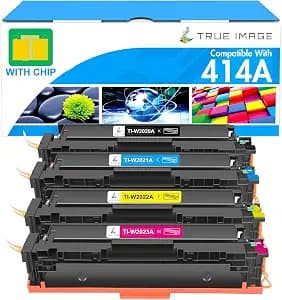
414A Toner Cartridges 4 Pack: MFP M479fdw M454dw Compatible for HP414A 414X 414 M479fdn M454dn Color Laserjet Pro M479fdw M455dn M479 M454 Printer Ink High Yield with Chip Black Cyan Yellow Magenta
Description
These 414A toner cartridges 4 pack high yield are alread installed with chips, No need to transfer original 414X or 414A toner chip to them. High-quality production technology and raw materials provide high-quality printout; What's in the box: TRUE IMAGE compatible 414A toner (with chip) replacement for HP laserjet 414A toner cartridges 4 pack; Package Contents: 414A toner cartridges 4 pack (W2020A W2021A W2022A W2023A) compatible for HP414A toner cartridges 4 pack toner and replacement for HP color laser jet pro mfp m479fdw ink cartridges; Page Yield: Up to 2,400 pages for 414A black toner and 2,100 pages per 414A color toner at 5% coverage (Letter/A4), replacement for hp m479fdw toner cartridges; Compatible for HP Printer: Color Pro MFP M479fdw M479fdn M479dw M479dw, Color Pro M454dw M454dn, Color Pro MFP M479 M454, Color Enterprise M455dn, MFP M480f laser printer
One less thing to search
Before you buy: quick questions
Are these compatible with my HP Color LaserJet Pro M479fdw or M454dw, and will using them void my printer's warranty?
Yes, this 4-pack is specifically designed to be fully compatible with the HP 414A/414X cartridge models used in the M479fdw, M454dw, and similar printers listed in the title. Using compatible cartridges does not void your printer's warranty in the US, thanks to the Magnuson-Moss Warranty Act. However, if a printer failure is directly and provably caused by a third-party cartridge, that specific repair might not be covered.
How does the print quality compare, especially for color graphics or photos?
For text and standard office documents, nearly all users report crisp, professional, and indistinguishable quality from HP originals. Where you might notice a difference is in high-resolution photos or graphics requiring extreme color saturation and detail. Some Reddit users note colors can appear slightly less vibrant. For everyday documents and internal materials, they're excellent. For critical client-facing color work, genuine HP may be preferred.
I've seen reviews mentioning "dud" cartridges. What's your return policy if one doesn't work?
We stand by our products. While the vast majority of cartridges perform perfectly, if you receive a defective or non-functioning cartridge, please contact our customer support directly through your order platform. We offer a straightforward replacement or refund for the defective unit, as noted by several satisfied users who had this issue resolved promptly.
The installation seems easy, but my printer isn't recognizing the new cartridge. What should I do?
This is a common, easily resolved hiccup. If your printer doesn't immediately recognize a newly installed cartridge, try a simple printer reset: turn the printer off, unplug it from power for 60 seconds, then plug it back in and power on. This often clears the printer's memory and allows it to recognize the new chip. Many YouTube tutorial creators highlight this quick fix.
Who are these cartridges best suited for, and who might want to consider other options?
These are a fantastic fit for home users, students, and small businesses that print high volumes of text-based documents (reports, essays, invoices) and prioritize significant cost savings. They're less ideal for professional photographers or designers who require absolute color fidelity for final products. If you value "set-and-forget" reliability above all else and are wary of any potential troubleshooting, you might prefer the consistency of OEM cartridges, despite the higher cost.
Answers are limited to the manufacturer's listing and the reviews we analysed. Questions those sources cannot support are not answered here.
Transparent by design