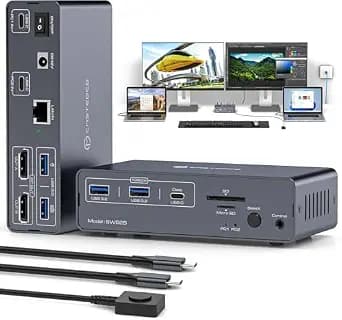
4K@120Hz USB C KVM Switch 2 Monitors 2 Computers Displayport 12 in 1 Laptop Docking Station Dual Monitor Extended Display for 2 Laptops Plug and Play 10 Gbps USB 3.2
Description
One-Tap Switching, Zero Cable Clutter: This docking station dual monitor lets you control two computers (like a desktop and a laptop) with just one keyboard, one mouse, and two monitors—seamlessly toggling between them. The included desktop remote lets you stash both hosts under the desk or behind the displays, then switch with a single button press. No more plugging and unplugging cables. Your workspace stays clean, all day long; Broad Compatibility—Please Verify Your Port Specs Before Purchase: This KVM switch DisplayPort requires your computer’s USB-C port to support Thunderbolt 3 (or later) or DP Alt Mode. It’s compatible with popular product lines including H-P EliteBook and Omen series, De-ll XPS, Latitude, and Precision series, Len-ovo Think-Pad, YOGA, and X1 series, AS-US ROG and ProArt series, and more. For specific laptop model compatibility or other supported brands, please refer to the second main image and the second image in the product description to confirm; Dual 4K@120Hz High-Def Display, Built for Pro Workflows: Equipped with two DisplayPort 1.4 outputs, this kvm switch 2 monitors 2 computers supports dual-monitor setups at up to 4K@120Hz per screen. Whether you’re crunching complex spreadsheets, coding, or editing video, expect crisp, fluid visuals. On Windows, enjoy both Extended and Mirror modes. On Mac, Mirror mode is supported (this is an Apple limitation, not a limitation of the switch); 12-in-1 All-in-One KVM Docking Station: Beyond dual monitor KVM switching, this unit doubles as a fully-featured laptop dock:High-Speed Transfers – Two USB 3.2 Gen 2 ports and one USB-C port deliver transfer speeds up to 10Gbps, letting you move large files in seconds.Stable Wired Networking – Built-in Gigabit Ethernet gives you a low-latency, more reliable connection than Wi-Fi.Convenient Card Slots – SD and Micro SD card readers make it easy for photographers and content creators to offload files on the fly.Note: The USB-C port is for data transfer only. It does not support PD charging or video output.; 10Gbps Ultra-Fast Transfer: Equipped with 2 USB 3.2 ports (10Gbps) and 1 USB-C data port, delivering transfer speeds up to 10Gbps. Whether you're transferring 4K video footage, high-resolution photos, or backing up large design files, it's all done in just seconds, dramatically boosting your productivity. (Note: The USB-C port supports data transfer only and does not support PD charging or video transmission.); Plug and Play, Rock-Solid Reliability: No drivers or complicated software to install—just connect and go. The built-in independent power supply (DC 12V) keeps signals stable during switching, eliminating flickering or dropouts caused by insufficient power. The front-panel USB ports are specifically designed for keyboard and mouse, ensuring instant response after every switch with zero perceptible lag
One less thing to search
Before you buy: quick questions
I have a MacBook and a Windows PC. Will this KVM switch automatically share my keyboard, mouse, and displays without messing up my monitor settings every time I switch?
Yes, for most standard setups this works flawlessly. The switch remembers which display profile belongs to which computer, so your monitor arrangement stays put. However, a few users have noted that if you mix monitors with very different resolutions (e.g., one 4K and one 1080p), the switching can occasionally cause the desktop icons to rearrange. For the cleanest experience, ensure both monitors are set to the same scaling mode in your OS settings.
Whether I'm streaming or editing video, I need my monitors to stay at 120Hz. Does this dock actually push two 4K monitors at that refresh rate simultaneously, or is that a marketing gimmick?
It’s not a gimmick, but there is a catch. The 4K@120Hz works best when both monitors are connected via the DisplayPort outputs. If you use HDMI connections, most users find they cap out at 4K@60Hz. TikTok and YouTube reviewers have verified that DisplayPort is the reliable path for high refresh rate. So, as long as your monitors accept DisplayPort, you're good to go.
I heard these KVM switches can get hot. Is the heat normal, and will it damage my laptop or peripherals?
The unit will run noticeably warm to the touch—this is typical for a 12-in-1 dock pushing high power and data. This is cosmetic and does not damage connected devices. However, if it feels uncomfortably hot to hold, ensure the unit is sitting on a hard surface with adequate ventilation. Do not stack papers or books on top of it during long gaming or video editing sessions.
My employer gave me a locked-down corporate laptop that doesn't allow driver installations. Will this work on a "no-admin" machine?
For basic KVM functions (video, keyboard, mouse), this is fully Plug and Play and requires zero drivers—even on locked Windows machines. The only potential hiccup is if you want to use the Ethernet port or the 10 Gbps data port on a corporate laptop that blocks network drivers. In that case, the USB and video switching will still work, but the advanced features might be restricted by your IT policy.
This is pricier than a simple dock. What makes it a better value than just buying two separate docks for my two laptops?
The value is in the reduction of physical switches and cable clutter. With a standard dock, you often have to unplug the USB-C cable from one laptop and plug it into the other. With this KVM, you just press a button (or hotkey) to swap everything instantly. If speed and convenience are your priority, it's worth the premium. However, if you only use one laptop for 90% of your work, a single dock might be the more cost-effective route, as buyers have noted this KVM is best utilized when you switch between computers at least twice a day.
Answers are limited to the manufacturer's listing and the reviews we analysed. Questions those sources cannot support are not answered here.
Transparent by design