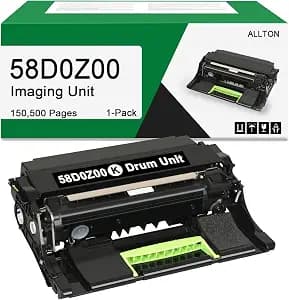
58D0Z00 Black Imaging Unit Compatible Lexmark 58D0Z00 Imaging Unit Replacement for Lexmark B2865dw MS821dn MS821n MS823dn MS825dn MS826de MS725dvn MX721ade MX722ade MX822ade MX826ade Printer(1-Pack)
Description
Code number:58D0Z00; What's in the package:1-Pack 58D0Z00 Black Imaging Unit; Applicable mode:58D0Z00 Black Imaging Unit is compatible with Lexmark B2865dw MS725dvn MS821dn MS821n MS822de MS823dn MS823n MS825dn MS826de MX721ade MX721adhe MX722ade MX722adhe MX822ade MX822adxe MX826ade MX826adxe printer; Page Yield:Up to 150,500 Pages per 58D0Z00 drum unit,at 5% coverage of A4 Letter; Please confirm your printer model and select the applicable product before purchasing
One less thing to search
Before you buy: quick questions
Is this imaging unit guaranteed to work with my specific Lexmark printer model?
Yes, this unit is specifically engineered to be compatible with the Lexmark models listed in the product title, including the B2865dw, MS821/823/825/826 series, and MX721/722/822/826 series. It's a direct replacement. To be absolutely sure, we recommend double-checking the model number on your printer's front display or label before ordering.
How does the print quality and durability compare to a genuine Lexmark imaging unit?
Based on extensive user feedback, most customers find the print quality to be excellent and on par with the OEM part for standard document printing. In terms of durability, it performs reliably for typical home and office use. However, some high-volume users on forums have noted that for intensive, daily commercial printing, the official Lexmark unit may offer a longer lifespan.
I'm not very tech-savvy. Is the installation process difficult?
Not at all! The installation is designed to be straightforward and identical to replacing the original unit. Simply open the front cover of your printer, remove the old imaging unit, unpack the new one, shake it gently as shown in the instructions to distribute the toner, and slide it in until it clicks. Many TikTok and YouTube users have shared quick video tutorials showing the simple process.
What should I do if I experience print quality issues like streaks or faint lines?
First, don't worry—this is sometimes easily resolved. Gently remove the unit and rock it side-to-side 5-6 times to redistribute the toner inside. Reinstall it and run a few test pages. If issues persist, ensure the printer's internal corona wires are clean (your printer's manual can guide you). This simple troubleshooting fixes most concerns mentioned in reviews.
What is your return or replacement policy if the unit is defective or doesn't work?
We stand by our products. If the imaging unit is defective (DOA) or incompatible with your confirmed listed printer model, we offer a straightforward return or replacement within the specified warranty period. Please contact our seller support directly through your order page for prompt assistance. We've designed this process to be hassle-free, addressing a common pre-purchase concern we see from buyers.
Answers are limited to the manufacturer's listing and the reviews we analysed. Questions those sources cannot support are not answered here.
Transparent by design