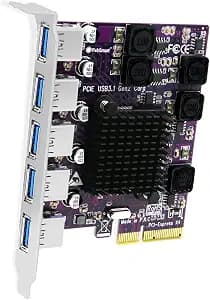
5X 10Gbps USB-A Ports PCIE USB 3.1 GEN2 Expansion Card for Windows 11, 10, 8.x, 7(32/64bit), Windows Server, MAC OS and Linux Desktop PCs, Built in Self-Powered Technology (FS-A5-Pro)
Description
1. FebSmart FS-A5-Pro will allow users add 5X 10Gbps USB 3.1 GEN2 type A ports on Desktop PCs, MAC Pros and Working Stations for large data transfers. The 5X USB 3.1 GEN2 USB-A ports will share 16Gbps total bandwidth. Each USB-A port can get super speed plus 10Gbps max data tramsfer rate for USB 3.1 GEN2 high power consumption peripheral device, such as NVME USB SSD enclosures, USB SATA SSD/HDD enclosures, VR-System, 10Gbps USB hubs and USB-A 4K video adapters.; 2. Built in FebSmart Self-Powered Technology. No need to plug any power cables from PCs power supply unit, but each USB 3.1GEN2 port can get 5V/3A (5V/15A, 75W in total, support BC1.2 fast charging) max power supply. Ensure all connected USB 3.1 GEN2 devices running on superspeed plus 10Gbps max. Enjoy super easy installation with Plug & Play use on most Desktop PCs.; 3. Based on ASMedia ASM3142 the 3rd generation USB 3.1 GEN2 16Gbps host controller and the latest VIALab VL822 USB 3.1 GEN2 10Gbps hub controller. Supports USB 3.1 Mutiple INs function, will auto-coordinate each USB 3.1 GEN2 port banwidth. The added-on Heat-Sink will help PCIE USB 3.1 GEN2 card core components stay away from overheat, make sure connected USB 3.1 GEN2 devices always stay at peak speed 10Gbps max.; 4. Compatible System: 1. Plug and Play on Windows 11, 10, 8.x (32/64bit) and Windows Server 2012, 2012R2, 2016, 2019, 2022. 2. Need to install driver on Windows 7 (32/64bit) and Windows Server 2008, 2008R2(32/64bit). 3. Driver Free on MAC OS 10.9.x, 10.10.x, 10.12.x, 10.13.x, 10.14.x, 10.15.x and later system. NOT works on MAC OS 10.11. x. 4. Supports most main stream Linux kernels.; 5. ATTENTION: 1. PCIE X4 interface design, will compatible with PCIE X4, X8, X16 slot, NOT works on PCIE X1, X2 slot. 2. Please use this PCIE USB card on PCIE 3.0 slot and works with USB 3.1 GEN2 devices or can not get 10Gbps peak speed. 3. Users must make sure PCs have one PCIE X16 slot, before purchase. 4. Support the standard size PCs only, do not support slim PCs.
One less thing to search
Before you buy: quick questions
Is this card truly "self-powered," or will I need to connect the extra power cable?
The card features built-in power delivery sufficient for most standard USB devices like flash drives, keyboards, and low-power external SSDs. However, based on user reports, connecting the included SATA power cable from your PSU is highly recommended for consistent performance with high-power devices like portable hard drives or multiple peripherals. This ensures stable operation and prevents disconnections.
I'm not very tech-savvy. Is the installation process plug-and-play?
For most Windows 10/11 users, it can be straightforward, but it's not always instant. Windows Update often finds the driver automatically. If it doesn't, you may need to manually install drivers from the manufacturer's website (the included disc is outdated). Some helpful YouTube tutorials exist showing this process. If you're uncomfortable navigating Device Manager or downloading drivers, you might want to consider a more user-friendly, branded alternative.
Will this fit and work in my specific PC (like a Dell or HP office desktop)?
It requires an available PCIe x4, x8, or x16 slot (the physical size is standard). It fits most standard and many small-form-factor towers. However, check your PC's internal clearance, especially the distance between the PCIe slot and your power supply or hard drive cage. For branded pre-builts (Dell, HP, Lenovo), searching your model number + "PCIe expansion card" online can reveal compatibility success stories from other users.
What's the real-world speed I can expect, and is it compatible with macOS or Linux?
With compatible 10Gbps devices, you can achieve speeds significantly faster than standard USB 3.0, greatly reducing file transfer times for large videos or backups. Officially, it supports macOS and Linux. However, community insights suggest that while it works, driver setup on these systems may require additional steps (like terminal commands on Linux) compared to Windows. It's best for users comfortable with moderate technical configuration on non-Windows OSes.
This seems like a great value. What are the most common reasons someone might regret buying it?
The overwhelming majority of buyers are satisfied with the speed and ports it adds. The primary reasons for dissatisfaction are: 1) Unresolved driver installation issues on newer operating systems, and 2) Needing a USB-C port format, which this specific model does not offer. If seamless, zero-hassle installation is your top priority, or you primarily use USB-C devices, you may want to look at slightly higher-priced cards from brands known for robust driver support.
Answers are limited to the manufacturer's listing and the reviews we analysed. Questions those sources cannot support are not answered here.
Transparent by design