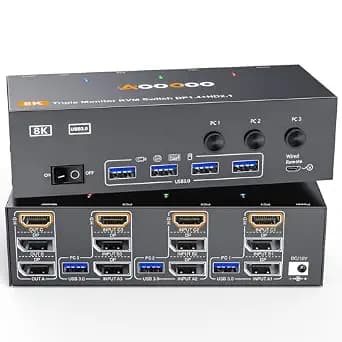
8K@60Hz HDMI2.1 Displayport KVM Switch 3 Monitors 3 Computers 4K@144Hz Triple Monitor KVM Switches with USB 3.0 Port,Wired Remote,Power Adapter and USB3.0 Cables(16cm 3 PC 3 Monitor 8K KVM)
Description
【Triple Monitor KVM Switch】2 Displayport1.4+HDMI2.1 USB3.0 KVM Switch allows 3 desktops to share 3 monitors and 4 USB3.0 ports(keyboard,mouse and other USB devices).It can make your work space tidy and efficient, also a premium choice for working from home.NOTE:Only when your computer supports 3 display or multi display, you can use this KVM to achieve 3 PC to share 3 monitors.; 【8K@60Hz/4K@144Hz】The resolution and fresh rate of triple monitor KVM switch supports up to 8K@60Hz/4K@144Hz, But please note that:①HDMI part supports 8K@60Hz,4K@120Hz,4K@60Hz,and backward compatible.②Displayport part support 8K@30Hz ,4K@144Hz and backward compatible.Warming: Please use HDMI2.1 and DP1.4 cables, if the set distance allows,the length of cabels more short more better.; 【3 Monitors KVM Switches with 4 USB 3.0 Ports】Triple monitor HDMI+2 Displayport KVM switch with 4 USB 3.0 ports which can recognize keyboard,mouse,printer,scaner and other USB devices. USB 3.0 offers data transfer speeds of up to 5Gbps, while USB 2.0 offers data transfer speeds of only 480Mbps.; 【Extended Mode&Copy Mode】Triple display KVM switches require 2 DP+HDMI connections per computer, and for computers with discrete and integrated graphics cards require both 2 DP+HDMI ports must belong discrete graphics card.; 【Compatibility & 2 Switching Methdos】AOOCOO triple monitors KVM switch driver-free and plug and play. you can press the button on the panel or use the wired remote controller(included in the package) to switch the computers.Three color lights indicate the active computer.; 【Note 】HDMI to DP and DVI/VGA to DP are not supported. If a signal converter or docking station is used, there may be compatibility issues.; 【Package List】1*Triple Monitor USB3.0 KVM Switch+3*USB3.0 Cables(1.5m/4.9ft)+1*Wired remote controller(1.52m/5ft)+1*User manual+1*12V Power Adapter(1.52m/5ft).
One less thing to search
Before you buy: quick questions
Does this KVM switch reliably deliver 4K at 144Hz or 8K at 60Hz on all three monitors?
Yes, but with an important caveat. The hardware supports these high resolutions and refresh rates. However, achieving them consistently requires using certified, high-bandwidth cables (like Premium HDMI 2.1 or DP 1.4 cables). Many users on tech forums emphasize that the included cables may not suffice for the top specs, so investing in quality cables is a common recommendation for optimal performance.
How difficult is the setup, and what should I know before connecting everything?
Setup is complex due to the number of connections. It's not plug-and-play. For a smooth experience, we recommend: 1) Connecting all monitors and computers with the KVM powered OFF, 2) Using the shortest, highest-quality cables you can for each link, and 3) Powering on components in a specific order (often KVM first, then monitors, then PCs). Reviewers suggest setting aside 30-60 minutes for configuration and testing.
Are the USB 3.0 ports fully functional for power-hungry peripherals like external SSDs or webcams?
The USB 3.0 hub works well for keyboards, mice, and basic devices. However, some users report that very power-hungry or data-intensive peripherals (like some external SSDs or HD webcams) may experience intermittent disconnections or drop to USB 2.0 speeds. For critical pro-grade gear, a separately powered USB hub connected to the KVM's output is a popular workaround mentioned in reviews.
I've read about stability issues. How common are signal drops or failed switches?
A segment of users do report occasional stability issues, such as a blank screen during switching or a peripheral not being recognized. This often relates to specific GPU/monitor combinations or EDID handshake problems. The consensus among experienced users is that once the system is correctly set up and "trained," it becomes stable. Using the included wired remote is generally more reliable than hotkeys. A quick power cycle of the KVM unit typically resolves any temporary glitches.
Who is this KVM switch best suited for, and who might want to look elsewhere?
This switch is ideal for technically confident users (like developers, traders, or creators) who need high-resolution, multi-monitor control of 3 PCs and are comfortable troubleshooting setup nuances for significant cost savings. It's likely not the best fit for users seeking absolute, set-and-forget reliability or those with less technical patience. For those users, dedicated dual-monitor KVMs from specialized brands or software-based KVM solutions might offer a smoother, albeit potentially more expensive or less feature-rich, experience.
Answers are limited to the manufacturer's listing and the reviews we analysed. Questions those sources cannot support are not answered here.
Transparent by design