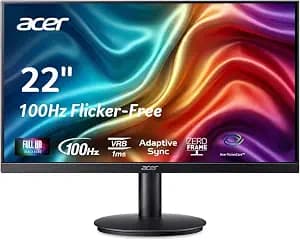
acer KB220Q H2bi 21.5" Full HD (1920 x 1080) Zero-Frame Home Office Monitor | Adaptive-Sync Support (FreeSync Compatible) | Up to 100Hz Refresh (Renewed)
Description
Vibrant Images: Crisp, true-to-life colors come alive in Full HD 1080p resolution. Movies and games appear more real and dramatic, and small details and text are clear with 1920x1080 resolution in a 16:9 aspect ratio.; Adaptive-Sync Support: Get fast refresh rates thanks to the Adaptive-Sync Support (FreeSync Compatible) product that matches the refresh rate of your monitor with your graphics card. The result is a smooth, tear-free experience in gaming and video playback applications.; Up 100Hz Refresh Rate: The 100Hz refresh rate speeds up the frames per second to deliver an ultra-smooth 2D motion scene. With a rapid refresh rate of up to 100Hz, Acer Monitors shorten the time it takes for frame rendering, lower input lag and provide gamers an excellent in-game experience.; Responsive!!: Fast response time of 1ms enhances the experience. Fast-moving action or any dramatic transitions will be rendered smoothly without the annoying effects of smearing or ghosting.; ZeroFrame Design: With a KB220Q monitor, you’ll want to see as much of the display as possible. Get more real estate with the near bezel-less design, allowing you to see more and do more. The ZeroFrame design lets you place multiple monitors next to each other for a seamless, almost uninterrupted view.
One less thing to search
Before you buy: quick questions
Does this monitor support 100Hz right out of the box?
The 100Hz refresh rate is available but typically requires enabling it manually in your display settings. Many users on Reddit noted the default is 60Hz. Make sure your HDMI or DisplayPort cable supports the bandwidth, and check your graphics card settings—this feature works best with Adaptive-Sync enabled.
I’m buying the “Renewed” version. What should I expect for condition and warranty?
According to community feedback on social media, renewed units vary. You’ll likely get a fully functional monitor with minimal cosmetic wear (small scratches on the bezel are common). The box might not be retail-ready, and power cables are usually included. Returns are generally accepted within 90 days, but always check the seller’s specific warranty policy before ordering.
Is this a good choice for dual-monitor home office setups?
Absolutely—the zero-frame design makes it ideal for side-by-side configurations, as many TikTok reviewers have highlighted. However, keep in mind the 21.5” size is compact for documents and web browsing. If you plan to run large spreadsheets or design software, a 24” or larger monitor might suit you better.
Can I mount this monitor on a VESA arm or wall mount?
Yes, the monitor has VESA 100x100mm mount compatibility. This is a frequent question in YouTube comments. Just note that the included stand is basic and wobbly according to some users, so a separate mount is recommended for stability. You’ll need to provide your own VESA screws as they’re not always included in renewed units.
Does this monitor have built-in speakers?
No, the KB220Q H2bi does not include built-in speakers. This is one of the top complaints mentioned on social platforms for home office use, especially for video calls. You’ll need external speakers, a headset, or a monitor with audio output if sound is important for your workflow.
Answers are limited to the manufacturer's listing and the reviews we analysed. Questions those sources cannot support are not answered here.
Transparent by design