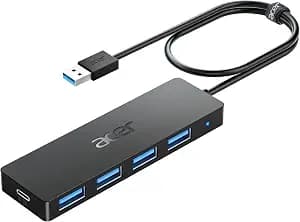
Acer USB Hub 4 Ports, Multiple USB 3.0 Hub, USBA Splitter for Laptop with Type C Power Port, Extender for A Port Laptop, PC, Desktop and More (2ft)
Description
【4 Ports USB 3.0 Hub】Acer USB Hub extends your device with 4 additional USB 3.0 ports, ideal for connecting USB peripherals such as flash drive, mouse, keyboard, printer; 【5Gbps Data Transfer】The USB splitter is designed with 4 USB 3.0 data ports, you can transfer movies, photos, and files in seconds at speed up to 5Gbps. When connecting hard drives to transfer files, you need to power the hub through the 5V USB C port to ensure stable and fast data transmission; 【Excellent Technical Design】Build-in advanced GL3510 chip with good thermal design, keeping your devices and data safe. Plug and play, no driver needed, supporting 4 ports to work simultaneously to improve your work efficiency; 【Portable Design】Acer multiport USB adapter is slim and lightweight with a 2ft cable, making it easy to put into bag or briefcase with your laptop while traveling and business trips. LED light can clearly tell you whether it works or not; 【Wide Compatibility】Crafted with a high-quality housing for enhanced durability and heat dissipation, this USB-A expansion is compatible with Acer, XPS, PS4, Xbox, Laptops, and works on macOS, Windows, ChromeOS, Linux; 📌NOTE: This USB C port (with IN 5V printed) CANNOT be used for transferring data and charging other devices. It can only supply power for the other 4 USB A ports, which can make data transfer more stable
One less thing to search
Before you buy: quick questions
Does the USB-C port on this hub charge my laptop or just power the hub itself?
Great question! The USB-C port is designed only to provide power to the hub itself, not to charge your laptop or transfer data. It helps keep the hub stable when you plug in higher-power devices like external hard drives. For actual laptop charging, you’ll still need your original charger.
I keep seeing Reddit comments about disconnections. Is this hub stable for everyday use?
For basic needs like connecting a mouse, keyboard, or a single flash drive, most users find it perfectly reliable. However, some TikTok and forum users reported occasional dropouts when running multiple high-bandwidth devices at once. It’s best suited for low-power peripherals rather than simultaneous heavy data transfers.
The cable is only 2 feet long—will that cause issues on a desktop setup?
It can be tight. The short cable works well if your laptop sits right next to you, but many desktop users wished for an extra foot. If you need more reach, consider pairing it with a short USB extension cable or looking for hubs with longer built-in cords.
Will this hub work with an older laptop that only has USB 2.0 ports?
Yes, it’s backward compatible with USB 2.0 and 1.1 ports, so you can use it on most older machines. Just keep in mind that data speeds will be limited to what your laptop’s port supports. A few users on YouTube noted it wasn’t detected on some specific models from 2015–2016, so if you have an older system, check the return policy first.
I noticed many 5-star reviews seem very short. Should I be concerned about quality?
That’s a fair observation. The high average rating comes mostly from quick reviews by users who had a simple, hassle-free experience. For light daily use with a mouse and keyboard, it’s a solid budget pick. However, if you need rugged build quality or plan to run multiple power-hungry devices, you might want to consider alternatives with aluminum casings or longer cables.
Answers are limited to the manufacturer's listing and the reviews we analysed. Questions those sources cannot support are not answered here.
Transparent by design