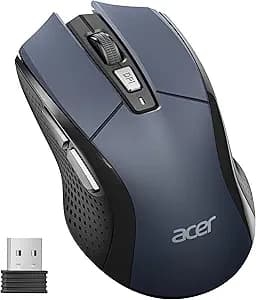
acer Wireless Mouse for Laptop, 2.4GHz Computer Mouse 5 Adjustable DPI Office Cordless USB Mice with USBA Receiver, 6 Buttons, 4000 DPI, Medium to Large Sized Hands Compatible with PC, Laptop, Desktop
Description
【Pre-Use Notice】① Please check the positive and negative electrodes of the battery are assembled correctly. ② Make sure the power switch is set to "ON". ③ The AA battery are not included.; 【Plug and Play for Home Office】The wireless mouse for laptop features 2.4GHz connectivity, providing a stable, interference-free connection of up to 33ft. Designed for 𝐦𝐞𝐝𝐢𝐮𝐦 𝐭𝐨 𝐥𝐚𝐫𝐠𝐞 hands, it ensures all-day comfort. Simply plug the 𝐔𝐒𝐁-𝐀 𝐫𝐞𝐜𝐞𝐢𝐯𝐞𝐫 into your device for instant pairing. 📌 Please remove the film at the bottom of the mouse before use.; 【5 Levels Adjustable DPI】This laptop mouse features 5 adjustable DPI levels (800/1200/2400/3200/4000), giving you the flexibility to choose the right sensitivity for detailed design work and boost your efficiency.; 【Visible Indicator Light】The cordless mouse includes a visual indicator that shows both the current DPI setting and low battery warnings. A red light flashes once (800 DPI), twice (1200 DPI), three times (2400 DPI), four times (3200 DPI), or five times (4000 DPI). When battery falls below 10%, the light flashes red continuously until power runs out.; 【Efficient Workflow】With forward and backward buttons, this USB mouse helps you quickly navigate web pages and files, making work more efficient with just one click.; 【Click to Wake】This travel mouse saves power by entering standby after 10 minutes of inactivity and wakes with just 2–3 clicks, extending battery life. This pc mouse is rated for up to 10 million clicks and offers exceptional long-term durability.; NOTE: The USB-A receiver is stored in the mouse. 📌 If the mouse isn’t suitable, place the USB receiver in the battery compartment and return both.
One less thing to search
Before you buy: quick questions
I have medium-to-large hands. Will this mouse be comfortable for all-day use?
Yes, this is one of its main strengths. Unlike many slim travel mice, the Acer Wireless Mouse is designed with a fuller, more arched body that supports medium-to-large hands quite well. Many users on Reddit specifically praise it for preventing hand fatigue during a full workday. However, it is not as tall as a dedicated vertical mouse, so it’s best for a palm or claw grip rather than a full palm rest.
I keep hearing about people accidentally hitting the DPI button. Is that a real problem?
It’s a very common point of feedback. The DPI button sits just above the scroll wheel and, due to its position and sensitivity, can be bumped by a stray finger while you’re moving the mouse. This instantly changes your cursor speed, which many TikTok reviewers find annoying. The good news is that the mouse defaults to a usable 1200 DPI, so if you can adapt your grip to avoid that spot, it’s a non-issue—but it is worth knowing about before you buy.
Does the mouse come with any batteries, and does it have a power switch?
Yes, it typically includes one AA battery to get you started. It also features a physical on/off switch on the bottom, which is a great way to save battery life when you’re not using it or when traveling. A quick tip from users: many report the battery lasting 6-12 months with moderate use, thanks to that switch. Just be aware there is no low-battery indicator light, so it’s a good habit to keep a spare battery handy.
I lost the tiny USB receiver. Can I use Bluetooth instead?
No, this is a strictly 2.4GHz wireless mouse, which means it requires the included USB-A receiver to function. It does not support Bluetooth. If you lose the receiver, the mouse is unfortunately unusable. We recommend storing the receiver in the slot on the underside of the mouse when you’re transporting it. Some users suggest getting a small case or tethering the receiver to your laptop cable to avoid losing it.
Is this a good budget option for casual use, or will it fail after a few months?
For the price, this is widely considered a reliable workhorse. The sentiment from over 200 reviews is that it offers excellent value for money, especially for office work, school, and general web browsing. It’s not built for heavy gaming or rough handling—the scroll wheel can feel a little wobbly over time—but for a basic, no-fuss cordless mouse, users consistently report it lasting for years. It’s a smart buy for anyone who needs something cheap and functional right now.
Answers are limited to the manufacturer's listing and the reviews we analysed. Questions those sources cannot support are not answered here.
Transparent by design