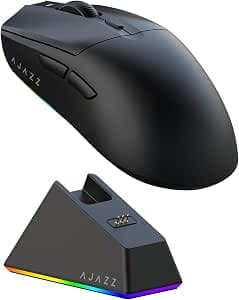
AJAZZ AJ139 V2 MC Wireless Gaming Mouse, PAW3311 Sensor, 24K DPI, 2.4G/USB-C/BT, 500mAh Battery, Ultra-Light 66g, RGB Magnetic Charging Base, 80 Million Clicks Life, Compatible with PC and Mac, Black
Description
Tri-mode Connectivity 500mAh Battery: AJAZZ AJ139 V2 MC supports three connection modes: USB wired, 2.4G wireless, and Bluetooth, enabling seamless switching between devices like PCs and laptops. Its 500mAh battery delivers up to 44 hours of usage in Bluetooth mode, balancing the endurance and convenience required for daily office work or gaming.; High-Performance Core Specifications: This gaming mouse features the PAW3311 sensor, offering adjustable DPI from 50 to 24,000 for precise control during both work and gaming. Its polling rate ranges from 125 to 1000Hz, with the 2.4G polling rate adjustable via driver settings: 125Hz/250Hz/500Hz/1000Hz, delivering zero-latency response. Furthermore, the microswitches undergo 80 million click tests, guaranteeing enduring reliability for demanding gaming sessions or daily tasks.; RGB Magnetic Charging Dock: This gaming mouse features a magnetic RGB charging dock. Simply place the mouse on the dock to charge—no need to fuss with cables or ports, eliminating cable clutter and port wear. The dock's RGB lighting adds dynamic flair to your desk while ensuring your mouse stays fully charged and ready to go. It seamlessly blends convenient charging with eye-catching aesthetics, delivering both practical functionality and visual appeal.; Customization Via Drivers: Using the mouse driver, you can tailor the mouse to your specific needs. Not only can you create custom macros to enhance gaming efficiency, but you can also adjust DPI (driver-controlled DPI adjustment in 50 DPI increments), mouse polling rate for 2.4G connection, and configure other parameters. This flexibility transforms the mouse into a personalized tool for both work and play.; Lightweight Ergonomic Design: Crafted from ABS plastic, this gaming mouse weighs a mere 66 grams with dimensions of 12.54 x 6.33 x 3.81 centimetres. Its ergonomic shape accommodates various grips, ensuring comfort during extended use. Backed by reliable after-sales support and built to last, it proves ideal for daily tasks, while its compact form fits any desk.
One less thing to search
Before you buy: quick questions
I have larger hands. Is this mouse a good fit, or will it feel too small?
The AJ139 V2 MC is generally considered a medium-sized mouse. Many users with medium to slightly larger hands find the shape comfortable for claw or fingertip grips. However, if you have very large hands and prefer a palm grip, you might find it a bit small. For reference, several Reddit reviewers noted it's similar in size to popular mice like the Razer Viper.
How reliable is the magnetic charging dock? I've seen mixed comments online.
The dock is a beloved feature for its convenience, but it requires a precise placement. The magnets are strong for picking up the mouse, but to initiate charging, the mouse's contact pins need to align perfectly with the dock's. A common tip from TikTok and YouTube users is to look for the RGB on the dock to pulse, confirming a successful connection. It becomes second nature after a few days.
Is the software buggy, and do I need to keep it running for my settings?
You can use the AJAZZ software to configure your DPI levels, polling rate, button assignments, and RGB lighting, then save these settings directly to the mouse's onboard memory. Once saved, you can close the software, and your preferences will work on any PC. Some users find the software interface a bit basic, but its "set-and-forget" functionality works reliably for core settings.
What's the real battery life like, especially with the RGB lights on?
With the RGB lighting at a default or bright setting, you can expect roughly 2-3 days of moderate use. However, a huge benefit mentioned in reviews is that turning the RGB off significantly extends the battery life to a week or more. The 500mAh battery charges quickly on its dock, making it easy to top up between sessions.
For the price, this seems packed with features. Where are the typical trade-offs?
You've hit on its core appeal: exceptional value. The trade-offs, as noted in detailed reviews, are usually in the refinement of secondary features. This means the main clicks and sensor performance are excellent, but some units may have side buttons that feel less crisp or a scroll wheel that doesn't feel as premium as a mouse twice the price. It's a fantastic performer that smartly prioritizes where the budget goes.
From a similar, more-reviewed product in this category: AK820 Grey White Wired Mechanical Keyboard, Gaming Keyboard Tastertur White Light|Volume Control|82 Keys|PBT Keycaps|Poron Cotton|Hot Swappable keyboard gaming tastatur 75 prozent tastatur
How does the keyboard sound when typing?
Multiple reviewers describe the sound as a pleasant "creamy thock" that is satisfying rather than annoying. The listing attributes this to multi-layer noise-reducing cotton, Poron Sandwich Cotton, and PET tone pads.
Is the keyboard good value for the price?
Reviewers repeatedly call the price-performance ratio excellent, with one noting they expected less for around 50€ and another calling it one of the best when comparing price versus quality.
Can I change the switches and keycaps?
Yes, the keyboard is hot-swappable with a 3/5-pin PCB mount design and comes with a 2-in-1 key puller for easy keycap replacement. Reviewers confirm they could swap switches and keycaps using the included tool.
Is the keyboard comfortable for typing?
The listing states the adjustable stand lets you set an individual typing angle, and the gasket structure with slotted keys provides a softer, more stable feel. Reviewers describe typing as smooth and comfortable.
What layout and connectivity does it use?
It has a 75% QWERTY layout with 82 keys and a detachable USB-C wired connection that is plug and play. One reviewer notes the layout is English but that the ñ still works if your computer is set to Spanish.
Answers are limited to the manufacturer's listing and the reviews we analysed. Questions those sources cannot support are not answered here.
Transparent by design