What people like
Clear display and smooth performance
Several reviewers praise the 11-inch 2.5K display as bright and clear, and note smooth performance for videos, games, and reading.
Our buying verdict
Several reviewers praise the display and speed, but setup difficulty and Google account requirements are recurring concerns.
Buyers who want a kids' tablet with a large, clear display and Google Play app access and who are willing to spend time on setup.
Buyers who want quick, simple parental setup without creating separate Google accounts for each child.
The 30-second read
What people like
Several reviewers praise the 11-inch 2.5K display as bright and clear, and note smooth performance for videos, games, and reading.
The main watch-out
Several reviewers found setup difficult, especially creating separate Google accounts for children; one reported malfunctioning within two days.
Before you choose
Two reviewers note this tablet uses a Google Android system rather than the Fire OS, so familiar Amazon parental controls may not be present.
Description
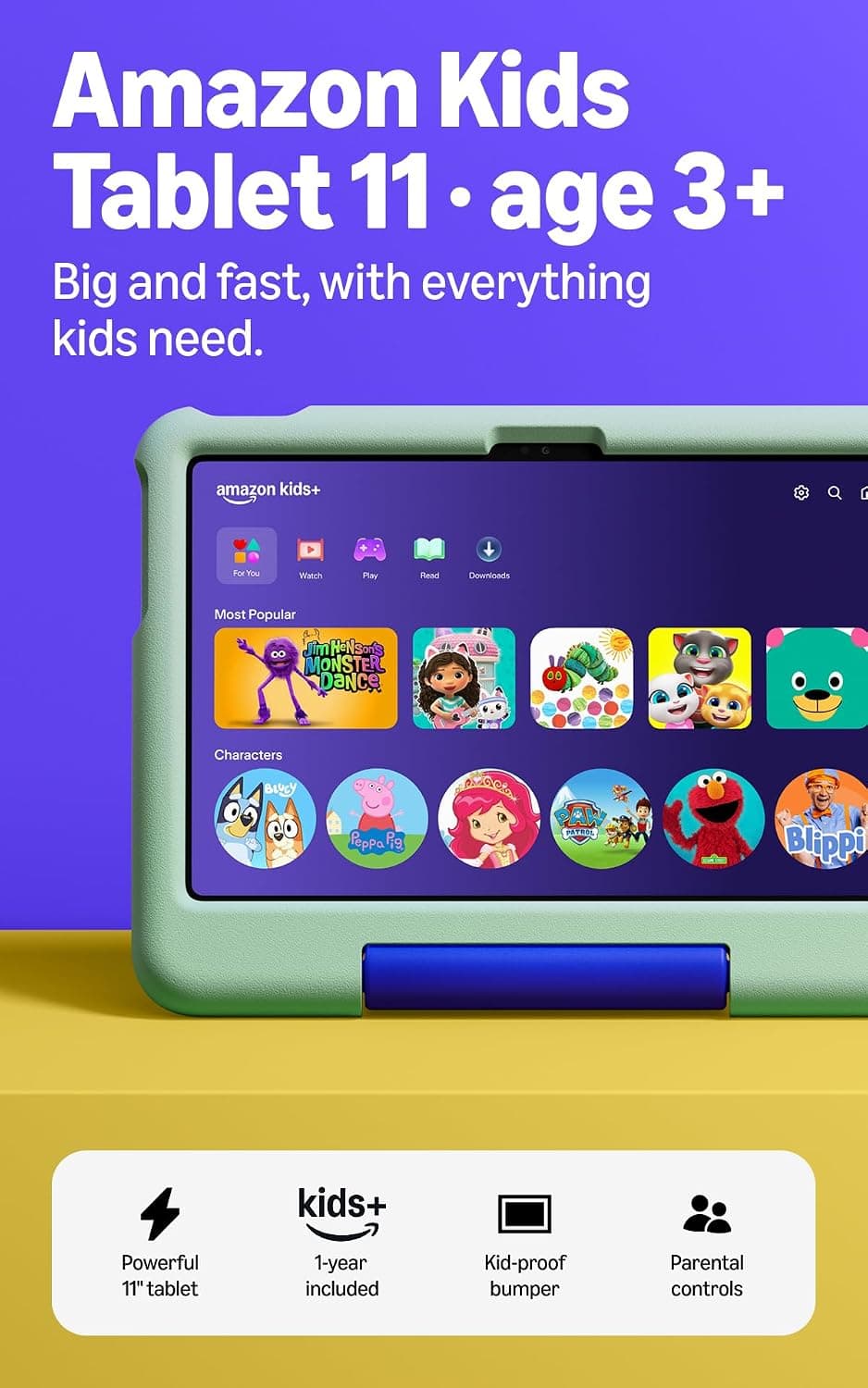
Everything in one box: An Amazon Kids Tablet with 11” display, a 1-year Kids+ subscription, and a soft bumper case. Includes charging cable. A more interactive experience: Brilliant 11” 2.5K display and 8GB RAM for graphic-heavy games; supports stylus for drawing apps, games and learning to write. A 1-year Kids+ subscription included (auto-renews after first year): Ad-free videos, games, apps and books carefully chosen for kids 3-5, including characters they love, like Peppa Pig, Bluey, and Talking Tom. Access to Google Play Store: Parents can supplement Kids+ with additional apps from the Google Play Store as kids’ interests change. Just visit the Google Play Store from your child’s tablet to review available options. Early learning made lovable: Kids learn about colors, shapes, letters and numbers with Blippi, Khan Academy, and other included apps and games from Kids+. Alexa built in: Kids ask questions about subjects they’re interested in and Alexa responds with age-appropriate dialogue and answers. Or they provide Alexa with plots and characters to turn into an original narrated story. Help without hovering: Parents can remotely set screen time limits, review the content kids have enjoyed, and suggest other content with the Amazon Kids Parent Dashboard mobile app. Easy to travel with: Battery provides up to 15 hours of video playback, and 64 GB of storage means there's room to download plenty of movies, shows and games to enjoy when away from WiFi. Soft bumper case included: Easy to carry and hard to hurt, with a built-in kickstand so kids can watch hands-free. Easy on the eyes: Blue light filtering helps keep kids' eyes comfortable when reading or in dim light.
Check the evidence
Included does not mean verified authentic. Flagged does not mean proven fake. These are analytical classifications.
Showing 3 illustrative excerpts, not the complete review set.
A must have tablet this holiday season!!!
“I really like the direction Amazon has taken with its newer lineup of kid focused tablets. The 11 inch 2.5K display is a very welcome change of pace (and actually a higher resolution than my gaming monitor at home 😆), offering cinema like screen quality and screen size for all your favorite educational apps, games, books, videos, movies and more! The colorful protective case is another welcome addition and I like all the different choices! I opted for a fairly neutral green but there’s tons of choices, like SpongeBob, Barbie, even an interstellar theme! I’m especially impressed with how soft yet rugged this case is. It feels like it could survive falls much higher than what a typical toddler would depict from. Just knowing the tablet won’t get broken while mom /dad leave the room for a second is great, especially considering how rough kids can be on electronics. We've seen the horror stories about kids being on their 3rd or 4th tablet due to accidental drops/breaks. One of the biggest selling points for me is the inclusion of Google Play, which opens up considerably more possibilities than the older Amazon tablets. I also appreciate the built in parental controls which help me monitor my kids screen time and if necessary set up time limits. The included year of Amazon Kids+ was a welcome, albeit slightly unexpected surprise, giving parents plenty of options for managing what their children can access. The sub only lasts for a full year so if you find that you don't need it, make sure to either pause or cancel before the renewal date. The universal complain with the kids lineup of tablets is the setup process. Now, this isn't Amazons fault, the issue stems with, getting the device booted up, configuring wifi, then come the updates, then you advance by signing into YOUR primary amazon account, then setting up a CHILD amazon account, then there is the subscription for the Amazon kids account which adds an additional layer of security, then connecting to the google play store... There's a LOT of steps and if you mess up during any of these steps, you may have to start from scratch. A lot of kids will be impatient and not to sit through the process, they just want to just straight into the fun! At $330, it's certainly not an inexpensive children's tablet, but by no means a cheap one that wont do half the things your kiddo wants to, but the combination of a high resolution display, protective case, and family oriented features makes it a must have for the upcoming holiday season. My biggest consideration would be whether the included subscription and kid-friendly extras justify the premium over a regular tablet with a protective case.”
Signals matched: Specific detail: quantity, entity, comparison, scenario · Reads as an authentic voice
Better performance than I expected, but setup takes some patience
“I found setting this Amazon kids tablet 11 up to be a bit of an annoyance, and it takes patience. There are a few different accounts, settings, and parental controls to work through, so it takes a little patience to get everything configured the way you want. Once it’s set up, though, I really like the flexibility it offers. You can use it in parent mode as a regular tablet, or switch over to the kids’ mode and have it much more locked down with age appropriate content and parental restrictions. I like being able to control screen time, manage what apps and content are available, and have a little more peace of mind about what a child is accessing. The 11” screen is a nice size, especially for watching videos, playing games, reading, or using it for schoolwork. The display is sharp, and honestly, this tablet seems to run smoother and faster than our two 9th generation iPads, which was a pleasant surprise. My daughter enjoys using it to do her favorite math game. It comes with a protective case, which is definitely a plus when it’s being used by kids, and the built in kickstand is convenient, especially to use as a handle to carry it by children. I like that it isn’t limited to just the content Amazon offers. Having access to Google Play with parental approval opens up a lot more options for apps as kids get older and their interests change. The included year of Kids+ is a nice bonus for families who plan to use it. The initial setup process is just annoying but once you get past that it has a lot of useful features and offers a nice balance between giving kids access to a tablet and allowing parents to maintain control over what they’re using. The price is definitely high for something advertised for kids but seeing that it is multi-user (parent friendly) makes the price more reasonable. I do wish it had more storage though as the system processes already take up a lot of storage. I suggest if buying this for a gift for your own child to set it up beforehand otherwise you’ll have a very excited child become quickly frustrated with the time it takes to setup and get all the parental controls setup.”
Signals matched: Specific detail: entity, process, scenario · Reads as an authentic voice
Not the same as previous Amazon Kids Tablets
“We have used the fire kids tablets since 2020. This new tablet has a COMPLETELY different operating system. It does not “allow access to Google play”, it is literally a Google android tablet. All of the parent controls are out the window. It forces you to create all new Google accounts for the kids. Amazon OS features like Max Volume Control? Gone. Forget the accidental damage warranty, it is now $60 and through a third party. This is not usable for a child under 8 years old, even though it’s advertised Age 3-5. Our autistic kids have profound cognitive disabilities and cannot read to understand how to follow steps to request or download apps. On the previous OS, it was just one obvious button they would press instinctively. Then I would get a message they were browsing an item and may want it. Google requires several steps to request help from a parent, and the authentication steps are impossible. Then, Google wants to do 2 step authentication from the tablet, but the tablet can’t do that because it’s a child profile. It feels INSANE. This was supposed to be for ages 3-5, just like the Amazon kids profile, just like the previous tablet! I suppose we could pre-download content, and disable the app stores, but that takes away a lot of their autonomy that they have appreciated utilizing on the previous OS. Just overall really unhappy with this. I guess we’ll have to find something else. A real shame. We’ve easily purchased 12+ of these over the years.”
Signals matched: Specific detail: comparison, entity, process · Reads as an authentic voice
One less thing to search
Yes — the included 1-year Kids+ subscription auto-renews at the standard rate after your first year unless you cancel before the renewal date. You can manage or cancel anytime through your Amazon account settings. Many parents on Reddit recommend setting a calendar reminder a few weeks before the year is up so the charge doesn't catch you off guard.
You're not locked in. The tablet gives you access to the Google Play Store, so parents can add extra apps as their child's interests grow. A quick tip from TikTok users: enable Play Store access through the Parent Dashboard first, then review each app before installing — it takes a couple of minutes but keeps things kid-safe.
The soft bumper case comes in the box — no extra purchase needed — and includes a built-in kickstand for hands-free viewing. It handles typical drops and tumbles well, though a few parents note the kickstand can snap if a toddler really leans on it. For ages 3–5, most families find it holds up nicely; a screen protector is a smart add-on for extra peace of mind.
Amazon rates it at up to 15 hours of video playback, and most parents report getting close to that when streaming downloaded shows at moderate brightness. Heavy gaming sessions tend to land closer to 8–10 hours — still plenty for a road trip or flight. With 64 GB of storage, you can download movies and games ahead of time so WiFi isn't a concern on the go.
For ages 3–5, this is a strong all-in-one pick — the curated Kids+ library (Bluey, Peppa Pig, Blippi), ad-free content, parental controls, and included bumper make it hard to beat on value. If you have an older child (7+) or want a tablet that doubles as a family device, an iPad with a kid-proof case may offer more longevity. As one YouTube reviewer put it: "Perfect for preschoolers — just know you'll likely upgrade in a few years."
Answers are limited to the manufacturer's listing and the reviews we analysed. Questions those sources cannot support are not answered here.
Transparent by design