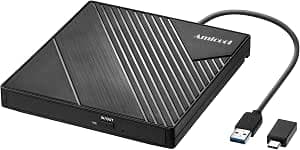
Amicool External DVD Drive USB 3.0 USB C CD Burner CD/DVD +/-RW Optical Drive, Slim Portable DVD CD ROM Rewriter Writer Duplicator for Laptop Desktop PC Windows 11/10/8/7 MacBook Mac Linux OS Apple
Description
【PLUG & PLAY – EASY CONNECTION】 Simply connect the Amicool External DVD Drive to your computer’s USB or Type-C port, and it will usually be detected right away without the need for extra drivers. For stable operation and sufficient power, we recommend connecting it directly to a USB port on your computer (for desktops, use a rear motherboard port) and avoiding USB hubs or extension cables. This user-friendly design ensures quick setup for both beginners and professionals.; 【FAST & STABLE DATA TRANSMISSION】 Featuring dual interfaces (USB 3.0 and Type-C), this optical drive supports data transfer speeds up to 5Gbps. To ensure a reliable connection, please connect it directly to your computer. The drive supports multiple disc formats such as DVD+R, DVD-R, CD-R, and CD-RW. Please note: It does NOT support DVD-RAM, Blu-ray (BD) discs, or certain proprietary formats. Maximum DVD read speed is 8x, and maximum CD read/write speed is 24x.; 【UNIVERSAL COMPATIBILITY】 Compatible with Windows 11 / 10 / 8.1 / 7, Linux, and macOS (Note: Some versions may require additional system settings for full functionality). Works with most computers from brands like Apple, Dell, HP, Lenovo, ASUS, Acer, and Samsung. 👉 Important: Designed specifically for computers. It is NOT compatible with TVs, tablets, game consoles (e.g., PlayStation, Xbox), car stereos, or standalone Blu-ray players.; 【SLIM & PORTABLE DESIGN – BUILT-IN CABLE, READY TO GO】With an integrated cable design, slim body, and stylish matte finish, this lightweight CD/DVD drive is both durable and portable. Easily slip it into your laptop bag or backpack and use it anytime, anywhere—perfect for business, travel, or home use; 【MULTIFUNCTIONAL & RELIABLE OPERATION】 Equipped with intelligent error correction and anti-shock technology, this drive supports reading, writing, and burning discs. If the drive is not recognized or a disc cannot be read, try restarting your computer or testing with a different, standard CD-R or DVD-R disc. The pop-up button and built-in cable design offer convenience and portability. For desktop PCs, connecting to a rear USB port is recommended for optimal power and performance.
Compare the trade-offs
Similar products, side by side
A random selection of analyzed products from the same category. Different products are not necessarily interchangeable.

ROOFULL External CD DVD Drive for Laptop & Mac with Case, USB 3.0 Type-C

8-in-1 External Blu-ray Drive, USB-C Hub & Card Reader for Laptop

ASUS ZenDrive V1M External DVD Drive and Writer with Built-in Cable-Storage Design, USB-C Interface, Compatible with Win 11 and macOS, M-DISC Support, SDRW-08V1M-U, 1 Year Warranty
One less thing to search
Before you buy: quick questions
I have a modern MacBook (M1/M2/M3 chip). Will this drive truly be plug-and-play, or will I need extra software?
For Macs, it's mostly plug-and-play for audio CDs and data discs. However, due to macOS restrictions, playing commercial DVD movies typically requires a free third-party media player like VLC. Many users on social media highlight this as an essential, quick download for full functionality. Reading and burning standard data DVDs/CDs generally works without extra steps.
How durable is this drive? I've seen mixed reviews about it lasting only a few months.
The Amicool drive is designed and best suited for light to occasional use. Based on user reports, it reliably handles tasks like installing software, ripping a CD collection, or watching the occasional movie. However, consistent daily heavy burning or prolonged continuous use may shorten its lifespan. For frequent, intensive tasks, a more industrial-grade drive might be a better long-term investment.
What's included in the box, and will it connect to my laptop's USB-C port?
The drive comes with the unit and a built-in, non-removable USB cable. The cable has a standard USB-A connector. If your laptop only has USB-C ports (common on newer MacBooks and ultrabooks), you will need a simple, inexpensive USB-C to USB-A adapter, which is not included. Many TikTok and Reddit users recommend getting a reliable adapter for a secure connection.
Is it noisy, and does it get hot during use?
Yes, users commonly note that the drive can be audible when spinning discs—comparable to a standard internal DVD drive—and it may become warm to the touch during extended reading or burning sessions. This is normal operation for slim optical drives. For movie watching, the noise is usually only noticeable during the initial disc spin-up and menu loading.
Who is this drive best suited for, and who might want to look at other options?
This drive is an excellent value-for-money choice for casual users who need to access discs a few times a month—think students, parents, or anyone with a small archive of old software, music, or family DVDs. If you require a drive for daily professional disc duplication, extensive video DVD burning, or demand absolute silent operation, you may be happier investing in a higher-end model from brands like LG or ASUS, as noted in several tech forum discussions.
From a similar, more-reviewed product in this category: ASUS BW-16D1HT - Ultra-Fast 16X Blu-ray Burner with M-DISC Support, Black, 1 Year Warranty
Does this drive work with Windows 10 and Windows 11?
Yes. Reviewers report it working on Windows 10, and one reviewer notes ASUS officially lists it as fully compatible with Windows 10 and Windows 11 without needing extra drivers.
How fast is this drive at burning and reading discs?
The manufacturer states it writes at up to 16X Blu-ray speed, backing up 25GB in about 8 minutes, and reviewers describe it as very fast, including ripping an extensive CD/DVD/Blu-ray collection in a few hours.
Is this drive noisy during operation?
One reviewer describes it as almost silent, and another notes it is surprisingly accurate and reliable during heavy ripping use.
Can it play or rip 4K UHD Blu-ray discs?
Not out of the box. Reviewers note the newer firmware does not support 4K UHD playback, but that flashing to an earlier firmware version can enable it, and some use it to rip 4K discs.
How much data can it store on a single disc, and does it support M-DISC?
The manufacturer states it supports BDXL for up to 128GB of storage on one disc, and M-DISC support for storing photos or documents for more than 1,000 years.
Answers are limited to the manufacturer's listing and the reviews we analysed. Questions those sources cannot support are not answered here.
Transparent by design