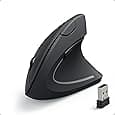
Anker 4-Port USB 3.0 Hub, Ultra-Slim Data USB Hub 2.4G Wireless Vertical Ergonomic Optical Mouse
Description
A7852011+A7516016
Compare the trade-offs
Similar products, side by side
A random selection of analyzed products from the same category. Different products are not necessarily interchangeable.

Anker 2.4G Wireless Vertical Ergonomic Optical Mouse for Work, Multi-Device Connectivity, 800/1200 /1600 DPI, 5 Buttons for Laptop, Desktop, PC - Black

TALONGAMES Curved Edges Ultra Strong Glass Universal 6mm Mouse Feet Skates Compatible with Gaming Mouse Feet Replacement,Super Smooth Glide Fast and Durable Sole (Black)

MEETION Left-Handed Mouse, Ergonomic Mouse Wireless Vertical Mouse, RGB Rechargeable Mice for Bluetooth(5.2 + 3.0) & USB-A with Type-c Adapter 4 Adjustable DPI for Mac/Windows/PC/Tablet/iPad Purple
One less thing to search
Before you buy: quick questions
Is this hub powered, or does it run off my laptop?
It's bus-powered, so it draws juice from your computer. That's perfect for a mouse, keyboard, or flash drive, but many Reddit users note that bus-powered hubs can struggle with power-hungry external SSDs or spinning drives. If you regularly move large files to an external drive, a powered hub is the safer pick.
Will the vertical mouse actually help my wrist, or is it just hype?
For a lot of desk workers, yes — the handshake-style grip keeps your forearm in a more neutral position, and TikTok reviewers often say the first week feels odd but the payoff is real. That said, ergonomics are personal. If you have smaller hands, several users mention the shape feels bulky, so check the dimensions before committing.
Does the mouse use Bluetooth, or do I need the USB dongle?
It's 2.4G wireless only, so the tiny USB receiver is required. Keep in mind that the dongle occupies one of the hub's four ports, which means your net gain is three free ports, not four. A few buyers found that surprising, so it's worth planning your setup around it.
Is the bundle a better deal than buying the hub and mouse separately?
Usually yes, especially when it's discounted — but only if you actually want both items. If you already own a mouse you love, or you only needed extra ports, buying the Anker hub alone is the smarter move. Shoppers on Reddit frequently point out that bundles only save money when both halves earn their place on your desk.
What if the mouse doesn't fit my hand or the hub doesn't work with my device?
Anker's return policy and 18-month warranty cover defects, and most retailers offer a standard 30-day return window for change-of-mind returns. Before buying, double-check compatibility — the hub works with Windows, macOS, Linux, and most USB-C tablets via adapter, but it isn't a powered dock for consoles like the PS5 or Steam Deck.
From a similar, more-reviewed product in this category: TECKNET Wireless Mouse, BT 5.0/2.4G, Rechargeable 6-DPI Silent, Grey
How long does the battery last on a full charge?
The listing states a full charge takes 1.5 to 2 hours and delivers 3 months of use at 2 hours per day. Reviewers back this up, with one reporting no charge needed after a month and a half of roughly 9 hours daily use, and another saying one charge lasts for months.
Are the mouse clicks actually quiet?
Yes. The manufacturer describes silent technology for noiseless clicks, and reviewers consistently call the left and right clicks "super silent," "quiet but satisfying," and a good fit for offices and quiet environments.
How do I connect it, and can I use it with more than one device?
It supports both a USB-A dongle and Bluetooth (3.0/5.0), and you can connect two devices at once and switch between them with a slide switch. Reviewers confirm both the USB and Bluetooth connections work well and are easy to set up, and the dongle is stored in a slot underneath the mouse.
Is this mouse suitable for small hands?
The listing notes it is better suited for small to medium-sized hands, though larger-handed users who prefer a smaller mouse may still like it. A reviewer who wears a small women's glove said it fits perfectly, and another described it as somewhat small but still comfortable in a man's hand.
Does it work with macOS?
The listing says it is compatible with Windows, macOS, Chrome OS, and Linux, but notes that the side buttons are not compatible with macOS.
Answers are limited to the manufacturer's listing and the reviews we analysed. Questions those sources cannot support are not answered here.
Transparent by design