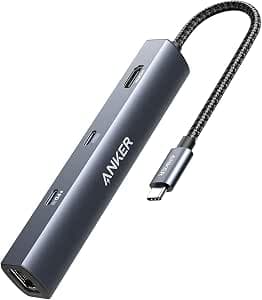
Anker 6-in-1 USB C Hub with Ethernet, USB C to 4K HDMI Multiport Adapter, 1Gbps Ethernet, 65W Power Delivery, 1xUSB-C & 2xUSB-A Ports for MacBook Air, iPad Pro, XPS, Home Office and More
Description
The Anker Advantage: Join the 65 million+ powered by our leading technology.; Massive Expansion: Equipped with a Power Delivery input port, an HDMI port, an Ethernet port, a USB-C data port, and 2 USB data ports.; Powerful Pass-Through Charging: Connect a 65W wall charger to the Power Delivery input port to provide high-speed pass-through charging to your laptop.; Media Display: The HDMI port allows you to connect to an external display in resolutions up to 4K@30Hz.; What You Get: PowerExpand 6-in-1 USB-C PD Ethernet Hub, welcome guide, our worry-free 18-month warranty, and great customer service.
Compare the trade-offs
Similar products, side by side
A random selection of analyzed products from the same category. Different products are not necessarily interchangeable.

Buffalo BSH4U125U3BK USB Hub, USB 3.0, Slim Design, 4 Ports, Bus Power, Lightweight, Compatible with Windows, Mac, PS4, PS5, Chromebook, Telework, Work from Home

Anker USB C Hub for MacBook, 7-in-2 mac Dock with 4K@60Hz HDMI, Compatible with Thunderbolt 4, 1 Type C and 2 USB A Data Ports for MacBookPro 13 Inch, MacBookAir M4/M5, and More (Not Work with Neo)

Powered USB 3.2 to Type-A, Type-C Hub, SmartDelux 10Gbps 10 Port Adapter, Individual LED Switches end High-Speed Data Transfer, Power Adapter 60W, USB Extension for Laptop, Flash Drive, PC and More
One less thing to search
Before you buy: quick questions
Can this hub run a 4K monitor at 60Hz? I’m seeing conflicting info on Reddit.
This hub supports 4K output at 30Hz, not 60Hz. If you’re planning to use it for smooth video editing or high-refresh gaming, you’ll want to look for a hub specifically advertising 4K@60Hz—like Satechi’s models, which several users recommend after switching. For standard office work or watching videos, 30Hz works fine.
I keep hearing the Ethernet port drops connection randomly. Is that a common issue?
Some users do report intermittent drops with this hub, especially during large file transfers or long video calls. Many on Reddit found that updating their laptop’s Ethernet drivers or using a powered USB-C cable can help stabilize it. If you rely on a rock-solid wired connection for work calls, you might prefer a higher-end docking station like CalDigit, which has better shielding.
Can I charge my 14-inch MacBook Pro through this hub at full speed?
The hub provides 65W Power Delivery, which is enough to charge most 14-inch MacBook Pros during light use. However, if you’re editing video or running heavy software, the laptop might still slowly drain. A few TikTok users noted their M2 MacBook Air charged perfectly, while 16-inch Pro owners saw slower charging. For full-speed charging, consider a 100W hub.
Does the extra USB-C port let me plug in an external SSD while charging my laptop?
That USB-C port is for charging only, not for data. Many buyers learned this the hard way. If you need two data USB-C ports, you’ll want a hub with dedicated data+charge ports. The two USB-A ports work fine for flash drives, mice, or keyboards while the laptop charges through the main USB-C cable.
This hub gets really hot during use. Is that normal, or should I return it?
A warm hub is normal under load, especially when you’re using Power Delivery and Ethernet at the same time. But if it feels genuinely hot to the touch after 15–20 minutes, that’s a concern some users reported. Ensure it’s on a hard, ventilated surface—not a bed or couch. If the heat bothers you or causes performance glitches, returning it is fair. Many users found the CalDigit TS4 runs much cooler for heavy workloads.
From a similar, more-reviewed product in this category: USB C to USB Hub Multiport Adapter with 4 USB-A & 3 USB-C 3.0 Port
Does this hub support charging?
No. The manufacturer's note states this device only supports data transmission, not charging.
How many devices can I connect at once?
Up to 7 devices can be connected simultaneously through a single port, including a keyboard, mouse, external HDD, and flash drives.
What data transfer speed does this hub offer?
It uses USB 3.0 technology with data transfer rates up to 5Gbps, which the listing describes as 10x faster than USB 2.0.
How long is the cable on this hub?
The hub has an integrated 1-foot cable, which the listing describes as offering a balance of reach and neatness for routing on a desk, in a laptop stand, or behind a monitor.
What operating systems and devices is this hub compatible with?
It supports Windows, macOS, and Linux, and is listed as compatible with laptops, MacBook, tablets, USB flash drives, and iMac.
Answers are limited to the manufacturer's listing and the reviews we analysed. Questions those sources cannot support are not answered here.
Transparent by design