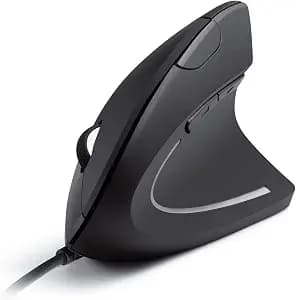
Anker USB Wired Vertical Mouse, Ergonomic Mouse for Computer and Laptops | Vertical Mouse with 5 Buttons, 1000/1600 DPI, Optical Technology, USB Corded for Computer and Laptop, Black
Description
Ergonomic Comfort: Experience the comfort of Anker's Ergonomic Mouse, designed to support a natural "handshake" wrist and arm position. This reduces strain and promotes smoother movement, making it a smart choice for extended computer use.; Enhanced Sensitivity: Experience precision like never before with our 1000/1600 DPI Resolution Optical Tracking Technology. This wired ergonomic mouse offers superior sensitivity compared to standard optical mice, ensuring smooth and precise tracking on a variety of surfaces to boost your productivity and computing experience.; Effortless Navigation: Navigate webpages with ease using the added next/previous buttons. This ergonomic wired mouse is not only ideal for internet surfers but also for gamers and professionals who spend long hours on the computer.; Compact and Lightweight: The Anker Vertical Ergonomic Optical Mouse, with its 1.5m/4.9ft USB cable and dimensions of 120*62.8*74.8 mm, offers a lightweight design of just 5.3 oz, ensuring a comfortable and convenient user experience.; Customer Value: Our package includes 1 Anker Vertical Ergonomic Optical Wired Mouse (with 4.9 ft cable), and a detailed instruction manual. 18-month warranty .
Compare the trade-offs
Similar products, side by side
A random selection of analyzed products from the same category. Different products are not necessarily interchangeable.

TECKNET Ergonomic Wireless Vertical Mouse, 4800 DPI with 5 Adjustable Levels, 2.4GHz Optical, 6 Buttons for Laptop, Desktop, PC, MacBook - Black

ProtoArc EM01 NL Wireless Trackball Mouse, Rechargeable Thumb Control, Gray
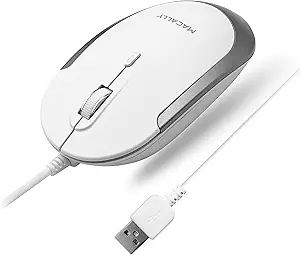
Macally Silent Wired Mouse - Slim & Compact USB Mouse for Apple Mac or Windows PC Laptop/Desktop - Designed with Optical Sensor & DPI Switch - Simple & Comfortable Wired Computer Mouse (White)
One less thing to search
Before you buy: quick questions
Will this mouse work with my MacBook, Windows laptop, or Chromebook right out of the box?
Yes—this is a true plug-and-play device. Simply connect the USB cord to any available port, and it will work immediately on Windows, macOS, Linux, and ChromeOS. There’s no software, driver, or bloatware required, which is a big plus for people who just want a working mouse without setup headaches.
I have larger hands. Is this mouse going to feel too small or uncomfortable?
Good question. While the vertical design helps reduce wrist strain for many users, people with larger hands have noted that the mouse can feel a bit cramped, especially during extended sessions. If your palm is larger than average, you might find your fingers hanging slightly off the edge. For small-to-medium hands, it’s generally very comfortable. If you’re on the fence, consider measuring your hand length before purchasing—or buy from a retailer with a flexible return policy just in case.
How long is the USB cable, and will it reach a desktop tower under my desk?
The cable is approximately 5 feet (1.5 meters) long. This is usually fine for laptops or desktops where the tower sits on or near the desk, but many Reddit users have mentioned it’s too short for floor-standing towers, especially if your setup is spread out. If you need extra length, a simple USB extension cable solves the problem for less than five dollars.
Can I use this mouse for gaming, or is it strictly for office work?
This mouse is designed with office productivity in mind, not gaming. It only offers two DPI settings (1000 and 1600), which is fine for browsing, spreadsheets, and document work, but gamers often complain about the lack of customizable sensitivity and the low click response rate. If you are a casual gamer, it’ll work in a pinch—but if you play fast-paced titles, you’ll want a dedicated gaming mouse instead.
I have mild wrist pain. Will this actually help, or is it just a marketing gimmick?
Many TikTok and YouTube reviewers with mild carpal tunnel or repetitive strain discomfort report noticeable relief after switching to a vertical grip like this one. However, it’s not a medical device, and it won’t “cure” chronic wrist conditions. It encourages a more natural handshake position, which reduces pressure on the median nerve during long typing and browsing sessions. For mild discomfort, it’s a low-cost, effective adjustment—but for serious pain, you should consult a doctor and consider a fully adjustable ergonomic setup.
From a similar, more-reviewed product in this category: TECKNET Wireless Mouse, BT 5.0/2.4G, Rechargeable 6-DPI Silent, Grey
How long does the battery last on a full charge?
The listing states a full charge takes 1.5 to 2 hours and delivers 3 months of use at 2 hours per day. Reviewers back this up, with one reporting no charge needed after a month and a half of roughly 9 hours daily use, and another saying one charge lasts for months.
Are the mouse clicks actually quiet?
Yes. The manufacturer describes silent technology for noiseless clicks, and reviewers consistently call the left and right clicks "super silent," "quiet but satisfying," and a good fit for offices and quiet environments.
How do I connect it, and can I use it with more than one device?
It supports both a USB-A dongle and Bluetooth (3.0/5.0), and you can connect two devices at once and switch between them with a slide switch. Reviewers confirm both the USB and Bluetooth connections work well and are easy to set up, and the dongle is stored in a slot underneath the mouse.
Is this mouse suitable for small hands?
The listing notes it is better suited for small to medium-sized hands, though larger-handed users who prefer a smaller mouse may still like it. A reviewer who wears a small women's glove said it fits perfectly, and another described it as somewhat small but still comfortable in a man's hand.
Does it work with macOS?
The listing says it is compatible with Windows, macOS, Chrome OS, and Linux, but notes that the side buttons are not compatible with macOS.
Answers are limited to the manufacturer's listing and the reviews we analysed. Questions those sources cannot support are not answered here.
Transparent by design