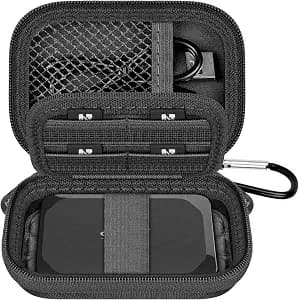
ANKHOH Compact Case for Crucial X9 Pro/ X10 Pro/ X9 1TB 2TB 4TB SSD, Hard EVA Shell Organizer with 8 SD Card Slots & Cable Pocket for Outdoor Photography Gear-Black (Case Only)
Description
Carrying Case for Crucial X10/ X9 Pro 8TB/ 6TB/ 4TB Portable SSD, 2TB/ 1TB External Solid State Drive Hard Storage Holder Bag with Mesh Pocket Fits for USB-C Cable (Box Only)
One less thing to search
Before you buy: quick questions
Is this case truly "compact," and will my Crucial X9 Pro fit snugly inside?
"Compact" here refers to its overall footprint compared to larger hard cases. It's designed to hold the drive, cables, and cards together neatly. The interior is not form-fitting; your X9 Pro will fit securely in the main compartment, but if you only carry the drive alone, it may shift slightly. Many users recommend using the SD card slots or the cable pocket to fill the space for a snugger fit.
How protective is the "Hard EVA Shell" in real-world use?
The shell provides excellent protection against scratches, dust, and minor bumps during transport in your bag—perfect for organization and daily handling. However, as noted in several user reviews, it is not a substitute for a crush-proof, waterproof hard case like a Pelican. It's an organizer with stiff walls, not designed for heavy impacts or submersion.
I've seen comments about the zipper and strap quality. Are they durable?
The zipper and strap are functional for regular use. The strap is designed for lightweight carrying, not for heavy loads. For extended durability, some avid users suggest reinforcing the strap's attachment points if you plan to carry it heavily. The zipper is standard for this case category; we recommend avoiding forcing it when overstuffed.
This seems perfect for my photography gear. What's the best way to use it?
You're right on target! This case is highly praised by photographers for organization. The ideal use is to store your portable SSD, utilize all 8 SD card slots for your shoots, and use the mesh cable pocket for a reader, USB-C cable, or other small accessories. It's designed to be a self-contained media management kit inside your larger camera backpack.
What does "Case Only" mean, and what is your return policy if it doesn't suit my needs?
"Case Only" means the purchase includes just the organizer case itself—no SSD, SD cards, or cables are included. Please ensure your expectations align. If the case isn't right for you, we offer a standard 30-day return policy for items in new, unused condition. Check our "Returns & Refunds" page for full details and to initiate a process.
From a similar, more-reviewed product in this category: CENMATE Aluminum 4 Bay Hard Drive RAID Enclosure with Cooling Fan for 2.5/3.5" SATA HDD/SSD with USB A/C 3.0+eSATA Cable, 3.5 Hard Drive Reader Supports 80TB Capacity, 8 RAID Modes, DAS(NO NAS)
How many drives can this enclosure hold and what is the maximum total capacity?
It supports up to 4 drives (2.5/3.5" HDD or SSD) with a maximum capacity of 80TB, which is 20TB per drive.
Is the fan noisy?
The manufacturer states fan noise is around 40-50 decibels and does not recommend it if you are very sensitive to noise, though some reviewers found it quiet enough for a home theater room while others noted it is a little loud.
How do I switch between RAID modes?
Disconnect the power, use a screwdriver to toggle the paddle to the corresponding mode, press and hold the reset button, turn on the power, and hold reset for ten seconds; note that when replacing RAID you must go back to NORMAL first, and designing RAID may result in data loss.
Is it easy to set up and is it compatible with my drives?
Reviewers report it is easy to set up and plug and play, with one noting it worked immediately after moving drives from another enclosure and setting the dip switches to RAID 10, and another confirming compatibility with shucked 20TB WD Easystore drives.
Does the eSATA port support hot-swapping or a SATA-to-eSATA adapter?
No, the eSATA port does not support a computer's SATA-to-eSATA adapter and hot-swapping is not supported; the computer's eSATA port must support RAID functionality to access multiple drive bays, otherwise only one bay can be accessed.
Answers are limited to the manufacturer's listing and the reviews we analysed. Questions those sources cannot support are not answered here.
Transparent by design