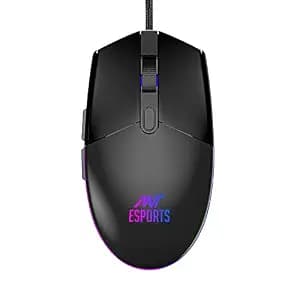
Ant Esports GM60 Optical Gaming Mouse Wired, 6 Programmable Buttons, 3200 DPI Adjustable, Optical Gamer Gaming Mice with Multicolour LED Lights - Black
Description
Adjustable four-level resolution by CPI key.; Support full color backlight LED which breathes with 7 colors in cyclic change and monochromatic backlight application; 6 Button Elegant Look & Durable Switches.; GM60 Comes with braided Cable, Cable Adopts the durable gold plated USB for more stability & Anti-Oxidation.; Excellent ergonomic contour & skin-friendly design - more comfortable contour design to keep your hand away from fatigue; unique skin-friendly material to ensure more comfortable hand-feeling, hope you enjoy every movement by using Ant Esports GM50 Gaming mice.; Support Win XP/Win2003 /Win2008/Vista/Win7/Win8/Win10/Linux system, MAC OS & Android System.; Compatible with PC | Mac | Xbox | PlayStation
One less thing to search
Before you buy: quick questions
Is the Ant Esports GM60 suitable for someone with large hands, or is it too small?
Based on numerous user reviews, the GM60 is generally considered a medium-sized mouse. It's praised for its comfortable, ergonomic shape by most users, but those with very large hands (especially palm grippers) have mentioned it can feel a bit cramped. If you have particularly large hands, you might want to consider a larger model.
How durable is this mouse? I've seen comments about the scroll wheel failing.
The GM60 offers excellent value and performance for its price. However, a common point of feedback from long-term users is that the scroll wheel can become less responsive after several months of heavy use. For casual to moderate gaming, it holds up well, but if you're a hardcore gester who clicks the scroll wheel constantly, this is something to be aware of. Many TikTok and Reddit users suggest handling the cable gently as well, as it's another area where careful use extends the mouse's life.
Can I turn off the RGB lights on this mouse, or are they always on?
The multicolour LED lights on the GM60 cycle through a default spectrum and cannot be turned off via a physical button on the mouse itself. To disable the lights, you would need to use the downloadable software (available on the Ant Esports website) to set them to a static black/off setting, or simply unplug the mouse when not in use.
What kind of gamer is this mouse best suited for?
The GM60 is a fantastic entry-level option for casual gamers, students on a budget, and MOBA/RTS players who appreciate its precise sensor, comfortable design, and programmable buttons. It's also a popular choice for everyday productivity. While it performs well, hardcore FPS gamers who demand ultra-durable components for intense, daily sessions might prefer investing in a mouse from a brand with a longer-established track record for build quality.
Is the software necessary, and is it easy to use?
The software is *not* necessary for basic functionality. You can adjust DPI using the button on the mouse and the RGB lights will cycle automatically. The software is required if you want to reprogram the 6 buttons, set macro commands, or customize the RGB lighting patterns. Be aware that user reviews frequently mention the software can be buggy or difficult to install. A common piece of advice is to download the latest version directly from the official Ant Esports website for the best chance of a smooth experience.
Answers are limited to the manufacturer's listing and the reviews we analysed. Questions those sources cannot support are not answered here.
Transparent by design