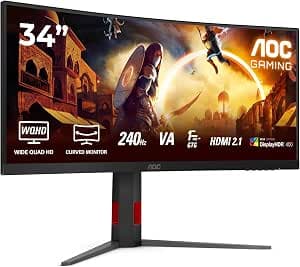
AOC CU34G4Z Gaming Monitor 34" WQHD Curved, 240Hz, Fast VA, 1ms GtG, HDR400, FreeSync Prem., Height Adjustable (3440x1440, 2X HDMI 2.1, 1x DP 1.4, USB-Hub) Black/Red
Description
Diseño de pantalla curva para una experiencia más inmersiva; Frecuencias de actualización de 240 Hz para imágenes brillantes y ultrasuaves; HDR400: alto rango dinámico para color y contraste mejorados, brindando una experiencia de visualización más vívida.; AMD FreeSync Premium; Juego fluido, sin desgarros y sin tartamudeos; Respuesta rápida de 0,3 ms (MPRT) para una imagen nítida y un juego fluido
One less thing to search
Before you buy: quick questions
Is the curve too aggressive for productivity tasks like spreadsheets or coding?
Not at all. The 1500R curve is designed to match the natural sightline of your eyes, reducing neck strain and making it easier to see the entire screen without moving your head. Many hybrid users on Reddit have praised how the curve actually enhances productivity by bringing the edges of the ultrawide display comfortably into view, perfect for having multiple windows or long lines of code open.
My graphics card is an RTX 3060/4060. Can it actually run games at this monitor's high resolution and refresh rate?
It depends on the game and your settings. For competitive esports titles like *Valorant* or *CS2*, these cards can often achieve very high frame rates at 3440x1440. For newer, graphically demanding AAA games, you may need to adjust settings from "Ultra" to "High" to get closer to that 240Hz sweet spot. The monitor's AMD FreeSync Premium support (which also works with NVIDIA GPUs) will ensure smooth gameplay even if your FPS fluctuates.
I've heard about backlight bleed and dead pixels. What's the warranty/return policy if I receive a faulty unit?
AOC offers a standard limited warranty that covers dead pixels and manufacturing defects. We recommend inspecting your monitor upon delivery. If you encounter any issues like significant backlight bleed in dark scenes or stuck pixels, please contact our customer support or your retailer immediately to initiate a return or replacement. Many users on forums advise purchasing from retailers with a clear and hassle-free return policy for the first 30 days to ensure you're happy with your specific panel.
How does the HDR400 performance actually look? Is it worth using?
It's important to have realistic expectations. As noted in many YouTube reviews, HDR400 is an entry-level HDR certification. It will make supported games and movies brighter and can improve contrast somewhat, but it lacks the local dimming zones for truly deep blacks and spectacular highlights found in more expensive HDR600 or HDR1000 monitors. Think of it as a nice bonus feature rather than the primary reason to buy this display.
The stand looks big in pictures. Is it sturdy, and can I mount it?
The included stand is fully adjustable (height, tilt, swivel) and gets the job done, but some users find it has a slight wobble and a large footprint. If desk space is tight or you prefer absolute stability, you'll be happy to know the monitor has a standard 100x100mm VESA mount pattern. Switching to a monitor arm is a very popular upgrade, as mentioned frequently in setup tours on TikTok and Reddit, giving you a cleaner desk and more flexibility.
Answers are limited to the manufacturer's listing and the reviews we analysed. Questions those sources cannot support are not answered here.
Transparent by design