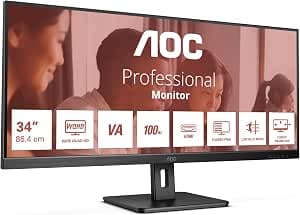
AOC U34E2M Monitor 34 Inch UWQHD, 100Hz, VA, 4 ms GtG, Adaptive Sync. (3440x1440, 2x HDMI 2.0, 1x DP 1.2), Black
Description
100Hz refresh rates for bright, ultra-smooth images; Reduces blue light emissions to decrease eye fatigue and improve comfort.; Sync the screen refresh rate with the graphics card to eliminate screen tearing and stuttering.; Reduces screen flicker to minimize eyestrain during prolonged use.
One less thing to search
Before you buy: quick questions
Is this monitor good for fast-paced competitive gaming, or is it better for productivity and casual use?
This monitor is fantastic for productivity, multitasking, and casual gaming thanks to its immersive ultrawide screen and sharp UWQHD resolution. However, competitive esports players seeking the highest refresh rates and fastest pixel response might find its 100Hz and 4ms VA panel limiting. For work, media, and story-driven games, it's an excellent choice. For serious competitive play, a dedicated high-refresh-rate monitor is often recommended.
How stable and adjustable is the included stand? I've seen comments about wobbliness.
The included stand provides basic tilt adjustment but does not offer height, swivel, or pivot functions. Some users note it can be slightly wobbily on desks, especially during heavy typing. If ergonomic flexibility or maximum stability is important to you, we recommend using the standard 100x100mm VESA mount (compatible with most monitor arms) for a rock-solid and customizable setup.
I'm concerned about screen issues like backlight bleed or dead pixels. What's your quality control like?
We conduct stringent quality checks, and the vast majority of our customers receive flawless panels. As with any monitor, a small percentage may experience minor uniformity variations (like corner glow) or pixel anomalies. This is common across all monitor brands. We fully support our products with a comprehensive warranty. If you receive a unit with a defective pixel or unacceptable backlight bleed, our return and replacement process is straightforward.
Can my laptop run this 3440x1440 resolution, and what cable do I need for the full 100Hz?
You'll need a laptop with a graphics output (HDMI or DisplayPort) that supports 3440x1440 at 100Hz. Most modern laptops with dedicated graphics can handle it, but older or budget models with integrated graphics may struggle. To unlock the full 100Hz refresh rate, you must use the DisplayPort (DP) cable included in the box. The HDMI 2.0 ports are also great but may limit you to 100Hz at a slightly lower color range depending on your system.
Who is this monitor the best fit for, and who might want to look at an alternative?
This monitor is a perfect fit for professionals, students, and casual users who want an immersive, high-resolution screen for work, multitasking, and entertainment without a huge investment. It's the ultimate value gateway to ultrawide productivity. You might consider an alternative if your primary focus is competitive esports gaming (look for 144Hz+), if you require extensive ergonomic adjustments without a separate arm, or if you are particularly sensitive to potential panel uniformity issues common in this price segment.
Answers are limited to the manufacturer's listing and the reviews we analysed. Questions those sources cannot support are not answered here.
Transparent by design