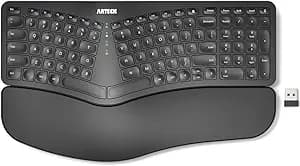
Arteck Split Ergonomic Keyboard with Cushioned Wrist and Palm Rest, 2.4G USB Wireless Comfortable Natural Ergonomic Split Keyboard, for Windows Computer Desktop Laptop
Description
Split Design Ergonomic: Split design helps to position wrists and forearms in a natural, relaxed position.; Wrist Rest: Soft cushioned wrist rest helps you to rest your wrist and forearm while typing and makes work easier and more comfortable.; Easy Setup: Simply insert the nano USB receiver (stored at the back of the keyboard) into your computer and use the keyboard instantly.; 6-Month Battery Life: Rechargeable lithium battery with an industry-high capacity lasts for 6 months with single charge (based on 2 hours non-stop use per day).; Package contents: Arteck Split Ergonomic Keyboard, nano USB receiver (stored at the back of the keyboard), USB-C charging cable, welcome guide, our 24-month warranty and friendly customer service.
One less thing to search
Before you buy: quick questions
Is the split angle adjustable, or is it fixed?
The split angle is fixed at a slight natural curve—think of it as a preset that works for average shoulder width. If you need adjustable tenting (tilting each half independently), you might prefer models like the Logitech Ergo K860. Many users mention this during setup, so if you have broad shoulders, check the size diagram before buying.
Will the wrist rest hold up, or does it start peeling?
The cushioned palm rest uses a leatherette material that feels soft at first. Some users report flaking after a few months of heavy use, especially in humid environments. Cleaning with a damp cloth helps, but if you’re a daily power typist, consider a silicone sleeve or buying a separate pad that’s replaceable.
Can I use this keyboard wirelessly with a MacBook or Chromebook?
Yes, it works with Windows, macOS, and Chrome OS via the included 2.4 GHz USB dongle. No Bluetooth here—just plug the receiver into any USB-A port. Mac users note the modifier keys (Alt/Windows) are labeled for Windows, but you can remap them in system settings. For Bluetooth, check out models like the MOFII or Logitech K780.
Does the dongle disconnect often, or is the connection stable?
The 2.4 GHz connection is generally rock-solid for typing and office work. A small number of users report dropouts when using it farther than 4–5 feet from the receiver, or if there’s a USB 3.0 device plugged right next to it. Keep the dongle in a front port away from metal objects, and you should be fine for everyday use.
Is this keyboard good for gaming or fast typing?
It’s designed for comfortable office typing, not gaming. The keys are scissor-switch style (quiet and low travel) with no backlight, no anti-ghosting, and no programmable keys. It’s perfect for reports, emails, and spreadsheets, but if you need mechanical switches or customizable RGB, you’ll want a dedicated gaming keyboard. For casual typing with wrist pain relief, it’s a solid budget-friendly choice.
Answers are limited to the manufacturer's listing and the reviews we analysed. Questions those sources cannot support are not answered here.
Transparent by design