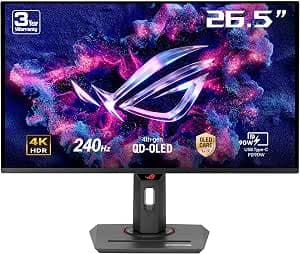
ASUS ROG Strix XG27UCDMG Gaming Monitor, 26.5" 4K Ultra HD QD-OLED (3840 x 2160), 0.03ms (GTG), 240Hz, HDMI, USB-C and DisplayPort, G-SYNC Compatible, Display Widget Center, Black
Description
26.5" Gaming Monitor with 4K UHD QD-OLED resolution (3840 x 2160) and features a frameless design with a wide 178° viewing angle; SmoothMotion technology with up to 240Hz refresh rate and 0.03ms GTG eliminates tracking and ensures seamless video playback, suitable for long gaming sessions; Extensive connectivity includes USB-C (for data transmission, video and laptop charging all with a single cable), HDMI 2.1, DisplayPort 1.4 and USB Hub; ASUS OLED Care Pro technology includes Neo proximity sensor that automatically darkens the screen when idle, reducing the risk of pixel burn; ROG Strix monitors are equipped with Flicker-free and Low Blue Light technologies, ensuring a comfortable viewing experience even after long hours of use
One less thing to search
Before you buy: quick questions
I keep hearing about OLED burn-in. Is this monitor safe for daily gaming and desktop use, and what's the warranty?
ASUS includes a 3-year warranty that specifically covers OLED burn-in, which is a major point of confidence for buyers. To minimize risk, the monitor has built-in pixel-cleaning routines (like pixel refresh and pixel shifting) that run automatically. Many users on Reddit recommend using dark mode, hiding taskbars, and varying your content for ultimate peace of mind, but the warranty is your safety net.
How is the text clarity for non-gaming tasks? I plan to use this for both work and gaming.
This is the most common consideration for hybrid users. Due to the unique QD-OLED subpixel layout, some users notice slight colored fringing on very small text, especially in desktop applications. Most find it manageable or minor after a short adjustment period, and tweaking Windows ClearType can help significantly. If your primary use is text-heavy productivity, a high-quality IPS panel might be less distracting.
Is the anti-glare coating on the screen noticeable? I've heard it can make the image look grainy.
The monitor uses a matte coating to reduce reflections. While effective for that purpose, some enthusiasts with a keen eye, particularly on solid bright colors like white or sky blue, report a subtle "sparkly" or textured appearance. If you're coming from a glossy display or prioritize absolute pixel clarity, it's something to be aware of. However, in dynamic gaming content, the vast majority of users find the image stunning and don't notice it.
How does this 27" 4K QD-OLED compare to a 32" model or using a larger OLED TV as a monitor?
It's a trade-off! The 27" size offers incredibly high pixel density for sharpness, but some users feel 32" is more immersive for 4K. Compared to using a 42" or 48" OLED TV, this monitor is designed for desks: it has DisplayPort, a higher 240Hz refresh rate, and dedicated gaming features. The main advantage of a TV is often a glossy screen and larger size for a cinematic feel, but it may lack peak gaming-focused specs.
Is the 240Hz refresh rate and 4K resolution worth it for my setup, and what kind of PC do I need to drive it?
The 4K 240Hz combo is fantastic for fast-paced, competitive games and provides an incredibly smooth experience. To fully utilize it, you'll need a powerful modern GPU (like an NVIDIA RTX 4080/4090 or AMD 7900 XTX) for the latest AAA titles. For esports titles (like CS2, Valorant) or older games, more modest hardware can hit high frame rates. Many reviewers on YouTube highlight that even if your PC can't always hit 240 FPS in 4K, the exceptional motion clarity and future-proofing are major benefits.
Answers are limited to the manufacturer's listing and the reviews we analysed. Questions those sources cannot support are not answered here.
Transparent by design