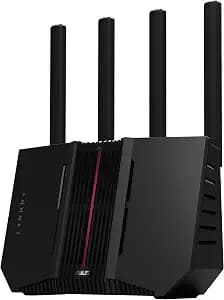
ASUS RT-BE92U BE9700 Tri-Band WiFi 7 Router, Supports New 320MHz Bandwidth & 4096-QAM, MLO, AI WAN Detection, AiMesh Support, Subscription-Free Network Security & Comprehensive VPN Features
Description
Elevate your smart home with blazing-fast tri-band WiFi 7 speeds of up to 9700 Mbps, boosted range with ASUS RF and AI-boosted Smart AiMesh technology and up to 20G of wired capacity. The ASUS RT-BE92U unleashes superior 6 GHz WiFi and future-proof 10G networking. With the new ASUS Network Security suite and advanced features such as the IoT Network, the RT-BE92U safeguards your network end-to-end, 24/7.
Compare the trade-offs
Similar products, side by side
A random selection of analyzed products from the same category. Different products are not necessarily interchangeable.

Netgear RAX10 Wi-Fi 6 IEEE 802.11ax Ethernet Wireless Router

ASUS RT-BE82U Dual-Band WiFi 7 (802.11be) Smart AiMesh Extendable Router, 6500 Mbps, Five 2.5GbE Ports, 4096-QAM, Up to 3 SSIDs for IoT Devices, Parental Controls & VPNs, Advanced Network Security

ASUS RT-BE58U WiFi 7 BE3600 AiMesh Extendable Router, 4K-QAM, MLO, AI Detection 2.5G Port, Four 1G Ports, Commercial-Grade Network Security, Parental Control, IoT Network, Kid’s Network, VPN Network
One less thing to search
Before you buy: quick questions
क्या यह राउटर मेरे अपार्टमेंट या घर के लिए, जहाँ स्टैंडर्ड इंटरनेट प्लान (1Gbps से कम) है, ज़रूरत से ज़्यादा है?
Reddit और समीक्षाओं में कई उपयोगकर्ताओं ने ध्यान दिया है कि यदि आका मुख्य लक्ष्य औसत आकार के घर के लिए सामान्य विश्वसनीयता और कवरेज में सुधार करना है, तो एक मजबूत WiFi 6 या 6E राउटर बेहतर मूल्य प्रदान कर सकता है। RT-BE92U वास्तव में तब चमकता है जब आपके पास मल्टी-गीगाबिट (2Gbps+) इंटरनेट प्लान और उस बैंडविड्थ को अधिकतम करने के लिए कई संगत WiFi 7 डिवाइस होते हैं। सब-गीग स्पीड के लिए, प्रदर्शन में छलांग ज्यादातर उपयोगकर्ताओं के लिए प्रीमियम कीमत को उचित नहीं ठहरा सकती है।
मेरे पास नया Samsung Galaxy या iPhone है। क्या मुझे इसके साथ वास्तव में WiFi 7 की गति मिलेगी?
यह खरीद से पहले एक बहुत ही सामान्य प्रश्न है। संगतता आपके विशिष्ट डिवाइस के चिपसेट और सॉफ़्टवेयर समर्थन पर निर्भर करती है। जबकि कई फ्लैगशिप फ़ोन 6GHz बैंड (WiFi 6E) का समर्थन करते हैं, MLO जैसी पूर्ण WiFi 7 सुविधाओं के लिए विशिष्ट हार्डवेयर की आवश्यकता होती है। हम अनुशंसा करते हैं कि आप अपने फ़ोन के तकनीकी विशिष्टताओं में "WiFi 7" या "802.11be" समर्थन की जाँच करें। कुछ शुरुआती समीक्षकों ने पाया कि उनके डिवाइस 6GHz बैंड पर कनेक्ट थे लेकिन सभी नई सुविधाओं का उपयोग नहीं करते थे।
जो कोई नेटवर्किंग विशेषज्ञ नहीं है, उसके लिए सेटअप और प्रबंधन करना कितना कठिन है?
ASUS राउटर ऐप के माध्यम से प्रारंभिक बुनियादी सेटअप लगातार त्वरित और आसान के रूप में प्रशंसित किया जाता है। हालांकि, राउटर उन्नत सेटिंग्स (जैसे एमएलओ, वीपीएन कॉन्फ़िगरेशन और एआई सुविधाएँ) की एक विशाल गहराई प्रदान करता है। जैसा कि कई YouTube ट्यूटोरियल में उल्लेख किया गया है, यह भारी लग सकता है। अच्छी खबर यह है कि आप इसके अधिकांश हिस्से को सुरक्षित रूप से अनदेखा कर सकते हैं और फिर भी एक शक्तिशाली, सुरक्षित नेटवर्क रख सकते हैं। "सदस्यता-मुक्त नेटवर्क सुरक्षा" और बुनियादी पेरेंटल नियंत्रण उपयोगकर्ता के अनुकूल हैं।
मैंने ओवरहीटिंग और बग्स के बारे में पढ़ा है। क्या ये समस्याएं हल हो गई हैं?
शुरुआती यूनिट्स में कुछ फर्मवेयर स्थिरता संबंधी समस्याएं थीं, जिन्हें ASUS ने अपडेट के माध्यम से हल कर दिया है। सेटअप के तुरंत बाद नवीनतम फर्मवेयर में अपडेट करना एक अच्छी आदत है। गर्मी के संबंध में, राउटर में एक शक्तिशाली आंतरिक डिज़ाइन है जो वास्तव में गर्म होता है, जैसा कि कई तकनीकी समीक्षाओं में बताया गया है। यह अपनी श्रेणी के लिए सामान्य है, लेकिन इसे एक अच्छी तरह हवादार जगह पर रखना आवश्यक है—बंद कैबिनेट के अंदर नहीं।
यह एक अच्छे WiFi 6E राउटर पर क्या मुख्य लाभ देता है, और क्या यह AiMesh संगत है?
मुख्य लाभ हैं उच्च संभावित गति (विशेष रूप से इसके 10G पोर्ट वाले वायर्ड उपकरणों के लिए) और लैपटॉप और एक्सेस पॉइंट जैसे WiFi 7 गैजेट्स के लिए भविष्य की तैयारी। वर्तमान फोन और टैबलेट से भरे घर में, दैनिक अंतर सूक्ष्म हो सकता है। और हाँ, AiMesh समर्थन उत्कृष्ट है! यह कई पुराने ASUS AiMesh-संगत राउटर के साथ निर्बाध रूप से काम करता है, जिससे आप एक मेश सिस्टम बना या विस्तारित कर सकते हैं, जो ASUS इकोसिस्टम में निवेशित उपयोगकर्ताओं के लिए एक बड़ा प्लस है।
From a similar, more-reviewed product in this category: TP-Link Dual-Band AX3000 Wi-Fi 6 Wireless Gigabit Internet Router for Home
How easy is this router to set up?
Multiple reviewers describe setup as easy, including one who upgraded from a TP-Link Archer C7 and another who set it up for travel use. The listing also includes a Quick Installation Guide and an RJ45 Ethernet cable in the box.
What kind of Wi-Fi coverage and signal strength can I expect?
Reviewers report strong, stable coverage throughout the home, with one noting the 5 GHz signal strength seemed better than their previous router. The listing cites 4 high-gain external antennas and Beamforming technology to extend reliable Wi-Fi.
Does it support Wi-Fi 6 and fast speeds?
The listing states next-gen Gigabit Wi-Fi 6 speeds of 2402 Mbps on 5 GHz and 574 Mbps on 2.4 GHz, and reviewers say Wi-Fi 6 makes a noticeable difference with faster speeds and smoother streaming. One reviewer specifically praised its speed and processing power compared to other routers.
Can I combine the 2.4 GHz and 5 GHz bands under one network name?
Yes, reviewers mention "Smart Connect" allows combining the 2.4G and 5G bands under a single SSID, with the router deciding which to use per client. One reviewer confirmed selecting the smart option during setup.
Does it work with my internet service provider?
The listing states it works with all internet service providers such as AT&T, Verizon, Xfinity, Spectrum, RCN, Cox, CenturyLink, and Frontier, though a modem is required for most ISPs.
Answers are limited to the manufacturer's listing and the reviews we analysed. Questions those sources cannot support are not answered here.
Transparent by design