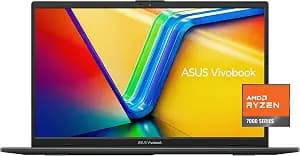
ASUS Vivobook Go 15.6” FHD Slim Laptop, AMD Ryzen 3 7320U Quad Core Processor, 8GB DDR5 RAM, 128GB SSD, Windows 11 Home, Fast Charging, Webcam Sheild, Military Grade Durability, Black, E1504FA-AS33
Description
It’s light. It’s compact. It’s the ASUS Vivobook Go 15, and it’s designed to help you stay productive and keep you entertained wherever you go. Get more out of your day with a 180° lay-flat hinge, camera shutter and thoughtful design features.
Compare the trade-offs
Similar products, side by side
A random selection of analyzed products from the same category. Different products are not necessarily interchangeable.

Lenovo V15 Laptop, 15.6" FHD Display, AMD Ryzen 5 5500U Hexa-core Processor (Beat Intel i7-1065G7), 16GB RAM, 512GB SSD, HDMI, RJ45, Numeric Keypad, Wi-Fi, Windows 11 Pro, Black

HP 15.6" Slim Laptop 2027, Office 365+Intel CPU, Copilot AI, 128GB UFS

Microsoft Surface Laptop (2026), 13.8-inch Premium Performance Laptop, Snapdragon X2 Elite Processor, Touchscreen Display, 16GB RAM, 512GB SSD Storage, Windows 11 Copilot+ PC Built for AI, Black
One less thing to search
Before you buy: quick questions
Is the 128GB SSD enough storage, or will I need to upgrade it immediately?
This depends on your use. For students and casual users who primarily stream, browse, and use web apps, 128GB is manageable, especially with cloud storage or an external drive. However, many Reddit reviewers and TikTok users suggest planning for an upgrade if you intend to store large media libraries, games, or professional software locally. The good news is the SSD is user-upgradeable.
How durable is it really? The "Military Grade" claim sounds impressive.
The "Military Grade" certification (MIL-STD-810H) means the laptop has passed a series of stress tests for things like vibration, humidity, and extreme temperatures. In practical terms, users report it holds up very well to the bumps and knocks of daily life in a backpack. The chassis is lightweight, so some note a slight flex, but overall feedback confirms it's a robust machine for its price point, not a fragile one.
Who is this laptop best suited for, and who should look elsewhere?
The Vivobook Go 15 is a fantastic fit for students, remote workers, and families needing a reliable computer for everyday tasks: online classes, document editing, video calls, and streaming. It's praised for its portability and value. We'd suggest considering a different model if your primary needs are hardcore gaming, 4K video editing, or you require an exceptionally bright, color-accurate display for design work.
What's the real-world battery life like, and how useful is the fast charging?
Based on user reports, you can expect around 6-8 hours of mixed use (web browsing, document work). Streaming video will reduce this. The fast-charging feature is consistently highlighted as a major benefit—many users mention it can charge to 60% in just 49 minutes, which is perfect for quickly powering up between classes or meetings.
Is it easy to set up, and is there a lot of bloatware to remove?
The initial Windows 11 setup is straightforward. Like many new Windows laptops, it does come with some pre-installed trial software and ASUS apps. Several tech-savvy YouTube reviewers recommend taking 15-20 minutes to uninstall programs you don't need. This is a common practice for new PCs and helps ensure optimal performance from the start.
From a similar, more-reviewed product in this category: 15.6 Inch Laptop Computer, N4020, 4GB DDR4 RAM, 128GB eMMC,with Windows 11
Is this laptop fast enough for school, work, and everyday tasks?
For document editing, email, web browsing, online classes, and video calls, yes — the Intel Celeron N4020 and Windows 11 handle daily essentials smoothly. Just keep expectations realistic: many reviewers note it's happiest with a handful of tabs or apps open at once. If you routinely run heavy multitasking, video editing, or gaming, you'll want a machine with more RAM and an SSD.
Can I upgrade the RAM or storage later?
The 4GB LPDDR4 RAM is soldered and not user-upgradeable, so plan around it from day one. Storage is more flexible — the 128GB eMMC fills up quickly once Windows and updates are installed, but the built-in TF card slot lets you add up to 1TB for movies, photos, and files. A common tip from owners: keep the internal drive for the OS and apps, and use a microSD card for media.
Will it handle light gaming like Roblox or Minecraft?
It can run very light titles like Roblox or Minecraft on low settings, but this is fundamentally a productivity laptop, not a gaming machine. Several YouTube reviewers specifically warn against buying it for Fortnite or other demanding games. If gaming is a priority, look for a model with a dedicated GPU and at least 8GB RAM.
How portable and durable is it, and what about battery life?
At roughly 3.17 lbs and 0.76" thin, it's easy to carry between classes or commutes, and the fanless design keeps it completely silent. The 38Wh battery with 45W USB-C fast charging typically delivers around 6–7 hours of mixed use — enough for a school day, though heavy users should pack the charger. Build quality is solid for the price, but treat the hinge and lid with care, as some owners note it's plasticky.
Does it come with Windows 11 and Office, and what if it's not right for me?
Yes — it ships with Windows 11 Home preinstalled and activated, and the listing highlights Office 365 inclusion, which parents and students frequently praise as a money-saver. It also includes a 1MP HD webcam, dual full-featured USB-C ports for charging and dual-monitor output, and two USB 3.2 ports for peripherals. If it turns out slower than you need, check the seller's return window before buying and confirm the refund policy — many happy buyers are basic users, so match the machine to your workload first.
Answers are limited to the manufacturer's listing and the reviews we analysed. Questions those sources cannot support are not answered here.
Transparent by design