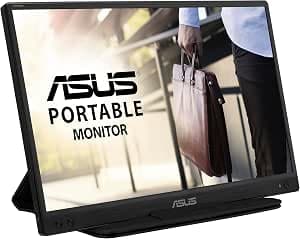
ASUS Zenscreen MB166C - 15.6 Inch FHD Laptop Screen - Teleworking or Gaming - Power and Display via USB Type-C - IPS Panel - 1920 x 1080 - Filcker Free/Light Filters - Blue - for Notebook
Description
ASUS Zenscreen MB166C - 15.6 Inch FHD Laptop Screen - Teleworking or Gaming - Power and Display via USB Type-C - IPS Panel - 1920 x 1080 - Filcker Free/Blue Light Filters - For Notebook
One less thing to search
Before you buy: quick questions
Will the Zenscreen MB166C work with my specific laptop?
It works seamlessly with laptops that have a full-featured USB-C port (supporting DisplayPort Alt Mode and power delivery). This includes most modern MacBooks, many Windows ultrabooks, and some tablets. However, as noted in several user reviews, some laptops have USB-C ports for data/charging only. We recommend checking your laptop's manual or specifications for "video out" or "DP Alt Mode" over USB-C before purchasing. If you're unsure, a USB-C hub with video output can often bridge the gap.
Is the stand stable enough for use on a couch or bed?
The included folding case provides basic protection and a stand function, but its stability is best on a firm, flat surface like a desk. Many Reddit and YouTube users mention it can be wobbly on uneven or soft surfaces like a lap or blanket. For flexible positioning, several happy customers recommend pairing it with a lightweight, portable tablet stand for maximum stability anywhere.
What's included in the box, and will I need to buy anything else?
You get the monitor, a protective case/stand, and a USB-C to USB-C cable. For many, this is all you need! However, based on common feedback, you might want a longer or higher-quality USB-C cable for more setup flexibility. If your laptop doesn't have a compatible USB-C port, you may also need a specific adapter or dock (like a USB-C to HDMI adapter with separate power).
Does this monitor have its own battery, and how does it affect my laptop's battery life?
No, the Zenscreen MB166C does not have an internal battery. It draws power directly from your laptop via the single USB-C cable. This is great for minimizing clutter but will consume your laptop's battery. The impact varies, but users report it can significantly reduce battery life, so it's ideal for use near a power outlet or with a laptop that has strong battery performance.
Who is this portable monitor best suited for?
It's a fantastic fit for remote professionals, students, and travelers who need a lightweight, high-quality second screen to boost productivity on the go. Gamers with compatible systems also enjoy it for a portable multi-display setup. It might not be the best choice if your primary laptop lacks a full-featured USB-C port, if you need to use it for hours without any power source, or if you require a very sturdy, adjustable stand included in the box.
Answers are limited to the manufacturer's listing and the reviews we analysed. Questions those sources cannot support are not answered here.
Transparent by design