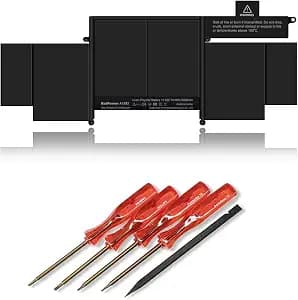
BatPower A1582 Replacement Laptop Battery for Apple Early 2015 MacBook Pro 13-inch Retina A1502 EMC 2835 Battery MacBook Pro 13" A1502 Apple A1582 Battery 74.9Wh
Description
Please NOTE: This battery (A1582) only compatibility with Apple MacBook Pro 13.3 inch Retina A1502(EMC 2835) (Early 2015).; BatPower 11.42V 74.9Wh 6500mAh A1582 Laptop Battery for MacBook Pro 13 Retina A1502 EMC 2835 MF839LL/A MF840LL/A MF841LL/A MF842LL/A MF843LL/A 2015 MacBook Pro 13 Inch A1502 Laptop Battery; Please check the MacBook Pro Model Number on the laptop back case and Make Sure Your Own Laptop Battery Model Before Place Order!; Package: Battery, S2 Stainless Steel Screwdriver Kits,helper stick and Laptop Battery Manual; Warranty: Free 18-month warranty and customer service.
One less thing to search
Before you buy: quick questions
Is this battery truly compatible with my specific MacBook Pro 13" model?
Yes, this A1582 battery is designed specifically for the Apple MacBook Pro 13-inch Retina models from Early 2015. It matches the model numbers A1502 and EMC 2835. As many reviewers on tech forums have confirmed, it's a direct physical replacement that fits perfectly into the chassis without any modification.
How is the installation process, and what's included in the kit?
The installation is straightforward for most users with basic technical confidence. The kit includes the necessary high-quality pentalobe and tri-wing screwdrivers, clear instructions, and adhesive strips for the new battery. A common tip from YouTube DIY guides is to gently use a plastic card or guitar pick to loosen the old battery's adhesive. Take your time and follow a video tutorial for visual guidance.
My MacBook still shows a "Service Recommended" warning after installation. Is the battery faulty?
Not necessarily. This is a known quirk mentioned in some Reddit discussions. The battery's microcontroller may not always reset the official macOS "Battery Service" flag. As long as the battery is holding a charge and providing good battery life (which most users report it does), it is functioning correctly. The warning is a software notification, not a hardware fault.
What kind of battery life and performance can I realistically expect compared to the original?
Based on extensive customer feedback, you can expect performance very close to your MacBook's original battery when it was new. Most users report 7 to 10 hours of actual use for tasks like web browsing and document editing, which is a massive improvement over a worn-out battery. The 74.9Wh capacity is designed to match the OEM specification.
What is the warranty and support like if I have an issue?
BatPower offers a standard warranty on this battery (typically 12 months). It's important to purchase from an authorized seller to ensure warranty validity. Their support is generally responsive to defective units. However, as noted in some reviews, the warranty does not cover installation errors, so we recommend careful installation or consulting a professional if you're unsure.
Answers are limited to the manufacturer's listing and the reviews we analysed. Questions those sources cannot support are not answered here.
Transparent by design