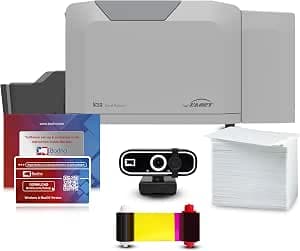
Bodno Seaory S28 Dual Sided ID Card Printer & Complete Supplies Package ID Software and Camera - Bronze Edition
Description
ALL-INCLUSIVE PACKAGE & DUAL-SIDED PRINTING: Get everything you need to start printing professional-grade, dual-sided ID cards right out of the box, including the Seaory 17031 color ribbon (300 prints).; DUAL-SIDED PRINTING IN ONE PASS: Print vibrant, high-quality images on both sides of the card in a single pass, saving time and boosting productivity with resolutions up to 300 x 1200 dpi.; VERSATILE COMPATIBILITY: Compatible with Windows, Mac, and Linux operating systems.; BODNO BRONZE EDITION WITH LIFETIME LICENSE: User-friendly software featuring pre-made templates and intuitive drag-and-drop design capabilities for ease of use.; 2-YEAR WARRANTY & LIFETIME SUPPORT: Includes a two-year hardware warranty and lifetime Bodno software support.
One less thing to search
Before you buy: quick questions
これは本当に「オールインワン」パッケージですか、それとも印刷を始めるために他に何か購入する必要がありますか?
ブロンズエディションは完全なスターターキットです。両面印刷機、IDデザインソフトウェア、写真用カメラ、ブランクカードのスターターパック、リボンが含まれています。必要なのは標準のUSBケーブルとコンピューターだけです。技術フォーラムの一部のユーザーは、高度な機能はアップグレードが必要な場合があるため、すべてのデザイン要件を満たしていることを確認するためにソフトウェアの仕様を確認することを推奨しています。
ソフトウェアのセットアップはどれくらい難しいですか?私はあまり技術に詳しくありません。
ソフトウェアは強力ですが、習得には時間がかかります。ほとんどのお客様は付属のガイドに従って1〜2時間以内に起動させています。YouTubeチュートリアルでよくあるヒントは、プリンターを接続する*前に*ドライバーをインストールすることです。サポートポータルには、初期セットアップを支援する段階的なビデオガイドもあり、多くの小規模事業者に非常に役立っています。
月に50枚程度のカードを印刷する小規模オフィスでの実際の耐久性はどのようなものですか?
お客様のような軽度から中程度の使用では、Bodno S28は信頼性を重視して設計されています。同様のユーザーからの全体的な評価では、クラブ会員証、社員証、学生証などのパフォーマンス期待を一貫して満たしています。最適なプリントヘッド寿命を確保し、カードプリンター全般に共通する懸念である詰まりを回避するために、同梱のBodnoブランドのリボンとカードの使用をお勧めします。
このプリンターパッケージが向いていないのはどのような方ですか?
このパッケージは、工業用グレードの大量印刷(1日数百枚)が必要な環境には理想的ではありません。そのような環境のユーザーは、より高級な商用システムに投資しなかったことを後悔することがあります。S28ブロンズエディションは、多額の初期投資なしでプロフェッショナルな見た目のIDカードを作成できる、費用対効果の高い社内ソリューションを必要とする中小企業、学校、ジム、団体に最適です。
印刷品質の問題やプリンターの詰まりが発生した場合はどうすればよいですか?
まず、カラーキャリブレーションやカード送りなどの一般的な問題の解決策については、オンラインのトラブルシューティングライブラリをご確認ください。多くのRedditユーザーがそこで問題を解決しています。さらにサポートが必要な場合は、サポートチームが対応いたします。応答時間は変動する可能性があることをご了承ください。迅速な解決のため、お問い合わせの際はシリアル番号と問題の説明をご準備ください。
From a similar, more-reviewed product in this category: MUNBYN RealWriter 941 Bluetooth USB 4x6 Shipping Thermal Label Printer
Will this printer work with my computer, and is setup really as easy as people say?
For the vast majority of users, yes. The RealWriter 941 supports Windows, macOS, and Chromebook via USB, with Bluetooth as a convenient wireless option. Most reviewers say they were printing labels within 10–15 minutes. One tip from seasoned users: install the MUNBYN driver first and set your label size to 4x6 before your first print — that's the step that trips up a few people.
Do I have to use MUNBYN labels, and does it need ink or toner?
No ink, no toner — ever. It's a true thermal printer, which is one of the biggest reasons small sellers love it. You can use any standard 4x6 thermal labels, though MUNBYN's own labels are the most commonly recommended for consistent feed and print quality. Just make sure they're direct thermal (not thermal transfer).
Is the Bluetooth connection reliable enough for daily shipping, or should I stick with USB?
Honest answer: USB is the most rock-solid option, and many power users keep it plugged in for high-volume days. Bluetooth works well for most people, but a few TikTok and Reddit users noted occasional pairing hiccups with older laptops or certain macOS versions. If you print dozens of labels a day, USB is your safest bet; for lighter use, Bluetooth is perfectly fine.
How fast and quiet is it, and can it handle a busy shop's daily volume?
It prints up to 150mm/s — fast enough that most sellers describe it as "instant" compared to inkjet label printing. It's also notably quiet; several reviewers said they can print while on calls without anyone noticing. Small business owners and Amazon FBA sellers consistently call it reliable for daily, high-volume shipping.
What if something goes wrong — is customer support actually helpful, and what about returns?
This is one of the most praised aspects of the product. Reviewers repeatedly mention fast, friendly support that resolves issues — including replacements for the rare unit that arrives damaged or with a jammed roller. It also comes with a standard warranty and is eligible for returns through the platform you purchased from, so you're covered if it's not the right fit for your workflow.
Answers are limited to the manufacturer's listing and the reviews we analysed. Questions those sources cannot support are not answered here.
Transparent by design