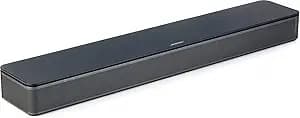
Bose TV Speaker - Soundbar for TV with Bluetooth and HDMI-ARC Connectivity, All-in-One Compact Soundbar, Includes Remote Control, Black
Description
The Bose TV Speaker helps you hear your TV better. It’s a small sound bar that clarifies speech and improves overall TV sound. Inside the TV speaker there are two full-range drivers angled to deliver wide, spacious sound and a center tweeter specifically focused on elevating vocals. Built-in Dolby decoding helps further enhance this compact TV speaker’s audio capabilities to deliver a more realistic and satisfying listening experience. Designed with simplicity in mind, this small soundbar only uses a single connection to the TV via an optical audio cable (included) or an HDMI cable (sold separately) and has you up and running in minutes. At just over 2" tall, the Bose TV Speaker is a compact sound bar that can be placed just about anywhere. And small LED lights on the front of this small soundbar turn on and/or change color for visual confirmation when certain features are enabled. They also blink in acknowledgement of volume changes. The Bose TV Speaker has HDMI-CEC, which allows the TV and this small soundbar to communicate when connected with an HDMI cable. Meaning when you turn the TV on, the TV speaker will automatically turn on too. With this technology, you can even keep using your current TV remote to control the volume of this compact soundbar. However, the Bose TV Speaker comes with its own remote. And on it, you can enable “dialogue mode” on the TV speaker to elevate vocals even more or press the “bass” button for some extra depth. This compact soundbar also is a Bluetooth soundbar. Simply press the Bluetooth button on the remote to pair your device to this Bluetooth TV speaker and wirelessly stream your favorite music or podcasts. You can also expand your system at any time by adding a wired subwoofer to the Bluetooth TV speaker for a more home-theater-like experience. The Bose TV Speaker is compatible with the Bose Bass Module 500 and 700 and requires the Bose Bass Module Connection Cable or a standard 3.5 mm audio cable, sold separately.
Compare the trade-offs
Similar products, side by side
A random selection of analyzed products from the same category. Different products are not necessarily interchangeable.

Sonos Beam Gen 2 - Black - Soundbar with Dolby Atmos

Bose Smart Dolby Atmos Soundbar, All-in-One Soundbar for TV, A.I. Dialogue Mode, Voice Control and Amazon Alexa Built-in, Supports Bluetooth/AirPlay/Spotify Connect/Chromecast, Black

TV Sound WZ95-M716, heilack
One less thing to search
Before you buy: quick questions
I have an older TV without HDMI-ARC. Will the Bose TV Speaker still work for me?
Absolutely. While the HDMI-ARC port offers the best experience (letting you control volume with your TV remote), the soundbar also includes an optical audio input. You can connect it to almost any TV from the last decade using an optical cable. Just note that the optical cable isn't included in the box, so you'll need to pick one up separately.
I watch a lot of action movies and listen to music. Is the bass strong enough, or will it sound weak?
This is the most common question we see across reviews. The Bose TV Speaker is engineered specifically for dialogue clarity, not cinematic rumble. If you are upgrading from built-in TV speakers, you will notice a significant improvement in vocal clarity and overall fullness. However, if you are looking for deep, room-shaking bass for movies or music, you will likely find the low-end lacking. This unit is best suited for news, dramas, and talk shows rather than bass-heavy action flicks.
How does this compare to cheaper soundbars from brands like Vizio or Polk?
Many users on Reddit and YouTube have compared this directly to budget options like the Polk Signa S2. The Bose wins in two key areas: dialogue clarity and build quality. The center channel processing is noticeably better at separating voices from background noise. However, cheaper competitors often offer more features, like a dedicated wireless subwoofer or multiple EQ presets, for a lower price. If you prioritize voice intelligibility and a premium, compact design, the Bose is worth the premium. If you want booming bass and deep customization, you may be better served elsewhere.
I’ve seen complaints about the remote control. Is it really that bad, and can I just use my TV remote?
The included remote is functional but admittedly basic—it feels light and lacks a dedicated input button, which makes switching between Bluetooth and TV sources a bit tedious. However, if you connect via HDMI-ARC, you can bypass the Bose remote entirely. The soundbar will respond to your TV's remote for power and volume control, which is how most users end up operating it daily. The Bose remote is really only necessary for switching to Bluetooth mode.
Is this soundbar a significant upgrade over my TV’s built-in speakers, and who is it best for?
Yes, the upgrade is significant, but specifically for speech. If you constantly find yourself turning on subtitles or struggling to hear dialogue over background music, this soundbar will solve that problem instantly. It is ideal for seniors, parents watching TV after the kids are asleep, or anyone with a bedroom TV who wants a compact, clutter-free setup. It is not designed for audiophiles or home theater enthusiasts seeking a surround-sound experience. It fills a specific niche—making TV dialogue clear and natural without requiring a complex sound system.
From a similar, more-reviewed product in this category: Samsung HW-Q600C 3.1.2ch Soundbar w/Dolby Audio, Q-Symphony, Adaptive Sound, HDMI eARC, Game Mode Pro, Bluetooth, Acoustic Beam, Tap Sound
How easy is it to set up the HW-Q600C with a Samsung TV?
Reviewers describe setup as very easy, with the subwoofer auto-connecting to the soundbar via Bluetooth and the included HDMI cable going into the TV's eARC port, getting the system operational within minutes. One reviewer notes there are two ways to listen on a Samsung TV: through the speakers only, or a combination.
Does the soundbar connect to the TV with a single HDMI cable?
Yes. The listing states HDMI eARC passes advanced audio like Dolby Atmos from your TV to your soundbar with one cable, and reviewers confirm connecting via the eARC jack gave better sound reproduction than a digital optical connection.
How is the sound quality and bass?
Reviewers report excellent sound with great highs and bass, with one noting plenty of bass especially when placing the port near a room corner, and another saying it sounds as good as or better than a $1200 Sony surround system they previously owned.
What is included in the box?
The listing states the built-in media includes a battery for the remote controller, an HDMI cable, a remote controller, and a wallmount kit.
Does it come with a remote that can control the TV too?
The listing describes a One Remote Control that controls both your Samsung TV and soundbar to streamline your setup, and a reviewer mentions installing batteries into the provided remote during setup.
Answers are limited to the manufacturer's listing and the reviews we analysed. Questions those sources cannot support are not answered here.
Transparent by design