What people like
Compact, quiet, and fast for everyday tasks
Reviewers repeatedly praise the small footprint, quiet operation, and smooth performance for browsing, office work, streaming, and light gaming.
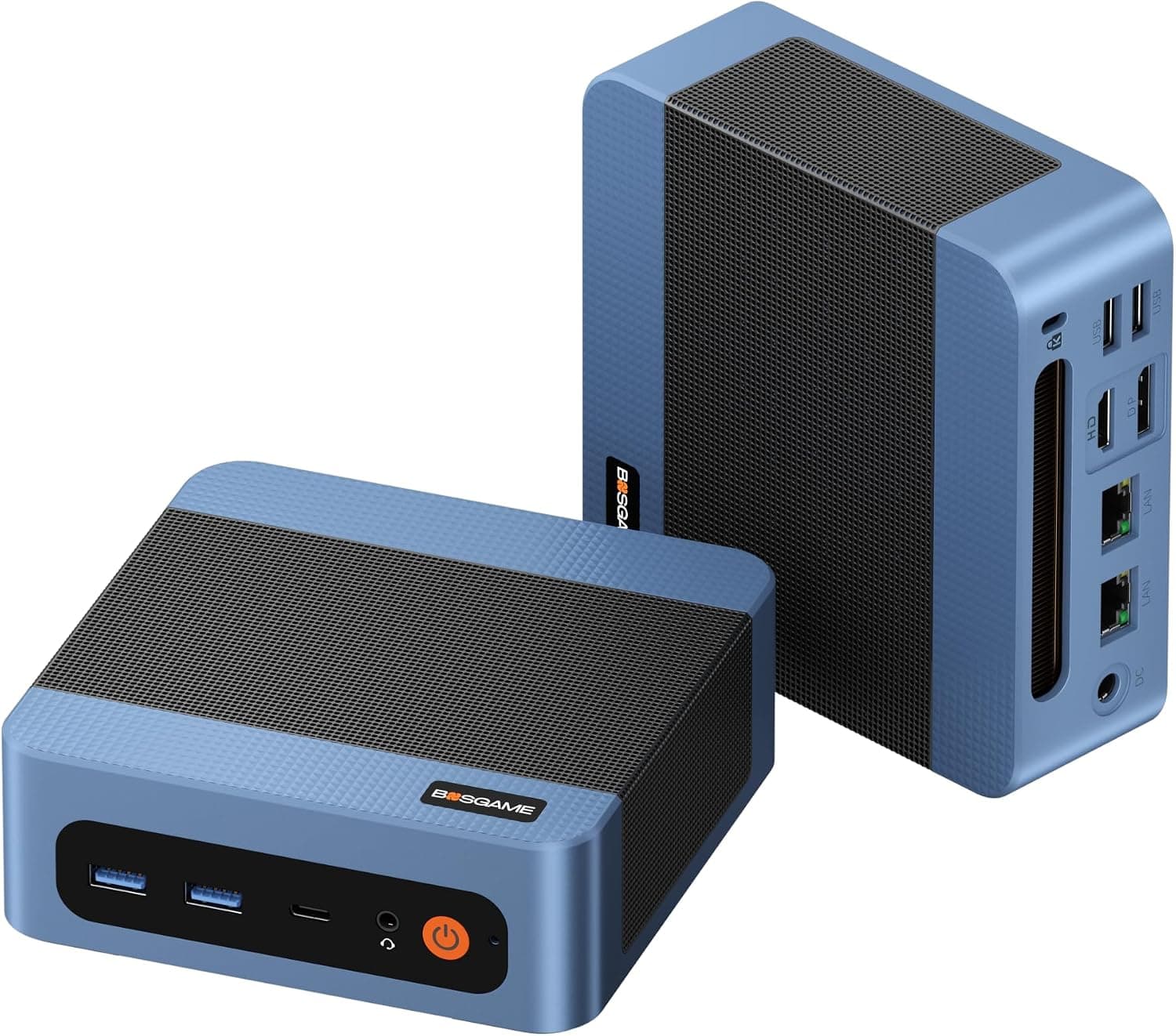
Our buying verdict
A compact, fast budget pick for light tasks, though long-term durability and Wi-Fi issues are real risks.
Buyers wanting an affordable, compact PC for everyday office work, streaming, browsing, and light gaming who don't need high-end graphics.
Those needing reliable long-term durability, strong warranty support, demanding gaming performance, or dependable Wi-Fi out of the box.
The 30-second read
What people like
Reviewers repeatedly praise the small footprint, quiet operation, and smooth performance for browsing, office work, streaming, and light gaming.
The main watch-out
Multiple reviewers report dead units, overheating, failed RAM, broken display ports, or no Wi-Fi, sometimes within months and with limited support.
Before you choose
Some units shipped with a no-name SATA drive rather than NVMe, and buyers note RAM/storage are upgradable but instructions are limited.
From a similar, more-reviewed product in this category: GMKtec Mini PC Computer, G10 Ryzen 5 3500U (Beats N150/4300U/3200U), 16GB RAM 512GB SSD 2.5GbE NIC LAN Desktop Office Home Business HTPC, Triple 4K Display, WiFi, BT, USB-C, DP, Type-C PD, HDMI 2.1
What people like
Many praise the compact size, easy setup, and strong performance for the price, including smooth triple-monitor and light office use.
The main watch-out
Several reviewers report units dying or failing to power on within months to about a year, plus SSD failures and loud fans.
Before you choose
Some units arrived with Windows not activated (support supplied keys), and Linux needs manual network-port configuration.
High-volume review analysis
Five signals are scored from the collected reviews; every line shows the statistic that produced it.
Signals run from −1 to +1. See Methodology for what this analysis cannot detect.
Description
Ryzen 5300U MAX 3.8Ghz 2 Powerful 5300U 3 8GB RAM & 256GB SSD 4 Radeon Vega 1500Mhz Previous page Next page 1 Quiet & Heat Dissipation 2 Triple Displays 3 4K 60HZ Previous page Next page 1 WiFi 5 2 Multi Port-Dual Lan 3 Small Mini PC Previous page Gift Power By USB-C Accessories Home Work Next page BOSGAME MIni PC Series E5 5300U 8GB 256GB Buying Options E5 5300U 16GB 1TB Add to Cart E5 5300U 16GB 512GB Add to Cart P6 Neo 6800H 24GB 1TB Add to Cart P2 Plus 12700H 32GB 512GB Buying Options Customer Reviews 4.4 out of 5 stars 586 4.2 out of 5 stars 144 4.2 out of 5 stars 144 4.2 out of 5 stars 46 3.8 out of 5 stars 10 Price $229.99$229.99 $479.99$479.99 $379.95$379.95 $699.99$699.99 — CPU Ryzen 5300 MAX 3.8Ghz Ryzen 5300 MAX 3.8Ghz Ryzen 5300 MAX 3.8Ghz Ryzen 7 6800H MAX 4.7Ghz Alder Lake 12700H MAX 4.9Ghz GPU AMD Radeon Graphics 1500Mhz AMD Radeon Graphics 1500Mhz AMD Radeon Graphics 1500Mhz Radeon 680M 2200Mhz Intel Iris Graphics 1400Mhz USB Ports USB 3.2*3, USB 2.0*1 USB 3.2*2, USB 2.0*2 USB 3.2*2, USB 2.0*2 USB 3.2*4, USB 4 *1 USB 3.2*4, USB 4 *1 Type-C Support Data/ PD3.0 / DP Support Data/ PD3.0 / DP Support Data/ PD3.0 / DP USB 4 * 2(40Gbps 8K 60Hz) Thunderbolt 4 RAM 8GB DDR4 16GB DDR4 16GB DDR4 24GB DDR5 32GB DDR4 (16GB x2) SSD 256GB SATA 3.0 1TB PCIe 3.0 X4 512GB PCIe 3.0x4 1TB PCIe 4.0 X4 512GB PCIe 3.0 X 4 Wi-Fi Wi-Fi 5(2.4Ghz, 5Ghz) Wi-Fi 5(2.4Ghz, 5Ghz) Wi-Fi 5(2.4Ghz, 5Ghz) Wi-Fi 6E(2.4Ghz, 5Ghz, 6Ghz) Wi-Fi 6(2.4Ghz, 5Ghz) Video Port HDMI + DP+Type-C HDMI + DP+Type-C HDMI + DP+Type-C HDMI + DP+USB4 HDMI + DP+Thunderblot4 Working Temperature -10°C--45°C,30%--90% Humidity -10°C--45°C,30%--90% Humidity -10°C--45°C,30%--90% Humidity -10°C--45°C,30%--90% Humidity -10°C--45°C,30%--90% Humidity NOISE 20dB-30dB 20dB-40dB 20dB-30dB 25dB-35dB 20dB-30dB TDP 25W 25W 25W 65W 35W POWER 65W, 19V 3,42A 65W, 19V 3,42A 65W, 19V 3,42A 120W, 19V, 6.3A 120W, 19V 3,42A Q1: What should I do if I find a product with a lower pri~ce within a month? Please do not re~turn, contact our store staff to re~fund the difference, Bosgame-Direct let you enjoy the lowest pri~ce. Q2: What should I do if I don't like the W11 pro system? Please do not return, please contact the service staff of our store to get W10 pro system files and tutorials. If the system you received is not Windows 11 Pro, please con`tact us to update the Key Or replace the Mini PC P1. Q3: How to enter BIOS? Press "delete" to enter the BIOS settings; press "F7" to enter the boot options menu (click continuously immediately after booting). Q4: Is the WiFI 5? BOSGAME E5 5300U is using WIFI 5. It supports 2.4Ghz,5Ghz bands. How to Deal With PIN BUG? Please update your Windows version, or find the BOSGAME support team!
Compare the trade-offs
A random selection of analyzed products from the same category. Different products are not necessarily interchangeable.

KAMRUI Pinova P1 Mini PC Computer, AMD Ryzen 4300U (Beats i3-10110U/3500U), 16GB RAM 256GB SSD, Mini Desktop Computer Support Triple 4K, USB-C, WiFi, Bluetooth, Ethernet for Business, Education, Home
Lenovo ThinkCentre M720Q Tiny Desktop, Intel i7 8700T 2.4Ghz, 32GB DDR4, 2TB NVMe M.2 SSD, WiFi, Windows 11 Pro (Renewed), black

Beelink EQI12 Mini PC,Intel 12th Gen Core i3-1220P (10C/12T,up to 4.4GHz),Mini Computer with 16GB DDR4 RAM 500GB M.2 2280 PCle 4.0x4 SSD,4K Dual Screen Display/WiFi6/BT5.4/USB3.0/Dual Gigabit LAN
Check the evidence
Included does not mean verified authentic. Flagged does not mean proven fake. These are analytical classifications.
Showing 3 illustrative excerpts, not the complete review set.
Slowest SSD, memory speed is not accurate - works fine - but is expensive for what you get
“This Bosgame E5 Mini PC isn't even a case of "you get what you pay for" because for the price of $359 (at the time of order), I would expect a whole lot more. If this Mini PC were $239, I'd say it was an ok deal for the all the low-grade parts they include. I'll explain... When I first booted up the Bosgame E5 with its included Windows 11, it had a noticeable lag with Windows 11 - windows were very slow to load. The first boot took forever - even once Windows was loaded, the first few windows I tried to open took 30-60 seconds to open. I was willing to write that off to the initial boot so I rebooted it. The times got better but it was still slow (20 seconds to open a window). So I shut it down and installed a spare Crucial M.2 NVME SSD that I had and this one booted up quickly and everything felt very responsive. With my curiosity peaked, I broke out CrystalDiskMark and ran speed tests on the included SSD vs. my own Crucial SSD. The results were telling... The included SSD (a KingFast brand) had a read score of 508 MB/s and write speed of 455 MB/s. My Crucial SSD had a read score of 3690 MB/s and a write speed of 3181 MB/s. That makes the included SSD 7x slower than my Crucial SSD. Some digging around produced the culprit - Bosgame only includes an M.2 SATA SSD whereas my Crucial is an M.2 NVMe PCI SSD. the M.2 SATA speeds are around 550MB/s (which matches what I saw) whereas the M.2 NVMe PCi speeds are 3500+ MB/s. In fairness to Bosgame, they do say if you dig far enough into the specs that the drive is M.2 SATA so you really are getting what they say. But the place where you aren't getting what they say is the memory. The specs on the listing say the memory is "DDR4 3200 MHz". However, when I look at the actual 8GB memory chip installed, it says "PC4-17000 CL15", which is a DDR4 2133 MHz module. I suspect that while the Bosgame E5 *supports* DDR4 3200MHz memory, that's not actually what comes with it. For normal PC use, you might not notice the difference between 3200MHz and 2133MHz - but advertising the specs as 3200MHz leads the consumer to think that's the memory they will be receiving. As for the rest of the Mini PC, it's a nice little box. With a proper M.2 NVMe SSD, it runs great just as I expected. It'll play older games just fine and some newer ones ok if you set the resolution low enough. The E5 also gets bonus points for ease of upgrading. Opening it is as easy as removing 4 screws and then there are three screws holding the fan to the motherboard. Once all those screws are removed, you have easy access to the two memory slots and the two SSD slots. But what I can't get past is the price of this Mini PC considering the low-end memory and SSD that's included. If this were a $239 Mini PC, I'd be ok with the trade-off. But for $359 and the less-than-clear specs on the memory/ssd, I'm disappointed.”
Signals matched: Specific detail: quantity, entity, comparison, process · Reads as an authentic voice
Great general PC with some caveats
“The build quality and upgradability of this PC is great! If you are not planning to install Linux and keep it on Windows though you can't use it well out of the box. This comes with a cheap 256GB KingFast SATA drive installed. Windows runs excruciatingly slow on it. Takes forever to boot, then everything inside runs slowly too. The RAM is just enough to get by. They made upgrading it super simple though. I bought u used 512GB NVME SSD and installed it next to the original drive. Note that the main slot the original KingFast drive is in is for SATA only, the slot next to it above the Wifi card supports NVME. So you don't need to remove the old drive. Installing was easy. You remove the 4 screws on the support pads and pull the cover off with the handy pull tab they have. Then 3 screws for the fan. Slowly lift the fan off and disconnect the fan cable. Now the RAM and SSD are exposed. I decided to get a used SODIMM 8GB DDR4 RAM stick as well. I got the 2666 MHz one since that's what's already in here and getting higher speed won't help right now. Slotting both in was easy. Then with a flash drive to reinstall Windows from I deleted the old drive and installed in the NVME drive. Then reinstalled all drivers and set the old drive as an extra storage drive and now the PC is running so much faster. Boots up in about 30 seconds or so. Before CPU usage was at 100% and down to 1% now. It required me spending for an additional hard drive. But now it's a very capable office PC for document work, browsing and watching videos. It's Wifi 5, but still good enough to stream 4k video content, plus the port variety is great. Has a modern USB C port, so can be used with portable monitors too if wanted and also the new XR glasses that are out there now. Overall very happy with this now. Just remember you'll need to upgrade your SSD to use this on Windows at all. Otherwise if you're a Linux person you're probably fine and know what you're doing.”
Signals matched: Specific detail: entity, quantity, process · Reads as an authentic voice
Working great for my needs!
“So far so good. I got this on sale to replace another mini PC that was nearly the same and I've had for a couple of years now but has been giving me problems and I was not able to figure out the issue of yet. I've tested all the hardware I could but its probably a software issue (random bluescreen related to file/ntfs/storage issues) and I just did not want to fight with it any more. I was able to get this on sale for just $199.99 so it was not bad and if I fix my other unit some day, I can always use this for something else. It's not as powerful as my other mini pc, but for what its doing it really did not need to be as powerful. I am only using it to play my personally ripped blu-rays and 4k media using Kodi and so far its doing it well. I've been able to test various rips and its handling the 4k media fine so it should do the job well. My only real complaint with all of these mini pc's is that they do not come with a built in Optical, S/PDIF output. I know many modern receivers can support HDMI pass-through to get the surround sound but my unit does not and when I try using the pass-through from the TV, I have complications, so like with my previous one, I have to use a USB adapter for that. Otherwise it was a good price and should hopefully work well. I have not opened it yet to see how identical it is compared to my other unit but if this works well for the next week, I may pull the ram from the other one since it had 16gb, and anything else that may help (like the wifi card or SSD). One thing my other unit had was a spot for a 2.5inch hard drive. This seems like it will too, but I really don't need it anyway since all my files are stored on a networked raid array. I do notice this has much better ventilation than the other unit so that is a plus. Its nearly the same but I noticed this one has vents on the bottom as well but the other one did not which I thought was odd since that is where the sata drive goes.”
Signals matched: Specific detail: comparison, process · Reads as an authentic voice
One less thing to search
For office and home use, it holds up well. The 5300U (4 cores / 8 threads, up to 3.8GHz) handles 30+ browser tabs, large Excel sheets, and Zoom calls simultaneously without noticeable lag — many reviewers specifically call out how snappy it feels for the price. Just set expectations: it's a productivity chip, not a gaming one. If your day is documents, browsing, streaming, and video meetings, you'll be happy.
You can upgrade both, and it's one of the most-praised features in user reviews. There are dual SODIMM slots (expandable up to 64GB) and a second empty M.2 2280 PCIe 3.0 slot for adding up to 2TB more storage — no need to remove the pre-installed drive. That said, if you're not comfortable opening the case, the 16GB/512GB configuration is the smarter buy up front; "should've gotten the bigger version" is the most common regret we see from base-model buyers.
Yes — you get HDMI, DisplayPort, and a USB-C port that supports DisplayPort output, so you can run three displays at up to 4K 60Hz. It's a favorite among remote workers and traders who want a compact triple-monitor desk setup. Just note the USB-C port handles data, PD 3.0, and DP — so a single cable can drive a monitor, but check your monitor's input to match.
Both come up in user feedback, and here's the honest picture. Wi-Fi 5 (2.4GHz/5GHz) is fine for most home and office use, but if you have a Wi-Fi 6 router and want maximum throughput, you'll be leaving some speed on the table — a wired connection via the dual LAN ports is the workaround. The PIN bug is a known Windows 11 login glitch; updating Windows or contacting BOSGAME support resolves it quickly, and support is consistently praised for fast responses. Neither is a dealbreaker, but they're worth knowing before you buy.
BOSGAME offers a price-match guarantee — if you find the same product cheaper within a month, contact the store for a refund of the difference rather than returning the unit. If you'd prefer Windows 10 Pro over the pre-installed Windows 11 Pro, don't return it: reach out to support and they'll provide the Windows 10 system files and installation tutorial. If the unit arrives without Windows 11 Pro activated, support will update the key or replace the PC. Overall, after-sales responsiveness is one of the most frequently praised aspects of this product.
From a similar, more-reviewed product in this category: GMKtec Mini PC Computer, G10 Ryzen 5 3500U (Beats N150/4300U/3200U), 16GB RAM 512GB SSD 2.5GbE NIC LAN Desktop Office Home Business HTPC, Triple 4K Display, WiFi, BT, USB-C, DP, Type-C PD, HDMI 2.1
Yes — it has HDMI 2.1, DisplayPort 1.4, and USB-C outputs, each capable of driving a 4K display (HDMI and DP at 60Hz, USB-C at 30Hz). Productivity users on YouTube and Reddit frequently praise this triple-display flexibility for spreadsheets, trading, and multitasking. Just note the USB-C video port runs at 30Hz, so if you need smooth 60Hz on all three, plan your primary screens around HDMI and DisplayPort.
For office work, browsing, and streaming, 16GB is plenty. One thing the tech community consistently flags: the 16GB ships as a single stick, which limits the Vega 8 graphics to single-channel mode. If you want better graphical performance, adding a matching 16GB DDR4 3200MHz stick (dual-slot, up to 32GB total) is the most-recommended upgrade — many Reddit users call it a "day-one" must for light gaming. Storage is also expandable via a second M.2 2280 slot.
Be realistic here — this is an office-and-media machine that handles *light* gaming. The Ryzen 5 3500U with Vega 8 runs esports titles and older or indie games at modest settings, but modern AAA games will struggle, especially before you add that second RAM stick. Many TikTok and YouTube reviewers note the "gaming" label oversells it. If gaming is a priority, the Ryzen 7-based M5 or M5 Plus in the same lineup is the better fit.
At idle and for everyday tasks it's essentially silent, which makes it a popular HTPC and bedroom choice. Under sustained heavy loads the compact fan becomes audible — some users describe a "small jet engine" during rendering — and airflow matters, so keep it ventilated rather than boxed in. For browsing, streaming, and Office work, most people never notice it.
It carries a 3-year limited replacement-parts and service policy, and buyers consistently rate the value highly (around 4.2/5 across hundreds of reviews). That said, some shoppers rightly ask *who* to contact in year two, since support is handled through the seller rather than local service centers. Our advice: buy from a retailer with a clear return window, register the product on arrival, and keep your order confirmation — that's the safest path if you ever need service.
Answers are limited to the manufacturer's listing and the reviews we analysed. Questions those sources cannot support are not answered here.