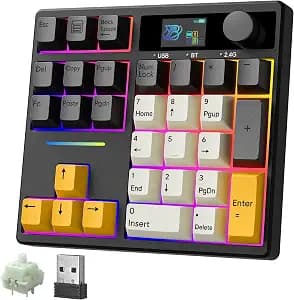
BOYI TD31Pro Mechanical Numpad,Mini Keyboard with Screen&Knob,Bluetooth5.0/2.4G/Type-C Wireless Numeric Keypad,Gasket HotSwap RGB Number Pad,PBT Keycaps Rechargeable Number keypad for PC(Black-Grey)
Description
Multi-function 30-key Numeric keypad: BOYI TD31Pro numpad with NumLock/ESC/Delete/Copy/Paste/Pgup/Pgdn and a shortcut key which can open the computer calculator directly.This number keypad is very easy to use; Tri-mode Connection Mini Keyboard: Work with Bluetooth 5.0, 2.4GHz,Type-C wired connection,Can connect up to 3 devices at the same time.This rechargeable numpad is equipped with a 1000mAh large-capacity battery which has long-lasting battery life; Big Features on a Multimedia TFT Display Screen: Is there anything this TD31Pro mechanical number pad can display? Custom DIY gif image,numlock,connection mode,WIN/MAC system,battery status,RGB Mode,etc. Enjoy the fun of Custom your own unique keypad; Mode Switching&Enhanced Metal Knob: Default Volume Mode's Knob Can One Click to Mute! Press the FN+knob to quickly switch volume/screen modes.The knob of the screen mode Can easy control the Screen display content but not Support one Click to Mute; Hot-Swappable Wireless Number Pad: With BOYI full POM Jadeite Green HIFI Linear Lubed Switches,meaning that the force at the beginning and the end of each stroke is nearly identical. Hot-swap PCB allows you to replace 3 pins/5 pins Mechanical switches freely without soldering issue; South-facing LEDs Gasket Mounted Structure: 16.8 million RGB presets are nice and varied! Features a gasket-mounted design ensures ultra-comfortable typing with reduced sound and shock. RGB music rhythm lighting effects are supported by the software driver; Pro Software Customizable Numpad: Fully Programmable Keys,You can remap your numpad by your willing. There are two different angles you can choose from to meet your longtime typing/gaming needs with this Ergonomic numpad; Dye Sublimation PBT Keycaps Number Pad: Features PBT sublimated themed keycaps. Wear-resistant and long-lasting,it also has anti-oil and anti-gloss properties.PBT keycaps offering a special texture makes it easier to type; Widely Compatible Number keypad: This mechanical number pad widely compatible with your computer or laptop and other keyboards without numeric section. Compatible with almost all operating systems with Windows Mac,OS,Android
One less thing to search
Before you buy: quick questions
Does the BOYI TD31Pro work with Mac, and can I customize the buttons or screen on macOS?
Yes, the numpad functions fully on macOS via Bluetooth, 2.4G, or USB-C — typing and the number pad work right out of the box. However, the dedicated configuration software is currently only available for Windows. This means Mac users can use the pad normally, but they won’t be able to remap keys, adjust RGB settings, or upload custom graphics to the screen from macOS. Several Mac users have suggested using a Windows machine temporarily for setup, but that’s not a great solution for everyone. If your workflow relies heavily on Mac-based customization, it’s worth considering models that support QMK/VIA or have native Mac software. ---
Can I change what the rotary knob does, and is the top screen fully customizable?
The knob is functional but not freely programmable — it works as a volume control out of the box, and that’s its primary function in the current firmware. The screen, meanwhile, displays system status information like connection mode, battery level, and current key layer. It’s not designed to display custom images or animations. If you’re looking for deep customization (like changing knob functions to control zoom, scrolling, or app switching), this model may not meet that need. That said, the hot-swappable switches give you plenty of flexibility in terms of typing feel, which is where many users find joy. ---
What’s the battery life like, especially with RGB lighting on?
With RGB lighting set to maximum brightness, expect roughly 2–3 days of heavy daily use before needing to recharge. If you lower the brightness or turn RGB off entirely, you can stretch that to about 2 weeks, which is much more practical for travel or office use. The 2.4G dongle mode tends to drain slightly faster than Bluetooth. A good habit is to keep the included USB-C cable handy for overnight charging — it charges quickly (about 2 hours for a full top-up). Users who prioritize battery life over aesthetics tend to set RGB to “breathing” or “off” for daily work. ---
Is the typing feel really different from a regular numpad, and does it sound loud?
Yes, the gasket mount changes the feel noticeably. Instead of a hard, clacky bottom-out, you get a softer, slightly springy response that many users describe as “pillowy” or “dampened.” It’s more pleasant for long data-entry sessions because it absorbs some of the impact. Sound-wise, it’s not silent, but it’s on the quieter side of mechanical keyboards — think “thocky” rather than “clicky.” One caveat: a few users noted the spacebar and larger keys can have a slight rattle at high speeds. It’s not a defect, but if you’re sensitive to hollow sounds, you might want to add a tiny bit of foam or tape under those keys — a common aftermarket fix. ---
Is this numpad worth the price, and who is it best suited for?
For the price, the build quality is impressive: an aluminum top plate, thick PBT keycaps, gasket mounting, hot-swap switches, and tri-mode wireless. It genuinely feels like a much more expensive product. It’s best suited for someone who works in Windows or Linux, wants a satisfying typing experience, and values versatility in a compact desktop setup. It’s less ideal if you’re a Mac user needing deep software customization, or if you expect a "set it and forget it" plug-and-play experience — the pairing and mode switching require a little patience at first. If you fall into that sweet spot of enthusiast-minded but not ultra-obsessive, this is a strong purchase. If you need fully open-source firmware or per-key macro control, you’d likely be happier with a QMK-compatible board like the Keychron Q0.
From a similar, more-reviewed product in this category: Anker USB A to USB C Cable, USB to USB C Cable (2-Pack, 6 ft, Black)
Is this cable compatible with fast charging?
It supports fast charging up to 15W (3A/5V) and Qualcomm Quick Charge, but it is not compatible with Power Delivery and does not support laptop charging.
How long is the cable and is that length practical?
It is 6 ft long, and reviewers say this gives enough room to use it in the car, at a desk, next to the bed, or with a wall charger without feeling too short.
Is the cable durable?
Reviewers describe it as sturdy, well-made, and more durable than basic rubber cables, with a braided nylon exterior that resists wear and tangling.
Does it support data transfer, and at what speed?
Yes, it supports data transfer speeds up to 480Mbps, and reviewers confirm it works for transferring data as well as charging.
Is this a USB 3.0 cable?
No, it is a USB 2.0 cable, as noted in the product specifications and pointed out by a reviewer.
Answers are limited to the manufacturer's listing and the reviews we analysed. Questions those sources cannot support are not answered here.
Transparent by design