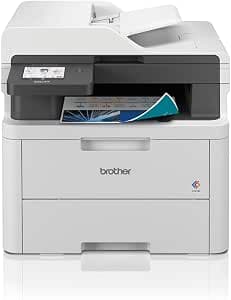
Brother DCP-L3560CDW 3-in-1 Colour Wireless LED Printer | Print, copy & scan | USB 2.0 |A4|UK Plug
Description
UP TO 26 PPM PRINT SPEED: With fast print speeds, print your professional documents in no time at all without compromising on quality.; ONNECTIVITY: Gigabit Ethernet connectivity for faster connections and USB capability, with 5GHz Wi-Fi module for remote printing, from anywhere, at anytime, when connected to the same Wi-Fi network; LCD COLOUR TOUCHSCREEN: 8.8cm colour touchscreen for quick and easy navigation of the printer fuctions, at your fingertips.; LARGE PAPER CAPACITY: With a paper input capacity of up to 250 sheets as standard.; BROTHER GENUINE SUPPLIES: 1,000 page yield black and colour in-box toner, with 2,300 page yield black and 3,000 page yield colour toners available, you can keep printing for longer without the need to replace your toner
One less thing to search
Before you buy: quick questions
Is the wireless connection reliable, or does it drop out often?
Most users find the wireless setup straightforward and experience stable daily use. However, a minority of reviewers on forums like Reddit have reported occasional network drop-offs, often resolved by restarting the printer or router. For the most reliable connection, using the Ethernet port is a great alternative.
I need to scan documents and photos without any borders. Can this printer do that?
The flatbed scanner requires a small margin around your document, so it cannot perform true edge-to-edge (borderless) scanning. This is a common note in user reviews. If scanning to the very edge of a page is critical for your work (e.g., for professional archiving), you may want to consider a dedicated scanner.
Who is this printer best suited for?
It's an excellent fit for home offices, students, and small businesses that need a compact, reliable all-in-one for printing sharp documents and occasional colour graphics. It's loved by those who value ease of use and consistent results. It's less ideal for users who require absolute silence or professional-grade, borderless scanning.
How easy is it to set up and use with phones and computers?
The physical setup is consistently praised as simple. Wireless setup with Windows and macOS is generally smooth, though a few users have needed to consult online guides for specific driver issues. Printing from iPhones and Android devices via the Brother app is highlighted as very easy and reliable by many TikTok and YouTube users.
Is it good value when you factor in the cost of toner?
The upfront price is competitive for a colour laser all-in-one. The included starter toner cartridges have lower page yields, so be prepared for the investment in full-size replacements. Users agree that the value comes from the printer's durability and reliability over time, making it a cost-effective choice for moderate, regular use rather than very high volume.
From a similar, more-reviewed product in this category: Brother HL-L3220CW Colour Wireless LED Printer | Single Function
How easy is it to set up this printer?
Multiple reviewers describe setup as easy or straightforward, including one who was up and printing within minutes of unboxing and another who set it up easily with a Chromebook. One reviewer did note the installation process was frustrating because it pushes an EcoPro toner subscription screen with no clear skip option.
What is the print quality like?
Reviewers consistently describe print quality as good, with sharp, clear text and vibrant colour suitable for everyday needs.
How does the wireless connectivity work?
Reviewers report that Wi-Fi setup was easy, with laptops and phones finding the printer quickly and mobile printing working smoothly and reliably. The manufacturer's listing states it has a 5GHz Wi-Fi module for remote printing when connected to the same Wi-Fi network, plus USB connectivity.
Is this printer quiet?
One reviewer describes it as quiet, and the manufacturer states it prints quietly, quieter than an average office conversation, making it suitable for desktop working.
What are the running costs and toner options?
The listing states the printer ships with 1,000 page yield black and colour in-box toner, with 2,300 page yield black and 3,000 page yield colour toners available. One reviewer notes third-party cartridges are accepted and that the TN229XL high-yield cartridges offer the best cost-per-page ratio, though other reviewers warn that replacement toner cartridges are expensive.
Answers are limited to the manufacturer's listing and the reviews we analysed. Questions those sources cannot support are not answered here.
Transparent by design