What people like
Strong budget performance and value
Reviewers say it handles everyday tasks, multitasking, and light gaming without lag, and several call it a great budget mini PC for the price.
The 30-second read
What people like
Reviewers say it handles everyday tasks, multitasking, and light gaming without lag, and several call it a great budget mini PC for the price.
The main watch-out
One reviewer reported software-side problems with the pre-installed Windows 11 Pro, including repeated Outlook login issues and account setup trouble.
Before you choose
One reviewer notes the case is larger than it looks in photos, and another upgraded RAM and SSD, so check dimensions and whether you want to expand it.
From a similar, more-reviewed product in this category: KAMRUI P1 Mini PC W-11 pro, AMD Ryzen 7330U Mini Computer (Βeats 3550H/R3 5300U,Max 4.3GHz,4C/8T), 16GB RAM 256GB M.2 SSD, Triple 4K Display, WiFi/BT/for Business Home Office Mini PC
What people like
Reviewers repeatedly praise the small form factor, quick performance, and simple setup, with several noting it handles everyday work and even Linux well.
The main watch-out
One reviewer reports weak wireless due to a tiny antenna, and another says the unit did not include a valid Windows 11 Pro license despite being advertised with it.
Before you choose
Some reviews mention limited storage that may need upgrading and setup complications with Bluetooth keyboards or mice, so confirm your needs before buying.
Your use case first
0 of 10 mentions describe a negative experience (0%).
3 of 10 mentions describe a negative experience (30%).
0 of 6 mentions describe a negative experience (0%).
0 of 5 mentions describe a negative experience (0%).
One review can mention several topics. Percentages describe the reviews we analysed, not all buyers or the product's overall failure rate.
From a similar, more-reviewed product in this category: KAMRUI P1 Mini PC W-11 pro, AMD Ryzen 7330U Mini Computer (Βeats 3550H/R3 5300U,Max 4.3GHz,4C/8T), 16GB RAM 256GB M.2 SSD, Triple 4K Display, WiFi/BT/for Business Home Office Mini PC
23 of 118 mentions describe a negative experience (19%).
4 of 41 mentions describe a negative experience (10%).
1 of 26 mentions describe a negative experience (4%).
0 of 21 mentions describe a negative experience (0%).
0 of 20 mentions describe a negative experience (0%).
1 of 15 mentions describe a negative experience (7%).
1 of 10 mentions describe a negative experience (10%).
3 of 8 mentions describe a negative experience (38%).
Compare the trade-offs
A random selection of analyzed products from the same category. Different products are not necessarily interchangeable.
Check the evidence
Included does not mean verified authentic. Flagged does not mean proven fake. These are analytical classifications.
Showing 3 illustrative excerpts, not the complete review set.
A great budget mini pc
“The Bottom Line: If you are looking for a budget Mini PC in 2026, you’ve probably seen a dozen "N100" or "N95" Intel boxes. Do yourself a favor and get this Ryzen 5 3550H unit instead. For about as much as an N100 device, you’re getting a real 4-core/8-thread processor that actually handles multitasking without breaking a sweat. Performance & Daily Use: Most budget minis stutter when you have 10+ Chrome tabs and a 4K YouTube video running. Not the C4. The Ryzen 5 3550H might be a few years old, but its multi-core performance still packs a punch. Windows 11 Pro: Comes pre-installed and activated. It’s snappy out of the box. RAM/Storage: 16GB of DDR4 is almost required nowadays. This device is dual-channel capable, but only comes with a single stick of RAM. If you can spare to, get another stick of RAM so you can take advantage of the dual-channel capability. Triple Display Support: Comes with HDMI, DisplayPort, and USB-C, providing flexible options for connecting to your monitors, as well as triple display support. Dual Gigabit LAN: Rare at this price point. Great if you want to use this as a dedicated home server or a hardware firewall. USB-C: It's a full-featured port on the front, which makes cable management for modern peripherals much easier. Linux Potential (The Secret Weapon): If you’re a Linux user, this is a dream. I wiped the Windows drive and installed Ubuntu 25.10. Every driver, such as Wi-Fi and Bluetooth, was recognized instantly. Under Linux, idle RAM usage dropped from 3.2GB to 1.4GB. What could be better? Build Quality: It’s all plastic. It’s a nice matte finish, but it’s very light. Use the included VESA mount to bolt it to the back of your monitor so it doesn't slide around your desk. WiFi 5: In 2026, WiFi 6 is the standard. It’s plenty fast for 4K streaming, but if you have a high-end router, you’ll be capped by the older internal card. The Thermals: While idling in Windows, it didn't take long for the CPU temperatures to reach 140 degrees Fahrenheit. When pushing the unit with 10+ browser tabs as well as a 4k Youtube video playing, temperatures reached 160. Under a heavier load or more strenuous tasks, this device could likely throttle, if not shutdown. Adding some heat sinks or internal fans would make a major difference. Pros: + Genuine Ryzen 5 power for the price of a Celeron. + 16GB RAM is a massive plus for 2026 multitasking. + Triple display and Dual LAN support. + Extremely easy to open and upgrade. Cons: - Older WiFi 5 standard. - Plastic chassis feels a bit "budget." - Poor temperature control Final Verdict: For a home office, a student, or a dedicated Linux lab, the Origimagic C4 is a great value-for-money I’ve found this year. It turns "budget computing" into a "pro experience." Edit: After a bit of fiddling around with it, I ended up taking the board out of the casing and removed the cpu fan. What I found was a little bit of old thermal paste. I wiped the old stuff off and applied a bit of new thermal paste, put it all back together, and now I'm noticing much better temperatures. Fixing this small issue raises my rating of the device to 5 star.”
Signals matched: Specific detail: quantity, entity, comparison · Mentions: performance, value for money · Reads as an authentic voice
DVD Server
“My wife made me get rid of my two huge 400 DVD Carousels & I still wanted to watch the DVDs, so I used MakeMKV to rip them to my Synology NAS & I got this to make a Video Server using ZenPoint DigitalCenter to play them on our 4k TV. I did a couple of upgrades, two Crucial 16GB SODIMM modules and a Samsung 2TB M.2 PCIe NVME GEN 3 SSD. OrigiMagic was nice & put a 16GB SODIMM module in, so I could have saved a few bucks just adding a second module, but I couldn't find the same brand they used & I like to have matching pairs, so I bought a matching pair. I had a 2TB GEN 4 stick and GEN 4 is supposed to work in GEN 3 slots, but it seemed to work & then crashed uglily. So I got the GEN 3 stick & it's working flawlessly. It was getting really hot tho & that has two problems 1) thermal throttling & 2) really short SSD life, so I got a heatsink. Still hot & throttling. So I tried a mess of heatsinks. ASIN B07KDDKDNN, wrong fin orientation, hot; B0D2677M5K, angled fins, better but still hot; B0DKBMVMS1 Graphite/copper top & B0DKBNFVX9 Graphite/copper bottom, better but still hot; & finally B0DKBLNM5K copper top & B0BV2GCP3W copper bottom, best but still hot. There is no airflow thru the bottom of this thing & no heatsink is going to solve that. I found a really tiny really quiet fan, ASIN B0B1V3NZJD, that plugs into a USB port for power. Throttling happens about 75C & with the fan, the SSD runs in the low 40C range; problem solved! I was looking for low power, so I removed the WiFi module, and that got the power down to 22 Watts. The performance is definitely not in the supercomputer range, but it plays movies with no hiccups & that's all I want! Amazon sells a huge variety of these mini pc's & I'd have returned this one in a heartbeat & got one with a fan that cools the SSD, but I wasn't able to find one with a bottom fan. Lotta hours wasted searching... If you are willing to attach a bottom fan, highly recommended.”
Signals matched: Specific detail: quantity, entity, process, scenario · Mentions: performance · Reads as an authentic voice
Good, low cost minipc for linux fans
“It came in a simple white box with a thin pamphlet. The case is plastic but feels sturdy. It's a bit larger than portrayed in the photos. Win11 was pre-installed but I installed Ubuntu 25.10 linux. The OS install from a thumbdrive went without a hitch, including shrinking the Windows partition to allow room for Ubuntu. It took about 15 minutes overall. Once linux was installed, I paired it with our bluetooth mouse and keyboard. It found our 2.4 wireless network with no problem. It has a fan but is almost totally silent. At first I let it hang off the back of the tv on a USB cord, then realized it was hovering over the tv's cooling vent and drawing in warm air. But it didn't get hot, and the fans were quiet. It now resides on the back of our new lg SmartTv using a large piece of Velcro stickum. Honestly, it's the perfect little min-pc for internet surfing and media streaming. Bootup is very fast. It appears to stream movies no problem. I haven't tried games or any benchmarks, but it should run older, non-graphically intensive games. The Ryzen 5 3550H is generally rated at about 50% faster than the Intel N150.”
Signals matched: Specific detail: quantity, entity, process · Mentions: value for money · Reads as an authentic voice
One less thing to search
Yes. It has dual SODIMM DDR4 slots supporting up to 32GB, plus a primary M.2 2280 NVMe PCIe 3.0 x4 slot and an extra M.2 2280 NVMe PCIe 3.0 x1 slot for storage expansion. One reviewer confirmed upgrading with two Crucial 16GB SODIMM modules and a Samsung 2TB M.2 NVMe SSD.
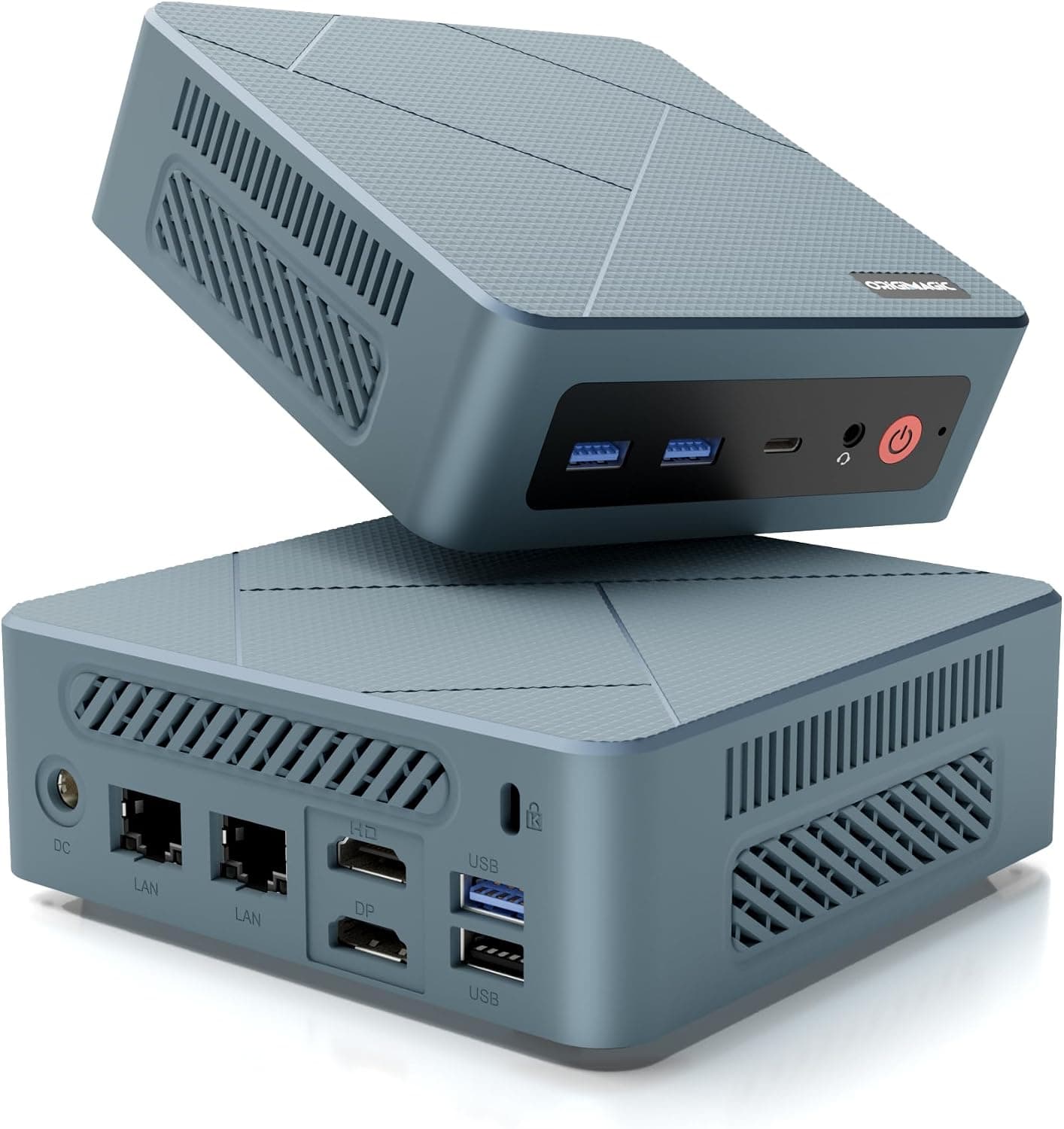
Yes. It features three display outputs: HDMI 2.0 (4K@60Hz), DisplayPort (4K@60Hz), and a Type-C port (1080p@60Hz), allowing up to three independent screens simultaneously.
It handles lighter games well — one reviewer said their son plays games on it with no lag, and another said it runs Minecraft and other games well. However, one reviewer noted that for bigger-title games it might not be the right choice.
Yes. Reviewers report it works great for basic tasks and office work, with no lag, smooth WiFi, and plenty of ports; the listing also describes it as delivering smooth performance for multitasking, office applications, web browsing, and everyday computing.
Yes. The listing states it is equipped with an efficient cooling fan and low-power AMD processor, engineered for low power consumption and high stability for 24/7 continuous operation, and it includes dual Gigabit LAN ports suited to soft router, firewall, and home server setups.
From a similar, more-reviewed product in this category: KAMRUI P1 Mini PC W-11 pro, AMD Ryzen 7330U Mini Computer (Βeats 3550H/R3 5300U,Max 4.3GHz,4C/8T), 16GB RAM 256GB M.2 SSD, Triple 4K Display, WiFi/BT/for Business Home Office Mini PC
The listing describes the operating system as OS(64bit), and one customer reported that the unit arrived with Windows 11 pre-installed, while another customer stated that no Microsoft license was included and that continued use required purchasing a valid license. The material does not consistently confirm that a Windows 11 Pro license is included.
Customers describe it as fitting in the palm of a hand, shorter than a mouse, and about the size of a breakfast English muffin, with one calling it very compact.
The listing states the P1 supports triple 4K@60Hz display via USB3.2 Gen2 Type-C, DP1.4, and HDMI2.0, and one customer reported connecting three 4K HDR monitors along with a mouse, keyboard, and speakers.
The listing says the P1 starts with 16GB DDR4 RAM (upgradable to 64GB, not included) and a 256GB M.2 SSD, and states storage is expandable to 4TB.
Customers report it is fast and easy to set up, with good performance for everyday tasks and cloud-based applications, and the listing cites an AMD Ryzen 7330U with boost clock up to 4.3 GHz for multitasking, 4K video playback, and light games.
Answers are limited to the manufacturer's listing and the reviews we analysed. Questions those sources cannot support are not answered here.
Transparent by design


