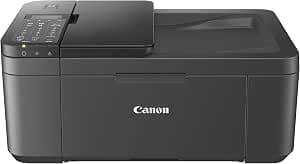
Canon PIXMA TR4755i - 4-in-1 Colour Printer - Print, Scan, Copy, Fax - Duplex WiFi Printer, CAD 20 Sheets, Photo Printer, Compatible with PIXMA Print Plan
Description
Ideal for home offices, this 4-In-One printer links connectivity with productivity and is compatible with PIXMA Print Plan, a flexible monthly subscription for inks based on pages printed – you'll never run low on ink again. With seamless Wi-Fi connectivity, automatic 2-sided printing and a 20-sheet ADF for copying and scanning multiple page documents, this printer is your perfect home office helper.
One less thing to search
Before you buy: quick questions
I keep seeing “CAD 20 Sheets” in the product title—what does that actually mean? Do I need special CAD software?
That refers to the rear paper tray’s maximum capacity of 20 sheets, not CAD software compatibility. Many users find this wording confusing, so you’re not alone. For typical home use, it’s fine for letter-size paper; just don’t expect to run large batch jobs without refilling.
Is the PIXMA Print Plan mandatory, or can I use regular ink cartridges? Which option saves more money?
The Print Plan is optional—you can buy standard cartridges separately. However, TikTok users and Reddit threads frequently warn that individual cartridges are expensive and run out quickly, especially with color photos. The Print Plan ($2–3/month for 50 pages) can save money if you print consistently, but for very light or heavy users, standard cartridges may be cheaper per page.
How reliable is the WiFi connectivity? I’ve heard complaints about it dropping offline.
That’s a common pain point in online reviews. The TR4755i’s WiFi works well for most users, but some report random disconnections, especially in homes with multiple devices or mesh networks. A tip from user forums: keep the printer close to your router, and avoid using the USB cable as a fallback if WiFi drops—the connection can be finicky.
I’m a student who prints 50+ pages per week. Is this printer a good fit for me?
Probably not the best choice for heavy use. While it’s great for light home office tasks (under 100 pages per month), students often find it too slow for duplex printing and too expensive on ink. Many users who regretted this purchase mentioned they should have chosen a mega-tank model like the Canon PIXMA G3270 for higher volume.
What’s the actual photo print quality like? Can I use thick paper without jams?
Photo quality is decent for casual prints—good enough for family albums or school projects—but it won’t match a dedicated photo printer. For thick paper (like 5x7 cardstock or glossy photo sheets), the rear tray handles it okay, but some users report occasional jams if the paper isn’t perfectly flat. For best results, stick to Canon’s recommended paper weight range (up to 300 g/m²).
Answers are limited to the manufacturer's listing and the reviews we analysed. Questions those sources cannot support are not answered here.
Transparent by design