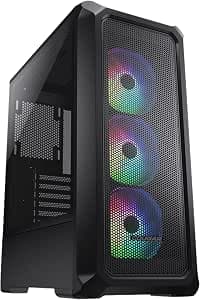
Cougar Archon 2 Mesh RGB Black Elegant ARGB Mid Tower Case with Powerful Mesh Entries
Description
Archon 2 Mesh RGB sports an attractive and stylish design with three ARGB fans on the front panel. The built-in light button allows it to display amazing lighting effects. Powerful airflow, powerful bracket for up to 360mm radiator, 315mm graphics card and 170mm CPU cooler offer superior value for you.
One less thing to search
Before you buy: quick questions
How is the build quality and material thickness? I've seen comments about it feeling "thin."
The Archon 2 is designed as a value-oriented airflow case. While the steel frame is structurally sound for assembly and daily use, some users on forums like Reddit have noted the side panels and certain sections can feel less dense compared to more premium cases. The trade-off is a lighter case and excellent airflow at this price point. Handle with care during building, especially when removing the side panels.
Will my large graphics card and CPU cooler fit inside this case?
Yes, compatibility is a strong point. It supports GPUs up to 350mm in length and CPU coolers up to 165mm tall. This comfortably fits high-end components like an RTX 4080 or a large dual-tower air cooler. As many YouTube build guides show, it's a roomy mid-tower for standard ATX builds.
What's the deal with the RGB lighting and software control?
The case includes pre-installed ARGB fans connected to a built-in controller, which can be managed with a button on the case or by connecting to a motherboard's 5V ARGB header. Social media feedback suggests the included Cougar software can be basic; many users recommend using your motherboard's software (like ASUS Aura Sync or MSI Mystic Light) for more reliable control if possible.
Is it good for a first-time builder, and how is cable management?
Absolutely! The open layout and tool-less drive bays make initial installation very straightforward. For cable management, there is a dedicated space behind the motherboard tray. It's sufficient, but as noted in several TikTok build videos, it can get snug with all cables. Using zip ties and taking a little extra time to route cables flat will result in a clean build with great airflow from the mesh front.
How does this case compare to alternatives like the Phanteks G360A or Lian Li 216?
The Archon 2 competes directly in the budget airflow segment. The common consensus from comparison reviews is that it matches or exceeds others on pure airflow and value. The Phanteks G360A often comes with one more pre-installed fan, while the Lian Li 216 is frequently praised for slightly more robust build quality and innovative features. The Archon 2 remains a top contender if your priority is maximizing cooling performance per dollar spent.
Answers are limited to the manufacturer's listing and the reviews we analysed. Questions those sources cannot support are not answered here.
Transparent by design