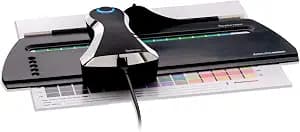
Datacolor Spyder Print - Advanced Data Analysis and Calibration Tool for Optimal Print Results, Perfect for Photographers, Graphic Designers, and Printing Professionals
Description
Spyderprint is the full-featured solution that professionals choose to manage color in their print output. By selecting any combination of printer, ink and media in the software, Spyderprint provides a full assortment of tools to let you push the limits of advanced inkjets to create gallery quality prints in color and black and white. Spyderprint gives you full control of your printer output with the ability to create any number of custom profiles to ICC Standards. Simply install the software, print your choice of targets with your printer and then use the SpyderGuide device to help step you through the easy process to calibrate and build a profile. Includes Spyderprint Spectrocolorimeter and Base, SpyderGuide, 6? USB cable, Spyderprint Software CD, Quick Start Guide (in 10 languages), Free Online Support.
One less thing to search
Before you buy: quick questions
Is the Spyder Print truly "plug-and-play," or is there a steep learning curve?
While the core process is straightforward, most users report that achieving optimal results requires some technical familiarity with color management. The software has a professional-level interface that can be unintuitive for beginners. We recommend checking out the official setup videos and budgeting some time for the initial learning process. Many YouTube creators have also made excellent tutorial guides that new users find invaluable.
I've read reviews about flimsy hardware and software bugs. How reliable is it in practice?
Feedback on reliability is mixed, which is reflected in the product's average rating. Some professionals use it for years without issue, while others encounter problems with the USB connection or software stability. The consensus on forums like Reddit is that when it works, it's incredibly accurate, but the experience can be inconsistent. We advise handling the device and connection port with care and ensuring your operating system is fully updated for the best compatibility.
Who is this product best suited for, and who might want to look elsewhere?
The Spyder Print is best for budget-conscious photographers and designers who are comfortable with technical software and troubleshooting to access high-end calibration results. It's less ideal for users who prioritize a seamless, 100% reliable "set-it-and-forget-it" experience. If your workflow demands absolute reliability and you have a higher budget, professionals on TikTok and photography subreddits often recommend considering alternatives like the X-Rite i1Studio.
Can I create custom profiles for any printer and paper combination?
Yes, this is one of the Spyder Print's key strengths. It allows you to build custom ICC profiles for your specific printer, ink, and paper type, which is essential for achieving exact color matches. This capability is why many users praise its accuracy once properly configured, as it can drastically reduce costly ink and paper waste from test prints.
What if the software doesn't work on my computer? What's the return policy?
Compatibility is a common pre-purchase concern. Before buying, please double-check the system requirements on our website. If you encounter insurmountable software or hardware issues, our standard return policy applies. We recommend testing the product thoroughly soon after purchase. Many users who expressed regret online noted they wished they had tested it more comprehensively within the return window.
From a similar, more-reviewed product in this category: Desk Ring Light with Stand for Computer, Desk Light for Video Recording
How bright is this desk ring light, and can I adjust the lighting?
Reviewers describe the lighting as bright and flattering, and the listing states it has 3 color temperatures and 10 brightness levels (3000K-6500K) so you can customize it to your needs.
Is the ring light sturdy and well made?
Multiple reviewers say it feels very sturdy and well made rather than flimsy, and the listing notes it has an anti-scratch metal base that is more stable than clamp-style ring lights.
Does it take up a lot of space on a desk?
A reviewer said it fits perfectly on their desk without taking up too much space, and the listing states the metal base can fit on any table without taking up too much space.
Why is my USB ring light not lighting up or flickering?
The listing advises using a 5V/2A (10W) adapter, which is not included, because incorrect voltage or low power may cause flickering or failure to turn on, and computer USB ports or power banks often do not provide enough power.
Why won't the bracket pole of my ring light stay fixed?
The listing explains that a rubber ring inside the bracket pole helps secure it, so if that ring has shifted or fallen off the pole may become loose, and the fixing screws may not be tightened properly.
Answers are limited to the manufacturer's listing and the reviews we analysed. Questions those sources cannot support are not answered here.
Transparent by design