What people like
Works well, often genuine Dell
Most reviewers report the battery installs easily, fits, charges, and works as expected, with several noting it appears to be a genuine Dell battery.
The 30-second read
What people like
Most reviewers report the battery installs easily, fits, charges, and works as expected, with several noting it appears to be a genuine Dell battery.
The main watch-out
A few reviewers report the battery not charging or not holding a charge, even after charging for over 24 hours.
Before you choose
One reviewer found it did not precisely fit an Inspiron 5482 despite the description, and installation may require small screwdrivers or a technician.
From a similar, more-reviewed product in this category: A1405 A1466 Battery for MacBook Air 13 inch A1466 Early 2015, 2017 A1496
What people like
Reviewers consistently say the battery fits properly, installs easily with the included tools, and restores their laptops to working order.
The main watch-out
A few reviewers report that battery life is lacking or shorter than expected, though others find it adequate.
Before you choose
Reviews mention specific MacBook Air models like A1466 and 2017 MacBook, so verify your model number matches before buying.
Your use case first
0 of 11 mentions describe a negative experience (0%).
2 of 10 mentions describe a negative experience (20%).
2 of 6 mentions describe a negative experience (33%).
One review can mention several topics. Percentages describe the reviews we analysed, not all buyers or the product's overall failure rate.
From a similar, more-reviewed product in this category: A1405 A1466 Battery for MacBook Air 13 inch A1466 Early 2015, 2017 A1496
119 of 629 mentions describe a negative experience (19%).
14 of 367 mentions describe a negative experience (4%).
34 of 296 mentions describe a negative experience (11%).
7 of 130 mentions describe a negative experience (5%).
1 of 100 mentions describe a negative experience (1%).
273 of 524 mentions describe a negative experience (52%).
143 of 301 mentions describe a negative experience (48%).
41 of 107 mentions describe a negative experience (38%).
Compare the trade-offs
A random selection of analyzed products from the same category. Different products are not necessarily interchangeable.

01AV478 L17L3P71 SB10K97620 Laptop Battery Replacement for Lenovo ThinkPad T480s Series Notebook L17M3P71 01AV479 SB10K97621 L17M3P72 01AV480 SB10K97622 11.58V 57Wh 4920mAh

Tanch Genuine L18C4PF3 L18C4PF4 L18M4PF3 L18M4PF4 5B10T09081 5B10W67217 5B10W67194 5B10T09079 Laptop Battery for Lenovo Ideapad s540 Ideapad c340 14IWL C340-14IWL 14API 81N6 15.36V 2865mAh 44W

86Wh 69KF2 Battery for Dell XPS 15 9500 9510 9520 Precision 5550 5560 5570
Check the evidence
Included does not mean verified authentic. Flagged does not mean proven fake. These are analytical classifications.
Showing 3 illustrative excerpts, not the complete review set.
Looks and it is recognized as a Dell battery, it works well on a 5-yr old Dell Inspiron 15 5000
“Just finished to install this battery on a 5-year old Dell Inspiron 15 5000. The battery does look and it is identified by the computer as a Dell battery. Installation was really easy (if you are at least a bit handy with disassembling electronics). Other than a Phillips screwdriver you will need a guitar pick or any other thin plastic tool to pry open the bottom panel of the laptop. Just be careful to not push it in too much, or you may damage something. Just slide it on the side with one hand while lifting gently the cover with the other to disengage the clips. Another important operation is to be very careful in detaching the battery connector. I used a small flat screwdriver as a lever, without pushing it in too much, inserting it in the small gap between the battery and the connector and working my way from left to right and back little by little, until it came loose enough to be pulled grabbing the connector body. Upon reassembly and power on of the laptop, it showed to already have a 70% charge out of the box. Checking it with the Dell Power Manager it now shows the battery health as "Excellent". For the curious minds, you can get much more information running the command powercfg /batteryreport from Terminal. It will save a very comprehensive battery report in a html file to the file path C:\Users\your_user_name\battery-report.html, which you can open with any browser. I suggest you run this command before you replace the old battery, so you can make a comparison between the old and new. You can see in the attached screenshots what I got in my case. As you can see, the old battery was really on its last leg, with only ~5,500mWh of the original capacity left The new one appears to have a slightly lower design capacity that the rated 42,000 mWh, although the full charge capacity is much close to the design one. Considering this cost $59 while Dell wanted $95, I'll gladly live with that!! Not a bank-breaking price difference, but why pay more and get it in a week instead that a couple of days? We'll see if anything changes after a few charge/discharge cycles and how long this will last, but we are off to a good start.”
Signals matched: Specific detail: quantity, entity, process · Mentions: functionality, quality · Reads as an authentic voice
Appears to be an original Dell battery
“If it's not an original Dell battery, it's a very good fake. In any case, it fits my Dell Vostro perfectly (same model number as the battery that it came with), and it fixed the problem I had before replacement - the laptop immediately shut off abruptly after Windows finished booting up. Battery life appears to be good again, and hopefully I can get another few years out of this laptop. It's more expensive than 3rd party batteries, but less expensive (and faster, thanks to Amazon Prime) than buying directly from Dell. Installation is fairly straightforward.”
Signals matched: Specific detail: entity, scenario · Mentions: quality, battery life, functionality · Reads as an authentic voice
Does NOT precisely fit an Inspiron 5482
“Despite the product description, this battery did not precisely fit my Dell Inspiron 5482. The battery itself fit into the case just fine, but the battery I removed had a different product number and the connector port was in a slightly different position. The connector itself fit fine, but I was forced to bend the wire somewhat - but not enough to kink it - to make it fit. The specs were the same. Otherwise, the install was easy and the battery appears to work just fine. I'll edit this review if I notice any other issues.”
Signals matched: Specific detail: entity, process · Mentions: quality, functionality · Reads as an authentic voice
One less thing to search
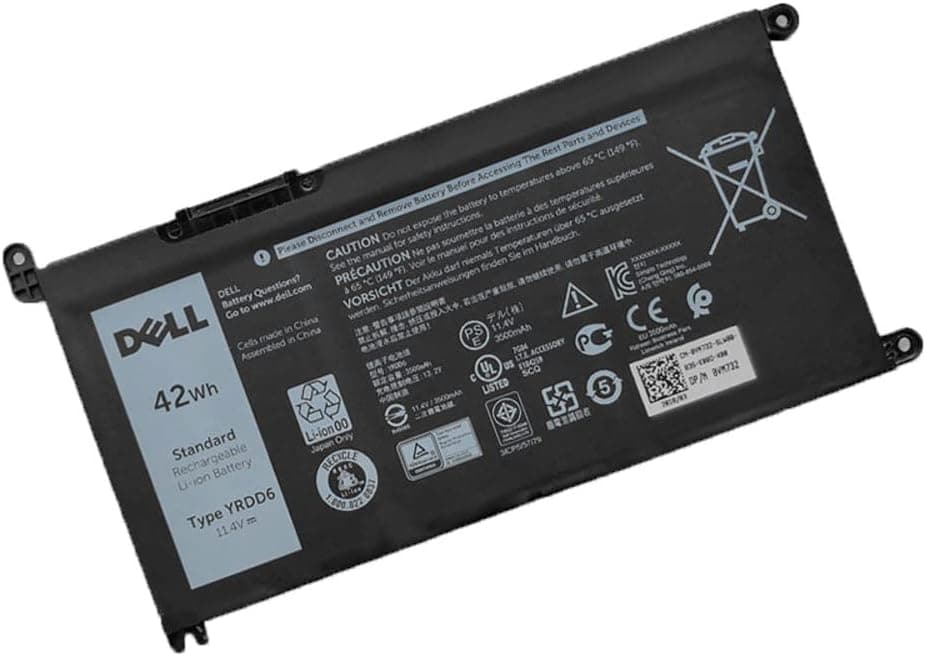
Multiple reviewers report that the battery looks and is identified by the computer as a Dell battery, with some noting it arrived in official Dell packaging. One reviewer said that even if it is not original, it is a very good fake that fits and works correctly.
Reviewers describe installation as really easy for anyone comfortable disassembling electronics, though one notes it requires screwdrivers with very small heads and suggests engaging a technician if you are uncomfortable taking your computer apart.
Several reviewers report that it keeps charge and lasts longer than the original, and one mentions it lasted almost two hours. However, a few reviewers reported problems, including one battery that would not charge past 14% after 24 hours and another that worked but did not appear to keep a charge.
It is a 3-cell rechargeable lithium polymer battery rated at 11.4V, 42Wh, 3500mAh, and is listed as brand new with overcharge, overdischarge, over-temperature, and short-circuit protection, supporting up to 500 recharge cycles.
The listing states a full refund within 30 days and free replacement within 12 months, and the product details list a 1 year warranty.
From a similar, more-reviewed product in this category: A1405 A1466 Battery for MacBook Air 13 inch A1466 Early 2015, 2017 A1496
Yes. The listing states it is compatible with MacBook Air 13" Model A1466 EMC 2925 (Early 2015 Version), and reviewers confirm it fit as it should and installed easily in their A1466 MacBook Air.
Reviewers report it is simple to install, with one noting the included tools fit perfectly and the swap took about 10 to 15 minutes. The listing advises turning off the laptop and disconnecting power before installing the new battery.
Reviewers report varied results: one got well over four hours depending on usage, another held a solid 2.5 to 3 hours with full usage, and one found battery life lacking but was happy overall.
The listing recommends updating the BIOS settings, or disconnecting the old battery and holding down the power button for 20 seconds, then connecting the new battery.
The listing states it offers a 60-day money-back return, a 12-month replacement, and 2 years of tech assistance.
Answers are limited to the manufacturer's listing and the reviews we analysed. Questions those sources cannot support are not answered here.
Transparent by design