quality
Mixed experiences50 of 241 mentions describe a negative experience (21%).

Description
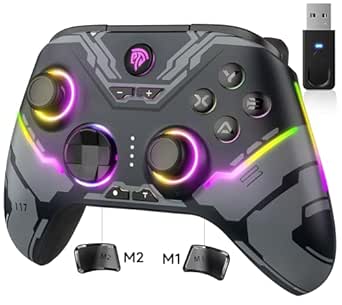
Product description ECHTPower Wireless PC Gaming Controller Upgraded PC Controller HALL EFFECT JOYSTICK WIRELESS PC CONTROLLER Previous page Next page 1 1000Hz Polling Rate 2 Compatible Devices 3 Advanced Features Previous page Next page 1 Globle Sales 2 Loved By Players 3 Certification Report
Your use case first
50 of 241 mentions describe a negative experience (21%).
8 of 63 mentions describe a negative experience (13%).
11 of 50 mentions describe a negative experience (22%).
74 of 152 mentions describe a negative experience (49%).
40 of 76 mentions describe a negative experience (53%).
25 of 56 mentions describe a negative experience (45%).
23 of 49 mentions describe a negative experience (47%).
20 of 34 mentions describe a negative experience (59%).
One review can mention several topics. Percentages describe the reviews we analysed, not all buyers or the product's overall failure rate.
From a similar, more-reviewed product in this category: DIANVEN Wired Controller for PS4 Controller Wired for Sony Playstation 4/Pro/Slim and PC Windows 11/10/8/7 with Double Vibration and Motion Motors, Wired PC Controller for PS4 Remote
5 of 17 mentions describe a negative experience (29%).
60 of 117 mentions describe a negative experience (51%).
29 of 91 mentions describe a negative experience (32%).
31 of 46 mentions describe a negative experience (67%).
31 of 45 mentions describe a negative experience (69%).
15 of 23 mentions describe a negative experience (65%).
28 of 29 mentions describe a negative experience (97%).
18 of 22 mentions describe a negative experience (82%).
Compare the trade-offs
A random selection of analyzed products from the same category. Different products are not necessarily interchangeable.
EasySMX X15 PC Controller - Enhanced Wireless Bluetooth Controller with Hall Joysticks/Hall Triggers/RGB Lighting - No Stick Drift, No Dead Zone - Work for Windows PC, Android, Steam and Switch

DIANVEN Wired Controller for PS4 Controller Wired for Sony Playstation 4/Pro/Slim and PC Windows 11/10/8/7 with Double Vibration and Motion Motors, Wired PC Controller for PS4 Remote

8BitDo Ultimate 2C Wireless Controller for Windows PC and Android, with 1000 Hz Polling Rate, Hall Effect Joysticks and Triggers, and Remappable L4/R4 Bumpers (Green)
Check the evidence
Included does not mean verified authentic. Flagged does not mean proven fake. These are analytical classifications.
Showing 3 illustrative excerpts, not the complete review set.
A PC gamer's review on the ECHTPower wireless controller
“This is a great value controller for those that want more features than what the official controllers offer but don't want to break the bank. Pros: - TMR joysticks. A must nowadays in the era of stick drift. - Very unique and cool looking design while still being relatively subdued. - Feels solid in the hands and not cheap. - Has a bit of weight but not too heavy. - Trigger switches to go from a more traditional trigger to clicky triggers. I personally prefer this so its a great feature to see. - Being able to switch between Xbox and Switch button layouts easily by popping off the magnetic faceplate. Personally I'm not someone that needs or cares about this too much but its nice for those that need the labels to match the platform. As a result the ABXY buttons aren't labeled in the traditional way and instead they use RGB lights to show the buttons, it looks pretty cool. - Being able to switch between 2.4ghz/Bluetooth with a simple switch and easily being to switch between Xinput/Dinput. Personally I always use Xinput and 2.4ghz since in my experience its always the best experience but great nonetheless. - Pretty low latency in games. I play Call of Duty, Halo and other games with it and it felt pretty good and responsive. - You can turbo every button! One of my biggest gripes with companies like 8bitdo is their controllers don't let you turbo the triggers. This controller can, a great feature. Pro/Con depending on your tastes: - Minimal RGB. I'm a staunch hater of RGB and too many flashing lights so the controller only lighting up the ABXY buttons and the charging light is right up my alley. - Clicky DPAD. Personally I like clicky dpads, I like the feedback it gives me and it feels nice to me but I know some people don't care for it. - Charging dock/built in battery. This might be a deal breaker for some. The controller has the option to use it wired through USB in case of anything. Cons: - No software on PC. It's not the end of the world but there are a LOT of button combinations on this controller to do specific actions. Some are straightforward (most of the important ones are) but others not so much so you'll be keeping the manual handy at all times. I would have liked to see a software that streamlined this. - The dpad is a little too tall. Unlike the rest of the buttons on the controller, the dpad is above the magnetic faceplate. As a result the dpad ends up being a little tall for my liking. I got used to it but if they do a revision/successor to this controller then I would like the faceplate to have a bigger cutout to accomodate the dpad and for it to be more inside the controller. - No way to completely turn off the RGB. You can adjust the brightness but for me the best option is off. I have another ECHTPower controller that lets you turn off all the RGB so I was surprised by the absence. It's not a deal breaker by any means but in a future revision I would like to see this added. - No simple way to see battery status on 2.4ghz. The cons are nowhere near enough to ruin this controller for me. It's a very good controller, I give it a 4.6/5, a great effort by ECHTPower.”
Signals matched: Specific detail: entity, comparison, process · Mentions: quality, ergonomics, stick drift, button responsiveness · Reads as an authentic voice
Awesome controller (with asterisks)
“I was really excited to try this controller. Here's are some things to consider if you're looking at this as a new or replacement controller. Pros - It was super easy to set up and you get multiple options to connect to your devices. The single is stored inside the controller, you just have to remove the face plate. - The faceplate is magnetic and very simple to remove. Just quickly pop off the D-pad and the plate comes right off. - Directly inside the faceplate, you can manually switch between button layouts for the Nintendo Switch and Xbox. - Some people might not like it, bit I thought it was really cool that the buttons are effectively blank. When you turn the controller on, the letters on the controller are backlit and show the button mapping for whichever setting you prefer (Switch or Xbox) - The back buttons are easy to program and require no external software. - The hall effect joysticks are very responsive - The buttons, triggers, and bumpers feel really nice. - Comes with a charging dock Cons - The controller doesn't feel cheap, but also not quite as premium as I would like for the price. For a $70 controller, it is competing with the likes of the Flydigi Vader 4 Pro, which is a much nicer feeling controller with more buttons and customizability where it matters, like joystick tension and thumbsticks. - The thumbsticks were a big issue for me. I prefer to play my games with extended thumbsticks. This controller does not have swappable thumbsticks, nor can I use my KontrolFreaks because the thumbsticks are not the same size as the Xbox. This was my biggest issue because of how I use my controllers. - Another issue I have with the controller is that I like having additional buttons for certain games. This controller has two additional buttons on the back that are minimally distracting and responsive. If it had two more, I would like this controller quite a bit more. - The magnetic faceplate.... It's such an awesome feature for customizability and yet I can't find any faceplates on Amazon or from the manufacturer. If you're going to provide a feature like this when you launch an item, it would be a great idea to have at least a few options available. - The turbo button is a cool feature but sometimes gets stuck on and I have to turn the controller off to turn the turbo off. This controller is very nice and I think it has a lot of potential, but the price is a bit high for the feature set offered. I would absolutely recommend the controller based on performance and features. But at this cost, I would choose the Vader 4 Pro over this. I would choose it over an Xbox controller, absolutely. And if it's on sale, that helps, not even then it's competing against established competition like the EasySMX, which offers a near identical experience for slightly less, especially on sale. In short, don't overlook this controller. There is a lot to love and be impressed by, but I personally need a better value proposition and improvements to customizability before I can give this controller 5 stars.”
Signals matched: Specific detail: entity, process · Mentions: connectivity, button responsiveness · Reads as an authentic voice
Very VERY weak USB Dongle, Worse Bluetooth
“TLDR: Don't buy for the wireless USB capabilities. It doesn't work. I purchased a BLACK 2 model to use with a BC-250 Linux system being utilized as a steam machine. My system does not have any native Bluetooth capabilities and has a hard-wired Ethernet connection. So buying a Wifi/Bluetooth dongle to use with a Bluetooth controller was less than ideal. Hence why I purchased this product. Currently, I am using a wired MSI controller that kids keep tripping up on and/or pulling. So I was hopeful getting a wireless controller with a charging dock. However, I have been nothing but disappointed by this controller. Before I drove into the negative aspects of the controller, there was a couple expectations that were met. The build quality is similar to a $20 Nintendo switch wired controller. For a $30 wireless controller with a dock, I expected this. The controller has multiple connection options, which is a nice to have, but unused by me. RGB is a fun touch too. HOWEVER, I cannot use this controller as I intended to. Since I already have a wired controller and my system didn't have native Bluetooth, I wanted to use the system with the wireless USB dongle. My system is inside of an ikea fjallbo tv unit. Think metal mesh. All of my game consoles (PS5, Wii, etc) are in there and have no problem with controller connections. However, they use Bluetooth connections for their controllers. When I plugged in the USB dongle for this controller and shut the metal mesh cabinet door, the controller had no connection and promptly shut off when I tried to use it. However, the wireless keyboard/mouse I have that also uses a wireless USB dongle has no such issues. When I opened the door to my TV cabinet, the controller was able to connect. Having to open the cabinet defeated the purpose of the cabinet since it no longer kept a young child out of the cabinet. However, after further testing, the controller only occasionally connected to the USB dongle (it often failed even if adjacent to the dongle) and if the controller lost line of sight to the dongle it dropped/missed inputs, experienced major lag, and constant disconnections. Essentially, the controller was less reliable than a wii controller's IR pointing functionality. And since I already have a wired controller, this was worthless. EDIT: Tried giving the device the benefit of the doubt and tried using it as a Bluetooth device. I purchased a third party Bluetooth dongle to use on the BC-250 and this device would not connect. I tried to use it on my Windows PC as well and this device would not connect. I've tried resetting the device and no luck. I pulled up the ECHTPower website to see if there was a firmware update, but the website was WORSE than the controller. I HIGHLY advise you to stay away from this controller.”
Signals matched: Specific detail: entity, scenario, comparison · Mentions: connectivity, compatibility · Reads as an authentic voice
One less thing to search
The manufacturer states it uses Hall Effect joysticks designed to eliminate drift, and multiple reviewers report no drift, including one who noted their Xbox controller developed drift after just over a year while this one did not.
The listing says it works on PC, Switch, iOS, and Android via Bluetooth, 2.4G wireless, or USB-C, and notes it is not compatible with Xbox; reviewers confirm it works with everything they tried, including a PC and Switch.
The listing claims an 800mAh battery with up to 15 hours of playtime, and reviewers report about 6 hours of gaming without needing a recharge, that the battery lasts long enough to get bored of playing, and that it holds its charge well.
The listing advertises a 1000Hz polling rate for instant response on 2.4GHz and wired, and most reviewers report no noticeable delay, though one reviewer did report a slight delay on the wireless option and chose to plug it into the PC instead.
Reviewers describe it as solid and not cheap-feeling, lightweight enough to use for long sessions without fatigue, and one long-term user called it very durable, while another found it lightweight and slightly fragile but manageable.
From a similar, more-reviewed product in this category: DIANVEN Wired Controller for PS4 Controller Wired for Sony Playstation 4/Pro/Slim and PC Windows 11/10/8/7 with Double Vibration and Motion Motors, Wired PC Controller for PS4 Remote
Results vary: one reviewer reported it turned off after 8 minutes on a PS4 Pro and had to be unplugged and replugged, while the listing states it fits PlayStation 4/Pro/Slim. Another reviewer said it worked as a true corded controller connecting to the PS4 via USB.
Reviews are mixed: one reviewer used it for a couple of years and said it still works like a charm, while others reported it stopped working in under two months or disconnected frequently.
Several reviewers described snappy response and solid build quality, but one reported the D-pad sometimes inputs the wrong axis when pressing near another axis, getting worse with use.
The listing says it is plug-and-play with no drivers needed and includes a 6.5 ft cable, and one reviewer confirmed great plug-and-play that was ready to go out of the box with Steam games.
No, the listing states the central button does not work as a touchpad, and one reviewer noted the touchpad won't register with games that use sliding or gliding.
Answers are limited to the manufacturer's listing and the reviews we analysed. Questions those sources cannot support are not answered here.
Transparent by design