
ELEGOO Neptune 3 Pro 3D Printer, Quick Assembly with Auto Leveling
Description
Reliable Printing with Ideal Build Size: ELEGOO Neptune 3 Pro offers a standard 225x225x280 mm/8.85x8.85x11 inch build volume, ideal for daily projects. STM32 motherboard and silent stepper motors ensure smooth, accurate movement with noise levels as low as 47dB. Ready to print in minutes with pre-assembled main parts and a full toolkit; Powerful Direct Drive Extruder: The Neptune 3 Pro features a dual-gear direct drive extruder with a 3:1 gear ratio, built from durable SUS303 stainless steel. It provides consistent filament feeding and fewer clogs, supporting PLA, TPU, PETG, and ABS with ease; Smarter Printing, Less Worry: ELEGOO Neptune 3 Pro includes 36-point auto bed leveling, making setup effortless while ensuring a perfect first layer. Filament runout sensor and power-loss resume function give you peace of mind during large or complex prints; Upgraded Nozzle System, Fewer Clogs: The nozzle system includes a titanium throat tube, brass nozzle, and widened aluminum heat sink. Combined with a front-mounted cooling fan, it enhances heat dissipation and helps prevent clogs during longer or faster jobs; Precision Z-Axis for Stable Results: Dual lead screws with dual motors ensure steady, accurate Z-axis movement. Durable POM V-guide wheels provide smooth motion and long-term reliability, ensuring consistent performance for every project
Compare the trade-offs
Similar products, side by side
A random selection of analyzed products from the same category. Different products are not necessarily interchangeable.
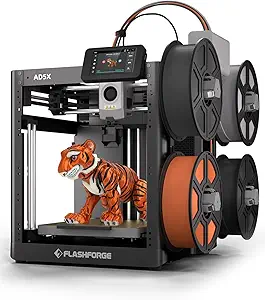
FLASHFORGE AD5X Multi-Color 3D Printer, CoreXY 600mm/s High-Speed, 1-Click Auto Leveling, 300°C Direct Drive Extruder, 220x220x220mm Build Volume, Ideal for Precision and Efficiency

FLASHFORGE AD5X Multi-Color 3D Printer 4 Colors with IFS, Fully Auto Leveling FDM 3D Printer with Max 600mm/s High Speed Printing and Max 300°C Nozzle, Large Printing Size 220 * 220 * 220mm

FLASHFORGE Adventurer 5M 3D Printer with Fully Auto Leveling, Max 600mm/s High Speed Printing, 280°C Direct Extruder with 3S Detachable Nozzle, CoreXY All Metal Structure, Print Size 220x220x220mm
One less thing to search
Before you buy: quick questions
Is the auto-leveling actually "automatic," or do I need to tweak the Z-offset manually after setup?
The Neptune 3 Pro does a solid job of auto-mapping the bed, but "set and forget" is a myth at this price point. Most users—and several YouTube reviewers—find they need to do a quick Z-offset calibration after the initial setup, especially if they swap nozzles or filaments. It’s a five-minute job, and after that, you’re good for a long while. It’s far less hassle than older manual-leveling machines, but it’s not yet a full "press print and walk away" experience.
Does this printer work with OctoPrint or a third-party slicer like Cura?
Yes, but the setup isn’t plug-and-play. The printer speaks standard G-code, so it works with Cura and PrusaSlicer, but ELEGOO’s official documentation is a bit lacking when it comes to custom profiles. A quick tip from the community: look up "Neptune 3 Pro Cura profile" on Reddit—you’ll find a user-generated profile that works infinitely better than the outdated one in the manual. For OctoPrint, you’ll need to plug it into a Raspberry Pi via USB, but the printer is fully compatible.
I’ve seen a few comments about the extruder jamming after a few weeks. Is this a widespread issue?
It’s a common concern but not a universal defect. A small percentage of users report grind marks on the filament after heavy use, which usually points to the tension arm wearing down. If you’re printing standard PLA, you likely won’t run into this for a long time. If you plan to print rougher filaments (like wood-fill or glow-in-the-dark), we’d suggest upgrading to a hardened steel nozzle earlier rather than later—this prevents premature wear that can lead those jams. When it does happen, the replacement parts are cheap, but you’ll be doing a little DIY repair.
I want to print a Cosplay helmet. Will a 220x220x280mm build volume be enough?
Honestly, no—not in one piece. That’s the number one “I wish I knew this before buying” comment we see on TikTok and Reddit. The volume is perfect for minis, toys, and mechanical brackets, but a full helmet will need to be sliced into pieces and glued together. If your main goal is big, single-piece prints, you’ll want to look at a larger model like the Sovol SV06 Plus. If you’re okay with sewing or gluing multi-piece prints, the Neptune 3 Pro handles that fine—just know the limitation going in.
I’m a total beginner. Is unboxing-to-first-print actually as fast as the marketing claims?
Yes, surprisingly so. The assembly is mostly attaching the vertical gantry and plugging in the screen—there’s no messy frame building. Most users report printing a successful Benchy within 45 to 60 minutes of opening the box. The only real hurdle is the slicer setup (we covered that in Q2), so we recommend saving the official ELEGOO Cura profile to your desktop before you even start the hardware setup. Once you do that, it’s a genuinely pleasant first-print experience.
From a similar, more-reviewed product in this category: ANYCUBIC Photon Mono 4, Resin 3D Printer with 7'' 10K Mono LCD Screen
How easy is it to set up the ANYCUBIC Photon Mono 4 for a beginner?
Multiple reviewers report that setup was quick and straightforward, with one printing within 30 minutes and another completing a first test print within an hour. The listing notes that every Mono 4 is assembled, calibrated, tuned, and tested before shipment, though leveling is still needed before printing.
What is the print quality like on the Photon Mono 4?
Reviewers describe the print quality as fantastic, with sharp details, smooth surfaces, and minimal layer lines, and one notes prints were very accurate most of the time. The listing attributes this to the 7'' 10K resolution (9024x5120, 17x17μm pixels) and the LighTurbo matrix light source that reduces layer lines and rasterization.
How big is the build volume, and is it large enough for bigger models?
The listing states a maximum print volume of 2.2L (153.4mm x 87mm x 165mm), or 6.04'' x 3.42'' x 6.49''. Some reviewers found the print size smaller than expected and had to adjust model sizes, and another said the print model size needs to be bigger.
Is the leveling difficult, and does the printer come leveled?
The listing says each printer is assembled, calibrated, tuned, and tested before shipment, but leveling is still needed before printing. Reviewers note the leveling is manual yet straightforward, with one mentioning minor leveling issues in the back corner that were not a big deal.
Is the Photon Mono 4 a good value for the price?
Reviewers repeatedly call it a great deal for the price, with one saying it is a heck of a deal and another calling it a good pick, while one negative reviewer reported the unit did not work and could not be returned. The listing shows a price of $209.99.
Answers are limited to the manufacturer's listing and the reviews we analysed. Questions those sources cannot support are not answered here.
Transparent by design