What people like
Ink lasts a very long time
Reviewers repeatedly praise the massive ink supply, with one noting they would have changed cartridges three times after 400 pages. Others highlight low ink costs and easy refilling.
The 30-second read
What people like
Reviewers repeatedly praise the massive ink supply, with one noting they would have changed cartridges three times after 400 pages. Others highlight low ink costs and easy refilling.
The main watch-out
One reviewer found the printer slow, especially when printing double-sided. Another had a negative experience with an ink cartridge error after years of use.
Before you choose
Consider whether you need a heavy-duty office machine or a home printer with fax capabilities, and confirm wireless setup works with your devices.
From a similar, more-reviewed product in this category: HP Envy 6555e Wireless All-in-One Color Inkjet Printer, Portobello, Print, scan, Copy, Duplex Printing Best-for-Home, 3 Month Instant Ink Trial Included, AI-Enabled (714N5A)
What people like
Many reviewers found setup quick and simple, and several praised the printer's print quality, including automatic double-sided printing.
The main watch-out
Some reviewers had a difficult setup experience or reported ongoing reliability issues, such as needing to unplug and replug the printer before each use.
Before you choose
One reviewer noted ink doesn't last long, and another needed a YouTube video to connect to Wi-Fi, so it's worth checking your printing volume and wireless setup needs.
Your use case first
36 of 122 mentions describe a negative experience (30%).
164 of 320 mentions describe a negative experience (51%).
110 of 303 mentions describe a negative experience (36%).
50 of 78 mentions describe a negative experience (64%).
17 of 45 mentions describe a negative experience (38%).
19 of 43 mentions describe a negative experience (44%).
75 of 106 mentions describe a negative experience (71%).
49 of 56 mentions describe a negative experience (88%).
One review can mention several topics. Percentages describe the reviews we analysed, not all buyers or the product's overall failure rate.
From a similar, more-reviewed product in this category: HP Envy 6555e Wireless All-in-One Color Inkjet Printer, Portobello, Print, scan, Copy, Duplex Printing Best-for-Home, 3 Month Instant Ink Trial Included, AI-Enabled (714N5A)
198 of 368 mentions describe a negative experience (54%).
222 of 319 mentions describe a negative experience (70%).
165 of 236 mentions describe a negative experience (70%).
66 of 172 mentions describe a negative experience (38%).
73 of 139 mentions describe a negative experience (53%).
51 of 79 mentions describe a negative experience (65%).
135 of 172 mentions describe a negative experience (78%).
61 of 78 mentions describe a negative experience (78%).
Compare the trade-offs
A random selection of analyzed products from the same category. Different products are not necessarily interchangeable.

HP Smart Tank Plus 570 Wireless All-in-One Ink Tank Printer with up to 2 Years of Ink Included (5HX14A)

Epson EcoTank ET-4800 Wireless All-in-One Cartridge-Free Supertank Printer with Scanner, Copier, Fax, ADF and Ethernet – Ideal-for Your Home Office, White

Epson EcoTank Pro ET-5800 Wireless Color All-in-One Supertank Printer
Check the evidence
Included does not mean verified authentic. Flagged does not mean proven fake. These are analytical classifications.
Showing 3 illustrative excerpts, not the complete review set.
5.0 out of 5 stars
“After 5 years, my HP home printer died. It had a good run, so I tried the similar level of HP. What a piece of junk that was! The HP didn’t work right from the get go and all the parts were so cheaply made. I returned that and decided to spend a little more to get the Epson ET-3850 after reading the reviews. I liked the idea of not having to pay a gazillion dollars every time you turn around on ink. The HP I had purchased because I liked the instant ink program I was on. It had its pros/cons.. Yes, I paid more for this printer, (I think it was $399) but it has a lot of ink that will last me for a while vs. paying a monthly instant ink membership of 5.99 - 9.99 a month. The Et-3850 was SOOOOO easy to set up. Super intuitive app that worked so easily with the printer. I set it up using my tablet and eventually added the printer to my husband’s phone, his tablet, and my phone. All easy peasy. I’m very impressed with the quality of the printer itself. The hardware of it seems well made; far better than the junk I got with the HP. The HP drawers were so rickety and always said they were open… (It was brand new and no, it wasn’t opened). I love the smaller footprint of it so it doesn’t take up valuable desk space. It allows me space to use my label printer too. I wanted one with the top multiple paper feeder; so again the ET-3850 fit the bill. I use that rarely to scan multiple pages (perhaps to a legal or financial professional) so I did still want that vs. raising and lowering the platten multiple times to copy each page. So far, I’m really impressed. I’m hoping this printer serves me well for at least another five years. I DO highly recommend it.”
Signals matched: Specific detail: quantity, entity, comparison, process · Mentions: printer quality, ink life · Reads as an authentic voice
1.0 out of 5 stars
“I bought this because in the past Epson provided phenomenal customer support and my last Epson lasted for many years without problem (although the way it died was annoying: one day it reported it could not read an ink cartridge, without specifying which cartridge - so I replaced each in order of 1st the cartridge I'd just replaced, then by low level... When all were replaced (costing me the whole box of all colors), it still wouldn't "read" an ink cartridge). I bought this because of the idea of the lower ink cost, bought this one on Amazon because our local (remote town) Walmart had no Epson printer with the automatic page feeder that I wanted for scanning. Set up was a pain with their automated set up not being user friendly. Unfortunately, the page feed did not work for more than 1 page when I tested it, but it was the middle of my business's busy season and I forgot to follow up and the warranty is quite short. Months later, I tried the feed again and now it won't even run 1 page, but keeps reporting "paper jam" when there is no paper to be found since it's never been used beyond that 1st test when the paper remained intact. I just wasted over 2 hrs, having to download Epson onto my computer again to make the scan work. SLOWEST PRINTER EVER EXPERIENCED. SCANNING IS EVEN SLOWER, especially when having to lay each page on the bed, then cover (otherwise you get dark edges on the saved scan image), then lift cover to start over with 2nd page - while having a 50 pg document to scan. I opted to instead eat up memory on my phone to more quickly use TurboScan app. EPSON HAS BECOME A SOURCE OF INSANITY AND WASTE OF MONEY & PRECIOUS TIME.”
Signals matched: Specific detail: process, entity · Mentions: ink life · Reads as an authentic voice
5.0 out of 5 stars
“I received this Epson EcoTank ET-3850 printer in excellent shape and in record time. This one was purchased for my church. I already had the same model at home and have been quite pleased with it. This purchase was no different. I like not having to purchase expensive ink cartridges frequently. This printer also does two-sided printing which saves on paper. The print quality is pretty good too. There is a document feeder in the top, And the shipper included two extra bottles of the black ink! I did not get any extra ink when I purchased the one for my home from a local store. We are really enjoying this printer! So, great product, fast shipping, great service. Thank you so much!”
Signals matched: Specific detail: entity, comparison · Mentions: ink life, print quality · Reads as an authentic voice
One less thing to search
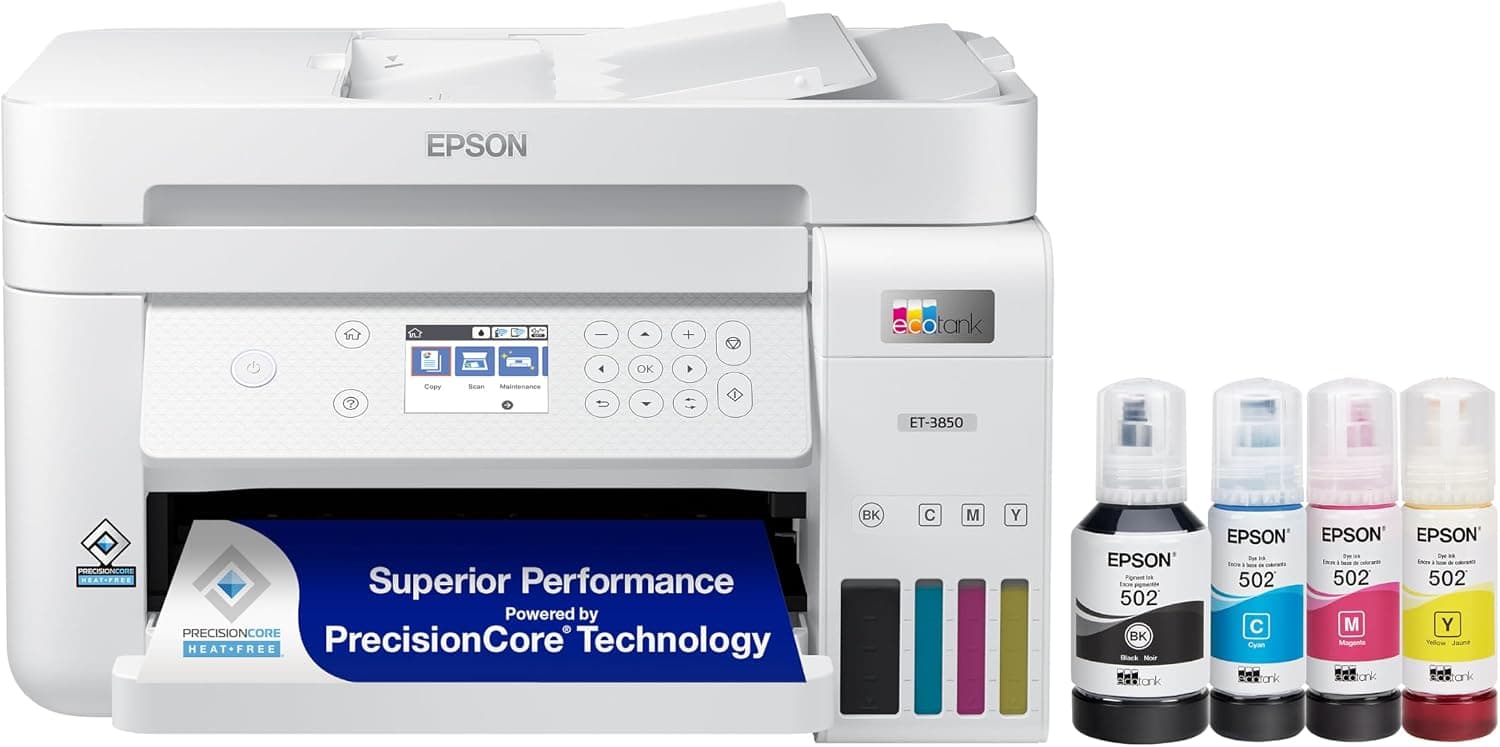
Reviewers report the included ink lasts a very long time; one said they had printed over 400 pages and would have changed cartridges three times by then, and another expected about four years of use. The listing notes actual yields vary by print tasks and that some included ink is used during initial setup.
Reviewers say it was simple to install and that they were printing within 20 minutes of opening the box, with easy wireless access and easy connection to tablets, iPads, and phones. The listing confirms Wi-Fi, USB, and LAN connectivity.
The listing rates it at 15.5 ppm in black and white and 8.5 ppm in color, with automatic duplex printing. One reviewer found it slow to print and even slower when printing double-sided.
The listing describes it as a color inkjet with resolution up to 1200 x 4800 dpi for excellent readability. Reviewers say the color is very good and the print quality is good.
Yes, the listing lists auto 2-sided printing as a feature, and a reviewer noted that the printer does two-sided printing, which saves on paper.
From a similar, more-reviewed product in this category: HP Envy 6555e Wireless All-in-One Color Inkjet Printer, Portobello, Print, scan, Copy, Duplex Printing Best-for-Home, 3 Month Instant Ink Trial Included, AI-Enabled (714N5A)
Most customer reviews describe setup as easy, with one reviewer calling it the easiest setup they've ever done, though another reviewer reported setup was a nightmare that took hours. One reviewer needed a YouTube video to find the correct steps to connect to Wi-Fi.
Yes. The manufacturer's listing states it has auto 2-sided printing, and customer reviews confirm it prints automatically on both sides and handles double-sided documents without difficulty.
Yes. The listing states it offers wireless and mobile printing and works with the HP app for printing, scanning, copying, or faxing from a smartphone, PC, or tablet. One reviewer said the phone app was very easy to use and they liked being able to print from their phone.
The listing states it includes 3 months of Instant Ink with HP+ activation, after which a monthly fee applies unless cancelled.
The listing states print speeds up to 7 ppm color and 10 ppm black.
Answers are limited to the manufacturer's listing and the reviews we analysed. Questions those sources cannot support are not answered here.
Transparent by design