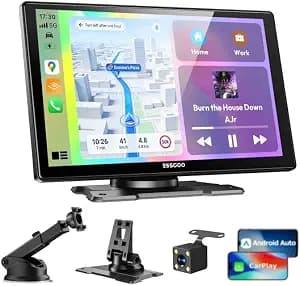
ESSGOO 9" Wireless CarPlay & Android Auto Screen for Car with Back Cam

ESSGOO 9" Wireless CarPlay & Android Auto Screen for Car with Back Cam

4.9 on Amazon12 ratingswww.amazon.com
Review reliability
86/ 100Grade A
Ratings and review wording line up closely, every review includes specific details, most ratings are high, and reviews show no promotional phrasing but strong signs of authentic voice.
Affiliate link — commission is the same whatever the score.

The 30-second read

Before you decide

A starting point, not a buying verdict

What people like

Easy wireless CarPlay upgrade

Reviewers consistently praise how easy it is to install and use, with wireless CarPlay connecting reliably and no dropouts. The 9-inch screen is seen as a good size for navigation and hands-free calling.

Before you choose

Check rear camera and vehicle fit

The rear camera is sold separately, so you'll need to buy it if you want backup camera functionality. Also consider whether a portable screen suits your car's dash layout, since it's designed to avoid replacing the factory radio.

The main watch-out

Rear camera sold separately

The backup camera is not included and must be bought separately, so factor that extra cost in if you want reversing support.

From a similar, more-reviewed product in this category: 9.26" Wireless Portable Carplay Screen for Apple Car Play Android Auto OTA

What people like

Easy setup and reliable connectivity

Reviewers repeatedly say the unit is plug-and-play, connects quickly to their phones, and works reliably for CarPlay and Android Auto. Many also praise the clear, bright screen and good value for the price.

The main watch-out

Minor lag and weak instructions

A few reviewers note occasional lag in navigation apps like Waze and criticize the included instruction pamphlet as poor. One also wishes the backup camera had a wider angle.

Before you choose

Check fit and phone compatibility

Consider whether the 9.26-inch screen size and supplied mounts suit your car's dashboard, and confirm your phone works with the wireless CarPlay or Android Auto connection.

Description

Previous page Next page Previous page Next page Is 9 inch too big? I don't want it blocking my view while driving. I had the same concern. The 9 inch sits right on top of the dash and honestly it's the perfect middle ground. I can read my maps without squinting but it doesn't block my windshield view at all. If you're between 7 and 10 inch, go with 9. Does the wireless connection actually stay stable or does it keep cutting out? This was my main worry before buying. It uses dual-band WiFi and Bluetooth 5.2 which makes a huge difference. I've been using it daily for 2 months on my commute and it reconnects instantly every time I start the car. Zero dropouts so far. I drive facing the sun every morning. Can I actually see the screen? Yes and that surprised me honestly. It's rated 400+ lux with an IPS panel. I drive east into direct sunlight and can still read my maps clearly. The 2.5D glass also reduces that annoying glare you get on cheaper screens. Way better than my last one. How do I get sound through my car speakers? My SUV only has Bluetooth. Then you're set. Just pair it via Bluetooth 5.2 to your car stereo and audio comes through your factory speakers. If your car has AUX you can also use the cable, or just use the built-in speaker for directions. Three options, your pick. Is it hard to install? I've never done anything like this before. If you can plug in a phone charger you can install this. Seriously. USB-C cable into any USB port or cigarette lighter, stick the mount on your dash, done. Took me maybe 5 minutes and I'm not a car person at all. No tools, no wiring, no dash removal.

Compare the trade-offs

Similar products, side by side

A random selection of analyzed products from the same category. Different products are not necessarily interchangeable.

Check the evidence

What the review excerpts say

Included does not mean verified authentic. Flagged does not mean proven fake. These are analytical classifications.

Showing 3 illustrative excerpts, not the complete review set.

Included in analysis5.0/5 stars

Great Mid-Sized CarPlay Screen That Hits a Nice Balance Between Visibility and Usability

“This is a review of the ESSGOO 9" Wireless CarPlay & Android Auto Screen with Backup Camera Support, that was priced at $89.99 (price shown in the listing) at the time of this review. I've used several portable CarPlay displays, and the 9-inch size feels like a sweet spot. It's noticeably larger and easier to read than many 7-inch units, especially when using navigation apps, yet it isn't so large that it dominates the dashboard or blocks visibility. The wireless CarPlay and Android Auto functionality is the main reason to buy it. Once paired, the unit reconnects automatically, allowing access to maps, music, messaging, and voice assistants without constantly plugging in your phone. For older vehicles that lack modern infotainment systems, this can be a significant upgrade. The IPS touchscreen is bright and reasonably sharp, making maps and controls easy to view during daytime driving. The dual microphone setup also appears to help with voice command recognition, which is useful when using Siri or Google Assistant while driving. I also like the flexibility of the audio options. Whether your vehicle uses Bluetooth, AUX, or the built-in speaker, there are multiple ways to get sound from the device without replacing the factory radio. The installation process is one of the biggest advantages. Simply mount it to the dashboard or windshield, connect power, and you're ready to go in minutes. There's no need to remove interior trim panels or install a new head unit. While the listing mentions backup camera support, note that the camera connectivity should be verified carefully since some versions support an included camera while others require a separately purchased compatible camera. Check the exact package contents before ordering. At $89.99, the value is strong. You're getting wireless CarPlay, Android Auto, navigation, Bluetooth connectivity, screen mirroring, and backup-camera capability for far less than the cost of replacing a factory stereo. Overall, this is a well-rounded portable CarPlay display that modernizes older vehicles without the expense and complexity of a traditional head-unit installation. The 9-inch screen size is arguably the best compromise between readability and dashboard space, making it particularly appealing for daily drivers.”

Signals matched: Specific detail: quantity, entity, comparison · Reads as an authentic voice

Included in analysis5.0/5 stars

Easy Way to Add CarPlay Without Replacing the Factory Radio

“I like these portable CarPlay screens because they can modernize an older vehicle without tearing the dash apart or replacing a factory stereo that otherwise works perfectly well. This ESSGOO gives you a 9-inch screen with wireless CarPlay and Android Auto, and setup is considerably easier than installing a traditional head unit. Once paired, the wireless connection is the feature I appreciate most. I can get in the car and have maps, music, calls, and Siri available without plugging my phone in every time. The 9-inch screen is also a nice size. It is large enough that navigation is easy to see at a glance, but not so oversized that it automatically dominates the dashboard. The IPS display looks good, touch response is quick, and the interface is straightforward. Navigation still comes from the phone, which I actually prefer because I can use Apple Maps, Google Maps, or Waze and always have current information instead of depending on maps stored inside the unit. There are several ways to get audio into the vehicle, including Bluetooth and AUX, plus the screen has its own speaker. I would use the vehicle's audio system whenever possible because the built-in speaker is more of a convenient backup than something intended to replace the car stereo. I also like the backup-camera input. A rear camera is not included with this particular package, but having the input available means you can add one later without replacing the display. Mirror Link is another useful bonus when appropriate, although for normal driving I am much more interested in the CarPlay/Android Auto interface than mirroring my entire phone. One thing worth thinking about before installing is placement. Even a 9-inch screen can block part of your view if it is mounted too high, so I would spend a little time finding a position that is easy to see without getting in the way. Overall: This is a very convenient way to add modern phone integration to a vehicle while keeping the original radio. Wireless CarPlay and Android Auto work well, the 9-inch screen is a good size, there are plenty of audio options, and the backup-camera support gives it room to expand. For an older car that I want to modernize without permanently changing the dash, this type of setup makes a lot of sense.”

Signals matched: Specific detail: entity, comparison, process · Reads as an authentic voice

Included in analysis4.0/5 stars

Easy Upgrade That Makes an Older Car Feel More Up to Date

“I wanted a CarPlay screen for an older vehicle because I use my phone for navigation all the time, and looking down at a phone mounted on the dash just isn’t as convenient. This gave me a larger dedicated screen without having to replace the radio that’s already in the car. Getting my phone connected was pretty straightforward. I especially like wireless CarPlay because my maps and music are right there on the screen when I need them. The display is clear and easy to see, and the touchscreen has responded well during normal use. Bluetooth 5.2 and the dual microphones are also nice additions, especially when using the system for calls or voice commands. The backup camera was another reason I wanted this setup. The night-vision capability is useful when backing up after dark, although I did spend more time installing and routing the camera wire than I did setting up the actual screen. I also like that it has an AUX output. Older vehicles don’t all have the same audio setup, so having another way to get the sound through the vehicle is useful. Pros: * Wireless Apple CarPlay and Android Auto * Clear IPS touchscreen * Backup camera included * Night-vision camera capability * Bluetooth 5.2 * Dual microphones for calls and voice control * AUX output * Mirror Link and GPS/navigation support * Doesn’t require replacing the existing radio Cons: * Running the backup-camera wiring takes some time * There are extra cables to organize if you want a clean-looking installation * It took me a little experimenting to find the best place for the screen Who It’s Good For: I think this makes the most sense for someone with an older vehicle who wants CarPlay, Android Auto, and a backup camera but doesn’t want to replace the factory stereo. It’s also nice if you want something that can be installed without making major changes to the dashboard. Final Verdict: I’m giving this 4 out of 5 stars. For me, the biggest benefit is having navigation on a larger screen and wireless CarPlay while still keeping the original radio. The backup camera adds another feature I actually find useful. Installation takes a little patience if you’re adding the camera and trying to hide all the wiring, but once I had everything where I wanted it, I was pleased with the setup.”

Signals matched: Specific detail: entity, scenario, process · Reads as an authentic voice
One less thing to search

Before you buy: quick questions

Will this fit my car, and how hard is the install really?

For most 2010–2020 vehicles, it's a genuine 10–15 minute job — no tools, no dash disassembly. The screen mounts on top of your existing dash and connects via the included cables. That said, a few Reddit and YouTube users with heavily curved or recessed dashes noted the suction mount needed extra fiddling, so it's worth eyeballing your dash shape before ordering. If your dash is flat or gently sloped, you're in the sweet spot.

Does the backup camera require running wires, and is audio quality good?

The backup camera is wired, and routing the cable through your trunk is the most time-consuming part of the setup — several TikTok reviewers called it "the only real chore." Once installed, though, it works reliably. On audio: it routes cleanly through your factory speakers via Bluetooth or AUX. Skip the FM transmitter option if you can — city users report static, while AUX delivers noticeably better sound.

How stable is the wireless connection day to day?

Very stable for the vast majority of users, with fast auto-reconnect when you start the car. A small number of reviewers mention the unit occasionally "forgetting" their phone and needing a quick re-pair — usually every few weeks, not daily. It's a minor quirk, not a dealbreaker, and most drivers never experience it at all.

Is the screen readable in bright sunlight, and does the 9-inch size block my view?

The 9-inch size is widely praised as the sweet spot — big enough for easy navigation glances, small enough to stay out of your sightline. Sunlight readability is strong; most users report no issues. A few note mild washout at high noon with the sun directly behind them, and a cheap matte screen protector solves that if it bothers you.

What if it doesn't work out — is it worth the money, and can I return it?

At this price point, reviewers consistently call it "90% of the premium experience for a fraction of the cost," especially since the backup camera is included. It's best suited to commuters, rideshare drivers, and anyone with an older car who wants modern CarPlay/Android Auto without replacing the head unit. If you're after a factory-integrated OEM look, a double-DIN replacement might suit you better. Returns follow the standard platform policy — check the listing for your region's window before ordering.

From a similar, more-reviewed product in this category: 9.26" Wireless Portable Carplay Screen for Apple Car Play Android Auto OTA

How easy is it to install and set up this CarPlay screen?
From 7 kept reviews mentioning "easy to set up"From the manufacturer's listing

Multiple reviewers describe it as plug-and-play and say setup was straightforward and quick, with one noting it helps to watch YouTube videos first. The listing also states it simply plugs into your car's cigarette lighter with no dashboard modifications needed.

Does it connect wirelessly to my phone, and how fast is the connection?
From 8 kept reviews mentioning "connectivity"From the manufacturer's listing

Reviewers report fast, easy Bluetooth pairing right out of the box, including with an iPhone 15 Pro Max, and one notes Bluetooth 5.0 lets you stay connected to both the CarPlay unit and your car's Bluetooth at once. The listing confirms wireless Apple CarPlay and Android Auto via 5G Wi-Fi and Bluetooth 5.0.

How is the screen quality and brightness?
From 6 kept reviews mentioning "screen quality"From the manufacturer's listing

Reviewers call the screen clear, bright, and well-sized, with one saying the size is perfect—not too big or too small. The listing specifies a 550 cd/m² IPS touchscreen with 1600x600 resolution and 1000:1 contrast ratio.

Is the touchscreen responsive, or does it lag?
From 3 kept reviews mentioning "responsiveness"From the manufacturer's listing

Reviewers say the touchscreen is fast and responsive, though one notes scrolling isn't super smooth while GPS apps like Apple Maps run very smoothly, and another mentions occasional Waze direction lag. The listing claims 1.35x smoother performance and 25% faster touch response than competitors.

Is this a good value compared to more expensive CarPlay units?
From 3 kept reviews mentioning "value for money"

One reviewer who previously used a competitor's product costing three times as much said the Krunia is superior, booting faster and handling audio better, and another called it the best bang for the buck.

Answers are limited to the manufacturer's listing and the reviews we analysed. Questions those sources cannot support are not answered here.

Transparent by design

Understand the analysis