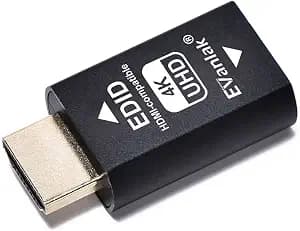
EVanlak Hdmi Edid Emulator Passthrough 3rd Generrtion Premium Aluminum Eliminated Emulator Adapter Work with Mac Thunderbolt to HDMI Switches/Extender/AV Receiver/Video Splitters 1080-3840x2160@60H
Description
Sleek Design: Crafted with premium aluminum, this HDMI adapter ensures durability and a modern look; EDID Emulation: Seamlessly connects to displays, eliminating the need for manual EDID settings; 4K@60Hz Support: Enjoy ultra-high definition video with smooth motion and vivid colors; Versatile Compatibility: Works with a wide range of devices, including Mac Thunderbolt, AV receivers, and video splitters; Plug-and-Play: No drivers required; simply connect and start using with your preferred devices
One less thing to search
Before you buy: quick questions
My Mac keeps losing the signal to my TV when I switch through my AV receiver. Will this emulator force it to stay connected at 4K?
Yes, that's exactly what it's built for. In "Pass-Through" mode, it reads and stores the EDID of your TV and constantly "whispers" it to your Mac, preventing the "signal not found" loop that's common with AVRs and switches. If you use the "Emulator" mode instead, you're essentially telling your Mac a 4K display is always connected, even if the TV is off, which gives a rock-solid connection. Just make sure you set the DIP switches to match your TV's native resolution (e.g., 3840x2160@60Hz for most modern TVs).
Is this device going to overheat or break if I use it behind my wall panel 24/7?
We understand this is a key concern for installers. The casing is a unibody aluminum housing, which isn't just for looks—it acts as a heat sink to dissipate heat during sustained use. While most users have found it stable for continuous operation, we recommend leaving a little breathing room if you're mounting it inside a wall or enclosed space. It is a passive device with no power supply, but like all electronics, excess heat is its enemy. If you're setting it and forgetting it, it's a solid choice, but avoid sealing it directly next to a heat-generating component like an amplifier.
I’ve seen mixed comments about whether this can "trick" a capture card or a KVM switch. Can I use it to make my console always think a 144Hz monitor is connected?
This is an important distinction. This is an EDID *Emulator*, not a full EDID *Manager*. You can program it to store a specific set of data (e.g., 1080p or 4K), which works perfectly to stabilize a capture card feed or a dual-monitor setup. However, it stores *one* set of data at a time—it cannot emulate a 144Hz refresh rate, as it's limited to 4K@60Hz. So, for a static 60Hz setup, it works flawlessly. If you need to spoof a high-refresh-rate monitor (like 144Hz/240Hz) or dynamically switch between multiple profiles, you'd need a more advanced (and pricier) EDID Manager.
The listing mentions "Premium Aluminum" but I'm worried about the shipping time and returns if it doesn't work. How is the after-sales support?
Shipping times vary, but many buyers on TikTok and Reddit have noted it arrives quicker than expected, usually within a week if you choose expedited shipping. Regarding returns, the reviews are mixed—which is a red flag for most electronic sellers. However, the listing typically indicates a 30-day return policy. Before purchasing, ensure the seller has "Free Returns" listed on the specific listing. Contacting the seller's chat before ordering is often recommended to confirm compatibility with your specific device; they are generally responsive and will help you determine if this unit is the right solution, which avoids the hassle of a return shipping fee.
I’m a novice and just want to plug this in to stop the black screens when I turn on my projector. Is this easy to set up?
The physical setup is simple: just plug it into the HDMI output of your Mac or streaming device. The slightly tricky part is the "DIP switch" configuration inside the case. You'll need to open the aluminum cover to set the resolution—it's a small, finger-press switch. Most users say that for a standard 1080p or 4K TV, it works out of the box. If you're not comfortable with the idea of opening the device and changing a tiny toggle switch, you might want to watch a quick installation video first. But if you can set a guitar tuner, you can handle these switches. Once set, you don't need to touch it again.
From a similar, more-reviewed product in this category: Amazon Basics Full Motion Articulating TV Wall Mount, with Swivel and Tilt, for 26" to 55" TVs and Flat Panels up to 80 Lbs, VESA Compatible, Single Stud, Black
What TV sizes and weights does this mount support?
The manufacturer's listing states it is designed for TVs up to 80 lbs (36.3 KG) and display sizes from 26" to 55". It is also designed for VESA sizes from 3.9" x 3.9" through 15.7" x 15.7".
What type of wall can this mount be installed on?
The manufacturer's listing states it is designed for concrete, brick, and wood studs wall (single stud).
Is this mount easy to install?
Multiple customer reviews describe the installation as easy and straightforward, with one reviewer noting it was much easier to set up than their previous mount. However, some reviewers mention the instructions were not very clear and required troubleshooting.
Does the mount hold the TV securely without wobbling?
Customer reviews consistently describe the mount as sturdy and well-made, with reviewers stating it holds the TV strongly and securely without any wobble.
What movement and adjustability does this mount offer?
The manufacturer's listing states it has a tilt range from +10° to -5°, an articulating up range from 2.6" to 16.3", and 180° swivel. Customer reviews confirm the swivel and tilt features make it easy to get the perfect viewing angle and to access HDMI ports.
Answers are limited to the manufacturer's listing and the reviews we analysed. Questions those sources cannot support are not answered here.
Transparent by design