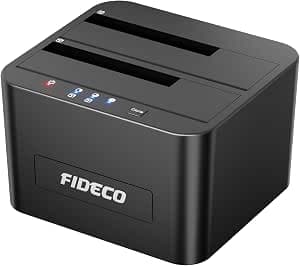
FIDECO HDD Docking Station, USB 3.0 for 2.5 and 3.5 inch SATA HDD/SSD, Dual Bay, Support Offline Clones
Description
Universal compatibility: FIDECO SATA HDD docking station is universally compatible with Windows XP/Vista/7/8/8.1/10/Mac OS/Linux. Please note that it only supports SATA hard drives / SSDs.; USB 3.0 SuperSpeed: FIDECO hard drive docking station supports ultra-fast data transfer speed USB 3.0 with speeds of up to 5 Gbps.; Offline clone: FIDECO docking station supports offline clone. Simply insert 2 hard drives into the respective station trays and press the "Clone" button for 5 seconds until the LED flashes. The clone can be completed without a computer; 24 TB capacity: FIDECO dock station can simultaneously support 2 x 12 TB hard drives for 2.5 / 3.5 inch SATAI / II / III HDDs / SSDs with exquisite design. Absolutely no drivers required and tool-free installation.; FIDECO HDD docking station: FIDECO docking station offers an easy way to add a hard drive/SSD to your computer. It offers you the flexibility to connect two 2.5"/3.5" SATA hard drives / SSD to your computer. Plug and play!
Compare the trade-offs
Similar products, side by side
A random selection of analyzed products from the same category. Different products are not necessarily interchangeable.

One less thing to search
Before you buy: quick questions
Can this docking station really clone a hard drive without being connected to a computer?
Yes, absolutely. The offline clone function is its standout feature. Just insert your source drive into the left "MASTER" bay and your target drive into the right "SLAVE" bay, then press the physical copy button. A red LED will blink until the process is complete. It's a true one-button solution that many users on tech forums praise for its simplicity when upgrading a laptop or creating a backup.
I'm concerned about build quality. Does it feel cheap or flimsy?
The unit has a functional plastic casing that some users note feels lightweight. However, the consensus from reviews is that it's a reliable "workhorse" for its price. It's designed for functionality and value rather than a premium aesthetic. The included power adapter is robust, and the internal components have proven durable for regular home and office use.
Is it compatible with my MacBook's USB-C port or a Linux system?
For modern computers with only USB-C ports, you'll need a separate USB-C to USB-A adapter. For Linux users, it's mostly plug-and-play, but a few advanced users on Reddit have noted that to achieve full USB 3.0 speeds on some distributions, you may need to install the UAS (USB Attached SCSI) driver, which is a quick terminal command.
What's the deal with the LED lights? I've read they can be very bright.
This is a common piece of feedback. The power and activity LEDs are quite bright, which is helpful for status checks but can be distracting in a dark home office. Many savvy users simply place a small piece of opaque tape over the LEDs—a simple, effective fix that doesn't impact the docking station's performance.
Who would benefit most from buying this docking station?
It's an excellent fit for home users, students, and small business owners who need an affordable, no-fuss way to access data from multiple SATA drives, recover files from an old PC, or clone a drive for an upgrade. If you need advanced RAID configurations or a all-metal enclosure, you might look at higher-end brands. But for straightforward plug-and-play access and cloning, this FIDECO dock delivers great value, as echoed in countless YouTube and Amazon reviews.
From a similar, more-reviewed product in this category: UGREEN USB 3.0 Hard Drive Enclosure UASP 3.5 Inch External Enclosure
Is the UGREEN 3.5 inch enclosure easy to install without tools?
Yes. Reviews describe the installation as quick and easy: slide off the lid, insert the drive, close the lid, then connect power and USB. The manufacturer also states the installation is tool-free.
Which hard drives are compatible with this enclosure?
It supports 3.5 inch SATA HDD and SSD drives up to 16 TB, including WD Red/WD Blue, Seagate Barracuda/Desktop, and Toshiba P300/X300. Reviewers report successful use with 3.5 inch SATA drives, 2TB WD Black HDD, OCZ Vertex 4 SSD, and WD Red.
Does it work without installing drivers?
Yes. The manufacturer states it supports plug & play with no driver required for Windows, Linux, and Mac OS 8.0 and above, and a reviewer confirms it works without installation as described.
Does the enclosure require an external power supply?
Yes. The package includes a 12 V/2 A power supply, and the manufacturer advises powering the case via the USB 3.0 power cable. One reviewer notes that no separate power supply was needed for their SSD setup.
Does the enclosure protect the hard drive and handle heat well?
The manufacturer states the sturdy ABS plastic protects the drive from falls, an internal EVA sponge secures it, and integrated ventilation slots provide heat dissipation. Reviewers describe the build as solid and robust.
Answers are limited to the manufacturer's listing and the reviews we analysed. Questions those sources cannot support are not answered here.
Transparent by design