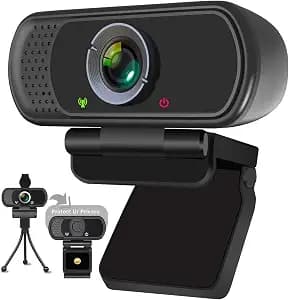
Full HD 1080P Webcam with Privacy Shutter and Tripod, Pro Streaming Web Camera with Microphone, Widescreen USB Computer Camera for Laptop Desktop Mac
Description
Web camera with full HD glass lens delivers razor sharp video that makes you look like a pro, with automatic light correction and HDR technology, computer camera auto adjusts color and brightness for natural lighting even in dim light; Webcam with microphone, pick up your voice even at 10ft distance to make sure everyone hears the real you; computer camera also features a universal clip can meet your multi angle needs on computers, laptops, desktops, and even other flat surfaces; HD Webcam 1080p, captures video at a wide angle of up to 110 degrees, fluid HD video calling in 16:9 widescreen; pro stream camera with advanced H.264 video compression technology provides you the excellent quality video on most software; USB webcam with 6ft USB power cable, no additional driver required, you just need to plug the USB port into your computer, then you can use video software such as facetime for calling; this 1080P Webcam comes with a privacy cover and small tripod; PC webcam, compatible with zoom, youtube, skype, facetime and more; you can widely use it for online teaching, video calling, recording, conferencing; package included webcam, privacy cover, small tripod, user manual, box
One less thing to search
Before you buy: quick questions
How good is the built-in microphone, and should I use a separate one?
The built-in microphone is adequate for everyday video calls, meetings, and online classes. However, many users on platforms like TikTok and Reddit note it can sound a bit hollow and may pick up background keyboard noise. If crystal-clear audio is critical for you—like for professional streaming, podcasting, or recording—we recommend pairing this webcam with a dedicated USB microphone for the best results.
Is the privacy shutter durable, or does it break easily?
The privacy shutter is a beloved feature for its practicality. Most users find it holds up well with normal use. A small number of reviews mention the shutter can become less "clicky" or slightly loose after several months of daily sliding. For peace of mind, we suggest operating it gently. It provides excellent privacy, but it's made of plastic, not metal.
Will this work seamlessly with my computer, and is it good for streaming?
Yes, it's designed for plug-and-play compatibility with Windows, macOS, and ChromeOS. In rare cases, you might need to select it manually in your video app's settings. For streaming software like OBS or Streamlabs, it's a popular, budget-friendly choice for video. Just remember, as noted by many streamers, you'll likely get better overall stream quality by using its video feed and a separate microphone for audio.
How does the video quality hold up in a dimly lit room?
This webcam performs best in well-lit environments. In low or uneven light, the image can become grainy or dark as the sensor struggles. If your home office or streaming space doesn't have good natural or overhead lighting, consider adding a simple ring light or desk lamp pointed at your face. This is a common tip shared by users in product review videos to dramatically improve the picture.
Who is this webcam the best fit for, and who might want to look elsewhere?
This webcam is an excellent fit for students, remote workers, and casual users looking for a major upgrade from their built-in laptop camera without spending a fortune. It's perfect if you value a physical privacy shutter and easy setup. You might want to consider a more advanced model if you are a professional content creator requiring studio-quality audio, need advanced software controls for color correction, or require exceptional performance in very dark lighting conditions.
Answers are limited to the manufacturer's listing and the reviews we analysed. Questions those sources cannot support are not answered here.
Transparent by design