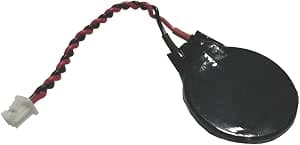
G07 3V CMOS Battery BIOS CR2032 Plug 2-Pin Plug Cable PC Laptop Replacement Battery in Your Laptop
Description
3 V lithium button cell with cable and plug 2 pin; A small double-sided adhesive pad; Chemical composition: lithium; Voltage: 3 V, capacity: 210 mAh
Compare the trade-offs
Similar products, side by side
A random selection of analyzed products from the same category. Different products are not necessarily interchangeable.

One less thing to search
Before you buy: quick questions
मैं कैसे जान सकता हूँ कि यह बैटरी मेरे विशिष्ट लैपटॉप मॉडल में फिट होगी और काम करेगी?
यह एक मानक 3V CR2032 बैटरी है, जो मदरबोर्ड BIOS के लिए सबसे आम प्रकार है। संगतता आपके लैपटॉप के आंतरिक कनेक्टर पर निर्भर करती है। अपनी पुरानी बैटरी जांचें: यदि यह सफेद 2-पिन प्लग वाली CR2032 है, तो यह सीधा प्रतिस्थापन है। Dell, HP और Lenovo मॉडल के कई उपयोगकर्ता एकदम सही फिट की पुष्टि करते हैं। हम खरीदारी से पहले कनेक्टर प्रकार की दृश्य रूप से पुष्टि करने के लिए YouTube पर अपने लैपटॉप मॉडल + "CMOS बैटरी प्रतिस्थापन" खोजने की सलाह देते हैं।
क्या यह वास्तव में "प्लग एंड प्ले" इंस्टॉलेशन है, या क्या मुझे सोल्डर करने की आवश्यकता होगी?
यह पूरी तरह से आपके लैपटॉप पर निर्भर करता है। बैटरी 2-पिन प्लग के साथ आती है, इसलिए यदि आपकी पुरानी बैटरी में मेल खाता सॉकेट है, तो यह प्लग एंड प्ले है। हालांकि, जैसा कि कई ऑनलाइन ट्यूटोरियल में बताया गया है, बहुत से लैपटॉप में CMOS बैटरी सीधे मदरबोर्ड पर सोल्डर की गई होती है या तारों से जुड़ी होती है। उन मामलों में, आपको पुरानी बैटरी को काटकर इस नई बैटरी के तारों को मौजूदा तारों से जोड़ना/सोल्डर करना होगा। यदि आप सोल्डरिंग में सहज नहीं हैं, तो कृपया पहले अपने लैपटॉप की आंतरिक सेटअप जांचें।
समीक्षाओं में उल्लेख है कि तार पतले हैं। क्या निर्माण गुणवत्ता विश्वसनीय है?
संलग्न तार वास्तव में पतले और लचीले हैं, जो एक तंग लैपटॉप चेसिस के अंदर रूटिंग में मदद करते हैं। हालांकि वे सीएमओएस सर्किट की बहुत कम बिजली आवश्यकताओं के लिए पर्याप्त हैं, लेकिन स्थापना के दौरान उन्हें सावधानीपूर्वक संभालने की आवश्यकता होती है। रेडिट और तकनीकी फ़ोरम से सामान्य सलाह यह है कि कनेक्ट/डिस्कनेक्ट करते समय प्लग को ही पकड़ें (तारों को नहीं) और तेज मोड़ से बचें। अधिकांश उपयोगकर्ताओं के लिए जो इसे एक बार सावधानी से स्थापित करते हैं, यह ठीक काम करता है।
मुझे इस रिप्लेसमेंट बैटरी के कितने समय तक चलने की उम्मीद करनी चाहिए?
ग्राहक फीडबैक के आधार पर, अनुभव अलग-अलग होते हैं। कई उपयोगकर्ता रिपोर्ट करते हैं कि यह "नई जैसी" काम करती है और सालों तक चलती है, जबकि कुछ लोगों ने कुछ महीनों के भीतर समय से पहले खराब होने का अनुभव किया है। एक सामान्य रिप्लेसमेंट के रूप में, इसकी आयु मूल निर्माता (OEM) की बैटरी के बराबर नहीं हो सकती है। अधिकतम लंबी उम्र के लिए, कुछ टेक उत्साही एक नामी ब्रांड की CR2032 सेल खरीदने और खुद लगाने का सुझाव देते हैं, लेकिन एक सीधे, किफायती समाधान के लिए, इस बैटरी ने हजारों लैपटॉप की कार्यक्षमता बहाल की है।
अगर मुझे बैटरी या इंस्टॉलेशन में कोई समस्या आती है तो क्या करूं?
उत्पाद पर आपके द्वारा खरीदे गए मार्केटप्लेस के मानक रिटर्न/वारंटी नीतियां लागू होती हैं। हालांकि, कृपया ध्यान दें कि कोई भौतिक निर्देश शामिल नहीं हैं। शुरुआत करने से पहले, हम आपके विशिष्ट लैपटॉप मॉडल के लिए एक वीडियो गाइड देखने की दृढ़ता से सलाह देते हैं। यदि आपको "DOA" (डेड ऑन अराइवल) बैटरी मिलती है या जो बहुत जल्दी विफल हो जाती है, तो प्रतिस्थापन या धनवापसी के लिए सीधे विक्रेता से संपर्क करें। इंस्टॉलेशन संबंधी समस्याओं के लिए, iFixit या YouTube जैसे सामुदायिक फ़ोरम दृश्य मार्गदर्शन के लिए उत्कृष्ट संसाधन हैं।
From a similar, more-reviewed product in this category: A2337 LCD Display for MacBook Air 13.3" M1 2020 A2337 EMC 3598 MGN63 MGN93 MGND3 MGN73 MGNA3 MGNE3 Retina 2560x1600 (Space Gray)
How do I know this A2337 display will fit my MacBook Air?
This panel is built specifically for the MacBook Air 13.3" M1 (2020) with EMC 3598, covering model numbers MGN63, MGN93, MGND3, MGN73, MGNA3, and MGNE3. Before ordering, check the "About This Mac" panel or the bottom case for your exact model and EMC number — Reddit users repeatedly warn that mixing up Air generations is the #1 cause of returns.
Is installation really as easy as some reviews claim?
For anyone who's opened a MacBook before, it's a straightforward 30–60 minute job with a pentalobe screwdriver, suction cup, and plastic pry tools. That said, YouTube commenters are honest: first-timers often strip screws or pinch the display flex cable. If you've never done a screen swap, budget for a local repair shop to install it.
Will the display quality and True Tone match my original screen?
The panel delivers the same 2560x1600 Retina resolution with accurate colors, and most buyers say it's visually indistinguishable from the original in daily use. True Tone, however, is tied to Apple's factory calibration and typically won't carry over — a point several TikTok repair creators flag so buyers aren't surprised.
What happens if the screen arrives cracked or fails after a few months?
Reviews show the seller honors a 12-month warranty and replaces DOA or defective panels, though you should inspect the package immediately on arrival and photograph any shipping damage. Keep the original packaging during the warranty window — it makes any return or replacement claim much smoother.
Is this worth it compared to paying Apple or buying a used donor screen?
If you're comfortable with a DIY repair, this is one of the best value options — you save hundreds versus an Apple Authorized repair while getting OEM-level fit and a year-plus of reliable use according to long-term reviewers. If you're not handy, factor in the cost of a professional install; a used donor screen may be cheaper but carries higher risk of hidden damage.
Answers are limited to the manufacturer's listing and the reviews we analysed. Questions those sources cannot support are not answered here.
Transparent by design